Why Buyers Are Searching for "Tesla Browser" in 2026
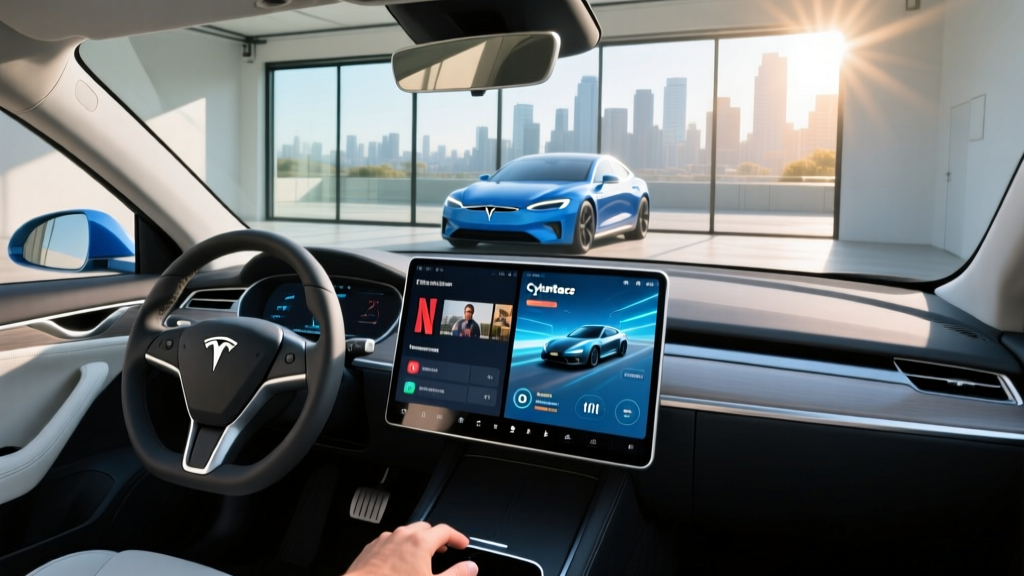
Searches for "Tesla browser" have grown steadily as more EV shoppers treat the in-car infotainment system as a deciding factor alongside range and price. Tesla's native browser — accessible from the center touchscreen while parked — is one of the most capable web interfaces offered in any production vehicle. But the browser is only one layer of a broader infotainment ecosystem that includes Netflix, YouTube, Spotify, Arcade gaming, and over-the-air (OTA) software updates that reshape the car's behavior months after purchase.
This guide breaks down what the Tesla browser actually does, which models support it, how the full infotainment suite affects real-world energy consumption, and whether these features justify the vehicle's price when compared to competitors with more conventional interfaces.
Tesla Browser: What It Is and What It Isn't
The Tesla browser is a Chromium-based web browser embedded in the vehicle's infotainment system. It is accessible only when the car is in Park. You cannot browse the open web while driving — Tesla enforces this as a safety lockout. Here is what it can and cannot do:
- Can do: Load most standard websites, stream music via browser-based players, check email, view Google Maps satellite imagery, access Tesla's owner manual, read news sites, use web-based email clients.
- Cannot do: Download files to the car's storage, run browser extensions, access sites requiring specific DRM plugins, or operate while the vehicle is in motion.
- Typing: The on-screen QWERTY keyboard is usable but slow; most owners pair a Bluetooth keyboard for longer sessions at Superchargers.
In practice, most Tesla owners use the browser in two scenarios: killing 15–25 minutes at a DC fast charger, and quick reference lookups (restaurant menus, hotel check-in details) while parked at a destination. It is a convenience feature, not a laptop replacement.
Model 3 and Model Y: The Volume Sellers (2026 Specs)
The refreshed Model 3 (Highland and subsequent updates) and the Juniper-refreshed Model Y represent the bulk of Tesla's sales and the vehicles most shoppers are cross-referencing when they search for "Tesla browser." Here are the key specifications for the current lineup:
| Spec | Model 3 Long Range AWD | Model Y Long Range AWD |
|---|---|---|
| EPA Range | 341 miles | 320 miles |
| Battery (usable) | ~75 kWh, NMC | ~75 kWh, NMC |
| Drivetrain | Dual-Motor AWD | Dual-Motor AWD |
| Horsepower | ~384 hp | ~384 hp |
| 0–60 mph | 4.2 sec | 4.8 sec |
| Max DC Fast Charge | 250 kW (peak) | 250 kW (peak) |
| 10–80% DC Time | ~25 min | ~25 min |
| Level 2 Home Rate | 11.5 kW (~44 mi/hr) | 11.5 kW (~44 mi/hr) |
| MPGe (combined) | 132 MPGe | 122 MPGe |
| kWh/100 mi | 25 kWh | 28 kWh |
| Base MSRP | $42,380 | $44,380 |
| Cargo (rear seats up) | 23 cu ft | 30 cu ft |
| Battery Warranty | 8 yr / 120,000 mi | 8 yr / 120,000 mi |
Source: fueleconomy.gov and Tesla.com official specifications. Specs reflect current 2026 model year; pricing excludes destination fee.
Model S and Model X: Premium Flagships
For buyers considering the premium end of the lineup, the Model S and Model X offer the same browser and infotainment features on a larger 17-inch center display (versus 15.4-inch in Model 3/Y), plus a rear passenger touchscreen for climate and media control.
| Spec | Model S Long Range | Model X Long Range |
|---|---|---|
| EPA Range | 402 miles | 348 miles |
| Battery (usable) | ~95 kWh, NMC | ~95 kWh, NMC |
| Drivetrain | Dual-Motor AWD | Dual-Motor AWD |
| Horsepower | ~670 hp | ~670 hp |
| 0–60 mph | 3.1 sec | 3.8 sec |
| Max DC Fast Charge | 250 kW (peak) | 250 kW (peak) |
| 10–80% DC Time | ~28 min | ~28 min |
| Base MSRP | $72,380 | $77,380 |
| Battery Warranty | 8 yr / 150,000 mi | 8 yr / 150,000 mi |
The Model S Plaid and Model X Plaid tri-motor variants sacrifice roughly 30–40 miles of range for 1,020 hp and sub-2-second 0–60 times, starting at $87,380 and $92,380 respectively. The Plaid battery warranty is the same 8 yr / 150,000 mi.
Charging Speed and the Infotainment Connection
Fast-charging speed is where the Tesla browser gets its most practical use. A 10–80% DC fast charge takes roughly 25 minutes in a Model 3/Y and 28 minutes in a Model S/X at a V3 or V4 Tesla Supercharger (250 kW peak). That is enough time to browse the web, watch a YouTube video, or play a game.
| Charge Level | Power | Miles Added per Hour | Typical Use Case |
|---|---|---|---|
| Level 1 (120V outlet) | ~1.4 kW | ~4–5 mi/hr | Emergency / overnight trickle |
| Level 2 (240V home) | 11.5 kW | ~44 mi/hr | Daily home charging |
| DC Fast (V3 Supercharger) | 250 kW peak | ~170 mi in 15 min | Road trips |
| DC Fast (V4 Supercharger) | 250–350 kW* | Up to ~200 mi in 15 min | Road trips (newer stations) |
*V4 Supercharger cabinet supports up to 350 kW, but current Tesla vehicles are limited to ~250 kW peak intake. Non-Tesla EVs with NACS adapters may access higher rates depending on vehicle capability.
Charging curve reality: The 250 kW peak rate is sustained only between roughly 10–45% state of charge. Above 60%, the rate tapers significantly — by 80%, you are typically at 60–80 kW. This is why Tesla's navigation system recommends charging to 80% on road trips: the final 20% takes nearly as long as the first 60%. Plan your stops accordingly.
Does Streaming and Gaming Affect Your Range?
A common question among new Tesla owners: does running Netflix, the browser, or Arcade games drain the battery enough to matter?
The short answer is minimally. The infotainment system draws roughly 50–150 watts depending on workload (video streaming is on the higher end; idle browsing is lower). Over a 30-minute Supercharger stop, that is approximately 0.05–0.075 kWh — effectively negligible against a 75–95 kWh battery.
The larger energy draw comes from cabin climate control while parked. Running the heater in winter can pull 2–5 kW continuously. In a 30-minute parked session, that is 1–2.5 kWh — roughly 3–8 miles of range. Tesla's "Camp Mode" and "Dog Mode" manage this more efficiently, but the physics of heating air remain the dominant parasitic load, not the touchscreen.
Autopilot, FSD, and the Infotainment Display
The Tesla browser and infotainment features are separate from Tesla's driver-assistance systems, but they share the same hardware and display. It is critical to understand the distinction:
The 15.4-inch (Model 3/Y) or 17-inch (Model S/X) center display shows real-time driving visualization — nearby vehicles, lane markings, traffic lights, stop signs — when Autopilot or FSD is engaged. This visualization is separate from the browser and streaming features and is always available while driving.
As of 2026, FSD (Supervised) costs $8,000 as a one-time purchase or $99/month as a subscription. Autopilot (basic adaptive cruise + lane centering) is included standard on all new Teslas.
Federal Tax Credit Eligibility (§30D)
Federal EV tax credit rules under IRS §30D have tightened significantly. Here is where Tesla models stand for the 2026 tax year:
| Model | Base MSRP | MSRP Cap (§30D) | Credit Amount | Key Caveats |
|---|---|---|---|---|
| Model 3 RWD | $36,380 | $55,000 (sedans) | Up to $7,500* | Battery sourcing rules apply |
| Model 3 LR AWD | $42,380 | $55,000 (sedans) | Up to $7,500* | Battery sourcing rules apply |
| Model Y LR AWD | $44,380 | $80,000 (SUVs) | Up to $7,500* | Battery sourcing rules apply |
| Model S LR | $72,380 | $55,000 (sedans) | $0 | Exceeds MSRP cap |
| Model X LR | $77,380 | $80,000 (SUVs) | Up to $7,500* | Battery sourcing rules apply |
*"Up to $7,500" is split into two halves: $3,750 for critical minerals sourcing and $3,750 for battery component manufacturing. Both halves must be met for the full amount. Rules change frequently — verify at IRS.gov §30D before purchasing.
- Income caps: Modified AGI must not exceed $150,000 (single), $225,000 (head of household), or $300,000 (joint filers).
- MSRP caps: $55,000 for sedans (Model 3, Model S); $80,000 for SUVs/trucks (Model Y, Model X, Cybertruck).
- Battery sourcing: Required percentages of critical minerals and battery components must be sourced from the U.S. or free-trade-agreement countries. These percentages increase annually.
- Point-of-sale transfer: As of 2024, buyers can transfer the credit to the dealer at purchase, reducing the sale price directly rather than waiting for a tax refund.
- Consult a tax professional — individual eligibility varies based on tax liability, income timing, and filing status.
Tesla vs. Competitors: Is the Infotainment Worth It?
| Feature | Tesla Model 3/Y | Hyundai Ioniq 5 | Ford Mustang Mach-E | BMW i4 |
|---|---|---|---|---|
| Native Browser | Yes (Chromium) | No | No | Limited |
| Video Streaming (parked) | Netflix, YouTube, Twitch | No | No | No |
| Gaming | Arcade (Cyberpunk 2077, Stardew Valley, etc.) | No | Limited | No |
| Apple CarPlay / Android Auto | No | Yes (wireless) | Yes (wireless) | Yes (wireless) |
| OTA Updates | Frequent, major feature additions | Occasional | Occasional | Occasional |
| Display Size | 15.4" (3/Y), 17" (S/X) | 12.3" | 15.5" | 14.9" (curved) |
| Rear Screen | Yes (Model S/X only) | No | No | No |
- Most capable native browser in any production EV
- Extensive gaming library (including AAA titles on Model S/X with AMD Ryzen chip)
- OTA updates add new features regularly — the car improves after purchase
- Supercharger network integration is seamless with built-in nav
- No phone dependency — everything runs natively
- No Apple CarPlay or Android Auto — a dealbreaker for many buyers
- Browser is parked-only (no passenger web browsing while driving)
- Everything routes through one screen — no physical buttons for climate or volume
- Learning curve for first-time EV owners used to traditional interfaces
- Gaming and streaming require Wi-Fi or premium connectivity subscription ($9.99/mo)
Who Should Buy a Tesla Based on the Tech Experience?
- You want the most integrated native infotainment system without relying on your phone
- You spend time at DC fast chargers and want built-in entertainment
- You value OTA updates that add meaningful features over time
- You prefer Tesla's Supercharger network reliability for road trips
- You don't need Apple CarPlay or Android Auto
- Apple CarPlay / Android Auto is non-negotiable for your daily workflow
- You want physical buttons and knobs for climate and volume control
- You need a passenger-accessible screen for media while driving
- You prefer a traditional dealership service experience over Tesla's mobile-ranger model
Frequently Asked Questions
Can I use the Tesla browser while driving?
No. The Tesla browser is locked out whenever the vehicle is in Drive, Reverse, or Neutral. It is only accessible in Park. This is a permanent safety restriction with no override.
Does the Tesla browser work without Wi-Fi?
The browser uses the car's built-in cellular connection (Standard Connectivity). However, media-heavy browsing and video streaming require either a Wi-Fi connection or Tesla's Premium Connectivity subscription ($9.99/month), which enables higher-bandwidth cellular data.
What is the real-world range of a Tesla Model 3 Long Range?
The EPA rates the 2026 Model 3 Long Range AWD at 341 miles. In real-world highway driving at 70–75 mph in moderate temperatures, expect 280–300 miles. In freezing weather, that drops to approximately 240–260 miles due to battery chemistry limitations and cabin heating demands.
How fast does a Tesla charge at home?
On a Level 2 home charger (240V, 48A circuit), Tesla vehicles charge at up to 11.5 kW, adding roughly 44 miles of range per hour. A full overnight charge (8–10 hours) easily replenishes the battery for daily driving. Installation costs for a Level 2 home charger typically range from $800–$2,000 depending on electrical panel capacity and run length.
Does the Tesla Model Y qualify for the federal EV tax credit?
The Model Y Long Range AWD ($44,380 MSRP) falls under the $80,000 SUV MSRP cap and may qualify for up to $7,500 under IRS §30D, subject to buyer income limits ($300,000 joint / $150,000 single), battery critical-mineral and component sourcing requirements, and your personal tax liability. The Model S exceeds the $55,000 sedan cap and does not qualify. Always verify current rules at IRS.gov.
Is Tesla's FSD actually self-driving?
No. Tesla Full Self-Driving (Supervised) is an SAE Level 2 driver-assistance system. The driver must remain fully engaged, monitor the road, and keep hands on the wheel. It is not autonomous driving. Only Level 4 services like Waymo operate without a human driver — and those are limited to specific geofenced areas in select cities.
What's the biggest drawback of Tesla's infotainment?
The lack of Apple CarPlay and Android Auto. For buyers deeply invested in Apple or Google ecosystems — Siri, Google Maps, Apple Music, Google Assistant — Tesla's closed system forces you to use Tesla's native apps or phone Bluetooth audio. This remains the single most cited complaint from Tesla skeptics.
Sources: EPA fueleconomy.gov, IRS §30D Clean Vehicle Credits, Tesla.com official specifications.