What "Tesla Keying" Actually Means for Owners
If you've searched for Tesla keying, you're likely trying to understand how Tesla's keyless entry system works, whether you can use a traditional key fob, or how to replace a lost key card or fob. Unlike legacy automakers that still rely on metal-cut keys with embedded RFID chips, Tesla uses a layered digital access system: a Bluetooth Low Energy (BLE) phone key, an NFC key card, and — for some models — a dedicated key fob. There is no physical ignition key. Ever.
This guide breaks down exactly which keying method each current Tesla model supports, what replacement costs, how to pair new keys, and the security realities every owner and buyer should know before relying on phone-as-key as their primary access method.
Tesla Keying Methods by Model (2026 Lineup)
Tesla's key hardware varies significantly across the lineup. Here's the precise breakdown for current-production models:
| Model | Phone Key (BLE) | NFC Key Card | Dedicated Key Fob | Notes |
|---|---|---|---|---|
| Model 3 (Highland/Refresh) | ✅ Included | ✅ 2 included | ❌ Not offered | No fob option even as accessory |
| Model Y (Juniper) | ✅ Included | ✅ 2 included | ❌ Not offered | Fob discontinued after early production |
| Model S (2026) | ✅ Included | ✅ 2 included | ✅ Sold separately (~$175) | Fob available via Tesla Shop |
| Model X (2026) | ✅ Included | ✅ 2 included | ✅ Included (1) | Falcon-wing doors respond to fob buttons |
| Cybertruck | ✅ Included | ✅ 2 included | ❌ Not offered | Phone key primary; card backup |
The Model 3 and Model Y — which represent the vast majority of Teslas on the road — ship with no key fob at all. You get two credit-card-sized NFC key cards and the ability to pair your smartphone as the primary key. For most owners, this is the system they'll use daily.
How Each Tesla Key Method Works
Phone Key (Bluetooth Low Energy)
Once paired via the Tesla app, your phone communicates with the car over BLE. As you approach, the vehicle detects your phone at roughly 3–6 feet and automatically unlocks. When you walk away with the phone, it locks. This requires:
- The Tesla mobile app installed and logged in
- Bluetooth enabled on your phone
- Background app refresh / location permissions set to "Always Allow" (iOS) or equivalent on Android
- Your phone's battery to be alive — a dead phone means no passive entry
In practice, phone key reliability is strong but not flawless. Users occasionally report a 1–3 second delay before the car detects the phone, particularly on older Android devices or when the phone is buried in a bag. Keeping the Tesla app running in the background and granting full Bluetooth permissions resolves most issues.
NFC Key Card
The NFC card works by tapping it against the B-pillar (driver's side, just below the side mirror) to unlock, and tapping again on the center console reader (behind the cupholders or on the wireless charging pad, depending on model) to start the vehicle. The card requires no battery and is essentially indestructible for daily use — making it the ideal backup.
Range on the NFC tap is roughly 1–2 inches. It's deliberate, not passive. You must physically touch the card to the reader.
Dedicated Key Fob (Model S, Model X)
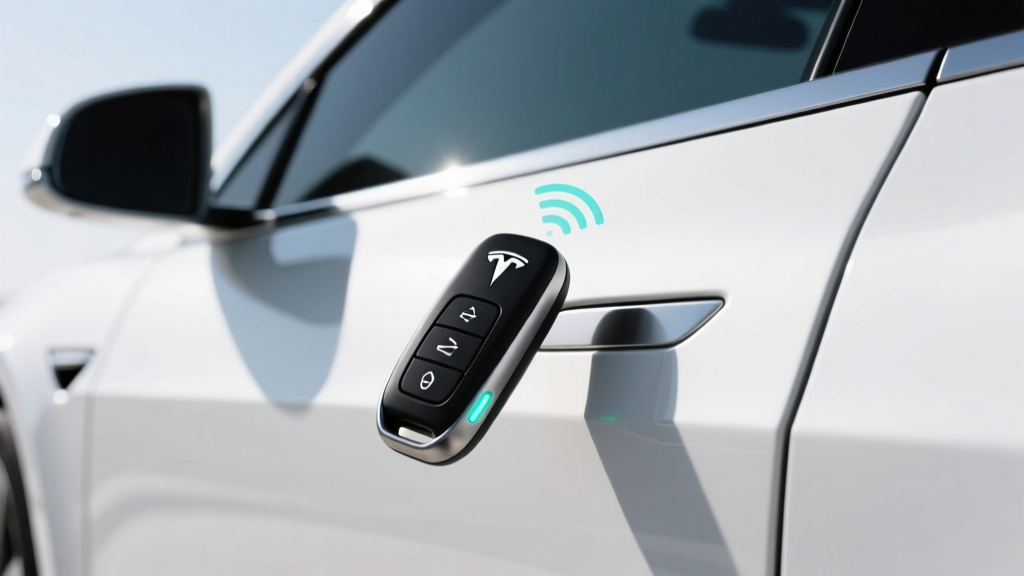
The Tesla key fob for Model S and X is shaped like a miniature car and supports passive entry (same as phone key) plus three physical buttons: front trunk, lock/unlock, and rear trunk. On the Model X, a double-press of the rear button can open the falcon-wing doors. The fob uses a CR2032 coin battery, which typically lasts 1–2 years.
Tesla Key Replacement Costs and Pairing
Losing a key is stressful. Here's what replacement actually costs and requires in 2026:
| Key Type | Replacement Cost | Pairing Method | Where to Buy |
|---|---|---|---|
| NFC Key Card | $35 (Tesla Shop) | In-car: Controls → Locks → Keys → Add Key (requires existing paired key) | Tesla.com or Service Center |
| Model S/X Key Fob | $175 (Tesla Shop) | In-car pairing via Controls → Locks → Keys | Tesla.com or Service Center |
| Phone Key | Free (app-based) | Tesla App → Phone Key setup | N/A — uses your phone |
Critical detail: To pair a new NFC card or fob, you must already have at least one authenticated key present. If you lose all keys and your phone isn't paired, you'll need to contact Tesla Support with proof of ownership to initiate a remote key reset — a process that can take 24–72 hours and may require a Service Center visit.
Always keep one NFC card in a safe place at home (not in the car) as your emergency backup. This is the single most important piece of Tesla keying advice for new owners.
Security: Key Relay Attacks and Tesla's Countermeasures
Like any keyless entry system, Tesla's BLE phone key is theoretically vulnerable to relay attacks — where thieves amplify the Bluetooth signal from your phone (inside your house) to unlock and drive away the car (in your driveway). Tesla has implemented several mitigations:
- BLE signal timing checks: The car measures round-trip signal time to detect relayed signals that add latency.
- Phone-as-key motion detection: Recent app versions use the phone's accelerometer to confirm the phone is physically moving toward the car, not stationary on a nightstand.
- Drive-away protection: If the paired phone leaves the vehicle while it's in Drive, the car displays a prominent warning and will not restart once shifted into Park without the phone or NFC card present.
- Pin to Drive: Owners can enable a PIN code requirement before the car can be driven, adding a second authentication layer even if someone gains physical access.
For maximum security, enable Pin to Drive (Controls → Safety → PIN to Drive) and keep your NFC backup card stored separately from the vehicle. According to NHTSA and insurance industry data, Tesla vehicles remain among the least-stolen vehicles relative to their market share, partly due to GPS tracking and remote disable capability via the app.
Common Tesla Keying Problems and Fixes
Based on owner reports and service bulletins, these are the most frequent key-related issues:
Phone Key Not Detected on Approach
- Verify Bluetooth is ON and Tesla app has "Always Allow" location access
- Force-close and reopen the Tesla app
- Remove and re-pair the phone key via Controls → Locks → Keys
- On Android: disable battery optimization for the Tesla app (Settings → Apps → Tesla → Battery → Unrestricted)
Key Card Not Registering on B-Pillar
- Ensure you're tapping the correct spot — the NFC reader is on the driver-side B-pillar, roughly 4 inches below the mirror, not on the door handle
- Hold the card flat against the pillar for a full 1–2 seconds
- If the card is bent or cracked, order a replacement
Key Fob Battery Dead (Model S/X)
- Replace the CR2032 battery (available at any pharmacy for ~$3)
- As a temporary workaround, hold the fob directly against the B-pillar — it contains a passive NFC chip that works even with a dead battery
Frequently Asked Questions
Can I use my Apple Watch or Galaxy Watch as a Tesla key?
Not natively. Tesla does not offer an official watch app for passive entry. Some third-party apps exist, but they require the phone to be nearby and don't provide true standalone watch-as-key functionality. Your phone or NFC card remains the primary method.
How many keys can a Tesla remember?
Tesla vehicles can store up to 19 paired keys (combination of phone keys, NFC cards, and fobs). This is more than sufficient for families, fleet vehicles, or shared-use scenarios.
Does the Tesla key fob work if the car battery is dead?
No. The key fob and NFC card both rely on the vehicle's 12V/16V auxiliary system to power the NFC/BLE readers. If the 12V battery is fully depleted, you'll need to jump-start the auxiliary system (via the front tow-eye cover access point on most models) before any key will register.
Can someone clone my Tesla NFC key card?
Tesla's NFC cards use encrypted authentication that makes casual cloning extremely difficult. However, no system is perfectly immune to sophisticated attacks. Enable PIN to Drive for an additional layer of protection, and report lost cards immediately so they can be de-paired from the vehicle.
Is the phone key reliable enough to skip carrying the NFC card?
For 95% of daily use, yes — phone key is reliable and convenient. But carry the NFC card (or keep it in your wallet) as a backup. Phone batteries die, Bluetooth glitches happen, and app updates occasionally disrupt pairing. The card weighs nothing and could save you a locksmith-equivalent ordeal.