Quick Answer: What Google Maps EV Stations Actually Shows You
In short: Google Maps lists over 100,000 public charging ports across the U.S., pulling data from networks like ChargePoint, EVgo, Electrify America, and Tesla Superchargers. You can filter by plug type (NACS, CCS, CHAdeMO), charging speed (kW), availability, and network. However, Google Maps does not guarantee real-time operational status for every station — always verify with the network's native app before driving to a remote charger.
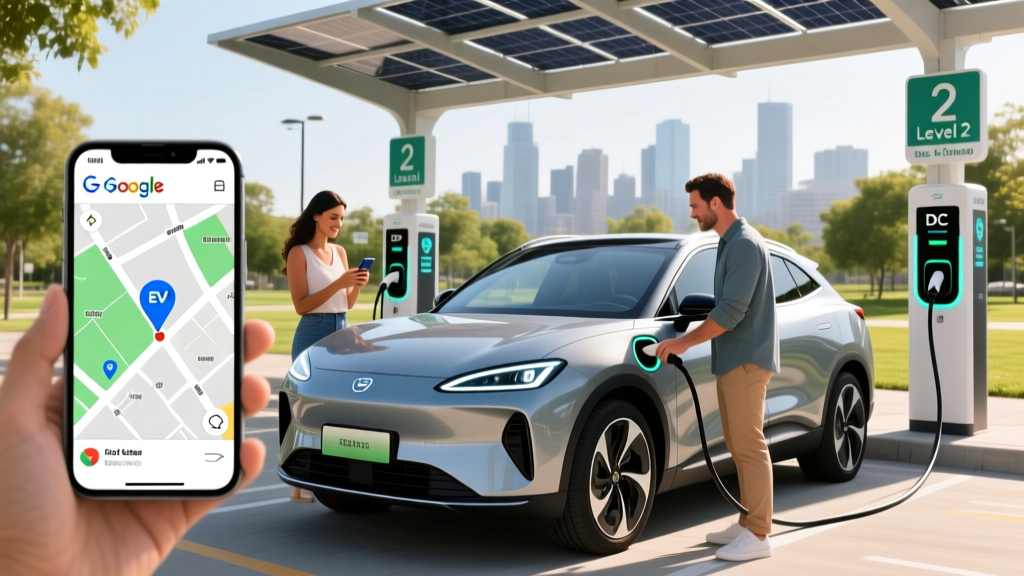
If you're shopping for your first EV or planning a road trip, Google Maps has become one of the most accessible tools for locating public charging infrastructure. Type "EV charging stations" or "EV stations near me" into the search bar, and you'll see nearby chargers plotted on the map with details like connector types, maximum power output in kilowatts (kW), number of ports, and user reviews. For 2026 model-year EVs with ranges stretching from 250 to over 400 miles EPA, knowing how to leverage this tool effectively is a core ownership skill.
But Google Maps is a directory, not a trip-planning optimizer. It won't calculate your state of charge (SoC) at arrival, factor in elevation changes, or tell you that a particular 150 kW charger has been throttled to 50 kW due to grid constraints. Understanding what Google Maps does well — and where it falls short — separates confident EV road-trippers from frustrated ones stranded at a broken charger in rural Nebraska.
How to Find and Filter EV Stations on Google Maps
Google Maps added dedicated EV charging filters in recent years, and the 2026 version of the platform offers meaningful improvements. Here's how to use the feature effectively:
- Search: Enter "EV charging stations" or "electric vehicle chargers" in the search bar.
- Filter by plug type: Tap the filter icon and select your connector — NACS (Tesla and now Ford, Rivian, GM, and others), CCS1 (most legacy non-Tesla EVs), or CHAdeMO (Nissan Leaf). As of 2026, the NACS standard has become dominant, with over 60% of new EVs shipping with a native NACS port.
- Filter by charging speed: You can set a minimum kW threshold. For highway road trips, filter for DC fast chargers at 150 kW or above. For overnight stops, Level 2 chargers at 7–19 kW are sufficient.
- Filter by network: Narrow results to Tesla Superchargers, Electrify America, EVgo, ChargePoint, or others.
- Check reviews and photos: User-uploaded photos often reveal whether a charger is in a well-lit lot, whether it's blocked by ICE vehicles ("ICE'd"), or whether the cables reach all parking spots.
Google Maps also integrates with Android Auto and Apple CarPlay, so your EV station search can appear directly on your car's infotainment screen. Many 2026 EVs — including the Hyundai Ioniq 5, Tesla Model Y, and Chevrolet Equinox EV — support native EV routing that pairs Google Maps data with the car's battery management system (BMS) to precondition the battery before you arrive at a DC fast charger.
What Google Maps Gets Right (and Where It Falls Short)
Google Maps is excellent for discovery. It aggregates station data from multiple networks, provides driving directions, and shows basic charger specs. But EV owners quickly learn its limitations:
| What Google Maps Shows | Reality on the Ground |
|---|---|
| Station listed as "available" | May be offline, under maintenance, or occupied — check the network app (e.g., PlugShare, ChargePoint) for live status |
| Max charge rate: 150 kW | Peak rate only — your EV may only accept 100 kW, or the charger may be power-sharing with another stall and delivering 75 kW |
| CCS connector listed | The CCS cable may be broken while the CHAdeMO cable works — user reviews and recent photos reveal this |
| "Open 24 hours" | The parking lot or building hosting the charger may close at night, blocking access |
| Station location pin | GPS accuracy can place the pin 50–100 feet off — in a multi-level garage, you may need photos or reviews to find the exact level and spot |
For trip planning, dedicated EV route planners like A Better Routeplanner (ABRP) or your vehicle's built-in navigation (Tesla's trip planner, Hyundai's EV route guide) offer more precision. These tools factor in your specific vehicle's efficiency (kWh/100mi), current SoC, elevation, wind, temperature, and charging-curve taper to estimate arrival SoC and total trip time. Google Maps tells you where chargers are; ABRP tells you whether you'll make it.
Real-World Charging Costs: Public vs. Home vs. Gas
One of the most common questions first-time EV buyers ask is whether charging in public costs less than gasoline. The answer depends heavily on where and how you charge. Here's a concrete cost breakdown for 2026:
| Charging Method | Avg. Cost per kWh | Cost per 1,000 Miles (at 3.5 mi/kWh) | Annual Cost (12,000 mi/yr) |
|---|---|---|---|
| Home Level 2 (national avg. electricity: $0.17/kWh) | $0.17 | $48.57 | $583 |
| Public DC Fast Charging (avg. $0.40/kWh) | $0.40 | $114.29 | $1,371 |
| Tesla Supercharger (avg. $0.30/kWh) | $0.30 | $85.71 | $1,029 |
| Gasoline car (28 MPG combined, $3.40/gal) | — | $121.43 | $1,457 |
| Hybrid (50 MPG combined, $3.40/gal) | — | $68.00 | $816 |
The numbers make the case clear: home charging is dramatically cheaper than gas — roughly $583 per year vs. $1,457 for a 28 MPG gas car. But if you rely entirely on public DC fast charging, your annual fuel cost ($1,371) approaches that of a gas vehicle. This is why home charging access remains the single biggest factor in EV satisfaction.
For apartment dwellers or those without garage access, Google Maps becomes critical for finding reliable, affordable public Level 2 chargers near home or work. Many workplaces, shopping centers, and municipal lots offer Level 2 charging at $0.10–$0.25/kWh — or even free. Filtering Google Maps for Level 2 stations near your daily routine can turn EV ownership into a practical reality even without a home charger.
Google Maps vs. Dedicated EV Charging Apps
Google Maps is a general-purpose navigation tool that happens to list EV stations. Dedicated EV apps are purpose-built for electric drivers. Here's how they compare:
| Feature | Google Maps | PlugShare | A Better Routeplanner (ABRP) | Network Apps (EA, EVgo, ChargePoint) |
|---|---|---|---|---|
| Station discovery | Excellent | Excellent | Good | Network-specific only |
| Real-time availability | Limited | Community-reported | Varies | Live for own network |
| Plug type filtering | Yes | Yes (detailed) | Yes | Yes |
| Trip planning with SoC | No | No | Yes (core feature) | No |
| User reviews/photos | Yes | Yes (EV-specific) | Limited | Limited |
| Charger status (broken/active) | Unreliable | Community-reported | Varies | Accurate for own network |
| Payment integration | No | No | No | Yes |
The practical takeaway: use Google Maps for discovery and directions, but always cross-reference with the charging network's own app to confirm the station is operational before you commit to a 40-mile detour. For multi-state road trips, plan your route in ABRP first, then use Google Maps for turn-by-turn navigation to each stop.
First-Time EV Buyer: What You Need to Know Before You Search
Before you start searching for EV stations on Google Maps, you need to understand your vehicle's charging capabilities. Not all EVs charge at the same speed, and not all chargers are compatible with all cars. Here are the key specs to know:
- Connector type: NACS (Tesla, and most 2025+ models from Ford, GM, Rivian, Volvo, Hyundai, Kia), CCS1 (older non-Tesla EVs like the 2022–2024 Volkswagen ID.4), or CHAdeMO (Nissan Leaf only). Adapters exist — a CCS-to-NACS adapter costs $200–$400 — but native compatibility is always preferable.
- Max DC fast charge rate: This is your vehicle's peak acceptance rate in kilowatts (kW). The 2026 Hyundai Ioniq 5 accepts up to 240 kW (10–80% in ~18 minutes). The Chevrolet Equinox EV peaks at 150 kW (~30 min 10–80%). The Tesla Model Y Long Range peaks at 250 kW (~15 min 10–80%).
- Battery capacity: Measured in kilowatt-hours (kWh) — this is energy, not power. A 77 kWh battery (Ioniq 5) stores more energy than a 65 kWh battery (base Equinox EV), giving more range but also longer total charge times at lower-power chargers.
- Charging curve: No EV sustains its peak charge rate from 0–100%. Most EVs charge fastest between 10–50% SoC, then taper significantly above 80%. Charging from 80–100% on a DC fast charger can take as long as 10–80%. This is why road-trippers typically charge to 80% and move on.
Understanding these specs means you can filter Google Maps intelligently. If your car maxes out at 150 kW, there's no benefit seeking out a 350 kW Electrify America station — a 150 kW charger will serve you just as well and may be less crowded.
Decision Framework: Should You Rely on Google Maps for EV Trip Planning?
Use Google Maps as your primary charger-finder if:
- You're driving locally and need to find a nearby Level 2 charger at a grocery store, gym, or workplace
- You're doing a short trip (under 150 miles) and just need to confirm a charger exists near your destination
- You own a Tesla and use the in-car navigation, which integrates Supercharger data natively
- You cross-check station status with the network's app before departing
Use a dedicated EV route planner (ABRP, in-car nav) instead if:
- You're driving 300+ miles and need to plan multiple DC fast-charging stops
- You're driving in cold weather (below 30°F), which reduces range by 20–30% and slows charging speeds
- You're towing — towing can cut EV range by 40–50%, drastically changing your charging needs
- You're driving a less common EV and need precise SoC-based route planning
- You're traveling through rural areas with sparse charging infrastructure ("charging deserts")
Common Misconceptions About Google Maps EV Stations
| Myth | Fact |
|---|---|
| "If Google Maps shows a charger, it's working." | Google Maps aggregates data from networks, but station outages aren't always reflected in real time. A 2025 J.D. Power study found that 20% of public charger visits resulted in a failure to charge — broken screens, payment errors, or hardware faults. Always have a backup station within 15–20 miles. |
| "All chargers on Google Maps are free to use." | Most public DC fast chargers cost $0.30–$0.55/kWh. Some Level 2 chargers at businesses are free, but many require payment via the network's app or RFID card. |
| "I don't need any other apps if I have Google Maps." | You'll need the charging network's app (Electrify America, EVgo, ChargePoint, etc.) to activate the charger and process payment. Many chargers no longer accept credit cards directly. |
| "Google Maps shows how many chargers are available right now." | Real-time stall availability is limited. Tesla Superchargers show live availability in the Tesla app and in-car nav, but most non-Tesla networks require their own app for live stall counts. |
| "EV charging is as fast as filling up with gas." | Even the fastest 2026 EVs take 15–20 minutes to charge 10–80% on a 250–350 kW DC fast charger. A gas fill-up takes 3–5 minutes. Plan for longer stops — but use them for meals, restrooms, or stretching. |
Frequently Asked Questions
Does Google Maps show Tesla Superchargers?
Yes. Google Maps lists Tesla Supercharger locations, including stall count and max power (typically 150 kW or 250 kW for V3 stalls). However, real-time stall availability and pricing are best checked in the Tesla app or your vehicle's navigation system. As of 2026, Tesla has opened select Supercharger stations to non-Tesla EVs via the Magic Dock NACS adapter — Google Maps may note which stations support non-Tesla vehicles.
Can I filter Google Maps for chargers that work with my specific EV?
You can filter by connector type (NACS, CCS, CHAdeMO) and minimum kW speed. However, Google Maps does not currently filter by specific vehicle model. To confirm compatibility, check your owner's manual for your connector type and max charge rate, then apply those filters.
How accurate is Google Maps for rural EV charging stations?
Rural coverage on Google Maps has improved significantly, but accuracy is lower than in urban areas. Rural chargers may be listed with outdated information, incorrect hours, or missing details about whether the host business (e.g., a convenience store) is still open. In rural areas, always cross-reference with PlugShare and the network's app before committing to a route.
Does Google Maps account for my EV's current battery level?
No. Google Maps does not connect to your vehicle's battery management system. It cannot tell you whether you have enough charge to reach a station. For SoC-aware routing, use your vehicle's built-in navigation (which integrates with the BMS) or A Better Routeplanner (ABRP), which can connect to your car via an OBD-II dongle or API.
What's the cheapest way to charge my EV if I don't have home charging?
Search Google Maps for Level 2 chargers at workplaces, libraries, shopping centers, and municipal parking — many offer free or low-cost ($0.10–$0.20/kWh) charging. Some utilities offer off-peak public charging discounts. Avoid relying solely on DC fast charging, which at $0.35–$0.55/kWh can cost more than gasoline per mile. According to fueleconomy.gov, the average 2026 EV achieves 100–130 MPGe, but that efficiency advantage is maximized when charging at home or at low-cost Level 2 stations.
How do I know if a Google Maps charger is broken before I drive there?
Check three sources: (1) the charging network's app (Electrify America, EVgo, ChargePoint) for real-time status, (2) PlugShare user check-ins and comments from the past 7 days, and (3) Google Maps user reviews sorted by "newest." If all three confirm the station is operational, you can go with confidence. If any source reports an issue, have a backup station identified.