The Chevy Blazer EV: Navigating Launch Pains and Software Glitches
The Chevrolet Blazer EV entered the highly competitive electric crossover market with striking styling, a spacious cabin, and the promise of GM’s advanced Ultium battery platform. With an EPA-estimated range of up to 320 miles on select trims and support for fast charging speeds, it was designed to be a mainstream hit. However, as with many first-year EV platforms relying heavily on software-defined vehicle architecture, early adopters encountered a series of reliability hurdles. From DC fast charging rejections to erratic range estimation, the Blazer EV's launch was marred by software bugs that even prompted a temporary stop-sale order from General Motors.
As Reuters reported in late 2023, GM temporarily halted sales of the Blazer EV to address widespread customer complaints regarding software quality and charging reliability. While subsequent over-the-air (OTA) updates and dealer-applied patches have resolved many of the most critical failures, EV owners must still understand how to troubleshoot the nuances of the Ultium charging system. This guide provides actionable, step-by-step troubleshooting advice for Chevy Blazer EV owners experiencing range anxiety, charging interruptions, and software gremlins.
Troubleshooting DC Fast Charging Failures
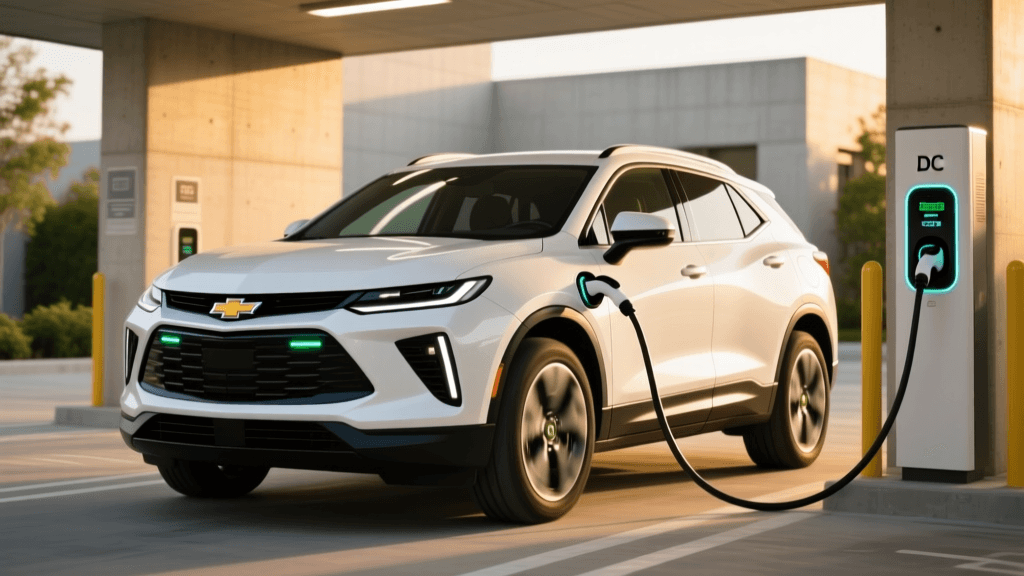
One of the most frustrating issues reported by Blazer EV owners is the vehicle's refusal to accept a DC Fast Charge (Level 3) at public CCS stations like Electrify America or EVgo. If you plug in and the handshake fails, or the charge stops after a few minutes, follow these troubleshooting steps:
1. Verify Battery Preconditioning
The Ultium battery management system (BMS) is highly protective of battery health. If the battery is too cold (below 50°F/10°C), the vehicle will restrict or entirely block DC fast charging to prevent lithium plating. The Fix: Always use the navigation system to route to the charging station. This automatically triggers the battery thermal preconditioning sequence. If you are already at the charger, open the infotainment climate settings or the MyChevrolet app and manually toggle 'Precondition for Fast Charging' if the software version permits.
2. Check the CCS Connector Seating
The Blazer EV’s CCS port requires a firm, deliberate connection. The heavy, liquid-cooled cables at 350kW chargers can sag, causing the control pilot pins to misalign. The Fix: Unplug the vehicle, lift the heavy cable to relieve the downward tension, and push the connector firmly into the port until you hear the secondary mechanical latch click. Ensure the vehicle is unlocked when inserting the plug, as the locking pin cannot engage if the doors are locked.
3. Perform an Infotainment Hard Reset
The charging handshake is managed by the vehicle's central computing modules. If the infotainment screen freezes or fails to communicate with the charger, the charge will abort. The Fix: Press and hold the physical volume/power knob on the dashboard for 15 to 20 seconds until the screen goes completely black and the Chevrolet bowtie logo reappears. This reboots the primary communication gateway without affecting the high-voltage battery contactors.
Resolving Level 2 Home Charging Interruptions
Waking up to an uncharged Blazer EV is a nightmare scenario. If your Level 2 home charger (such as a ChargePoint Home Flex or Emporia Vue) stops delivering power midway through the night, the issue often stems from software scheduling conflicts or 12V battery preservation logic.
1. Override Location-Based Charging
GM’s software includes a 'Location Based Charging' feature designed to only allow charging at your saved 'Home' GPS coordinates to prevent accidental charging at expensive public Level 2 spots. If your home Wi-Fi or GPS signal drops, the car may think it is in an unauthorized location and halt the charge. The Fix: Open the MyChevrolet app, navigate to the Energy/Charging menu, and temporarily disable Location Based Charging. Set the vehicle to 'Charge Immediately' to bypass geographic restrictions.
2. The 12V Battery Drain Safeguard
Like all modern EVs, the Blazer EV uses a traditional 12V lead-acid or lithium-ion battery to power its computers, relays, and infotainment. If the 12V battery voltage drops below a critical threshold while parked, the high-voltage contactors will physically open to use the main Ultium pack to save the 12V system. This instantly halts any ongoing Level 2 charging session. The Fix: Ensure you are not leaving accessories plugged into the 12V accessory ports while parked. If this happens frequently, have your dealer test the 12V battery and the DC-to-DC converter that maintains it.
Fixing Range Estimation and Phantom Drain
The Blazer EV utilizes a dynamic 'Guess-O-Meter' (GOM) that calculates range based on recent driving habits, ambient temperature, and HVAC usage. Some owners have reported sudden drops in estimated range or excessive phantom drain while parked.
1. Recalibrating the Battery Management System (BMS)
If your Blazer EV's range estimator is wildly inaccurate—showing massive drops after short trips—the BMS may have lost its calibration regarding the battery's true state of charge (SoC). The Fix: Perform a manual BMS recalibration. Charge the vehicle to 100% using a Level 2 charger and leave it plugged in for an additional two hours after it reaches full capacity to allow for cell balancing. Then, drive the vehicle normally until the battery drops to 10% or lower, and immediately recharge it back to 100%. This teaches the BMS the exact upper and lower voltage limits of the Ultium modules.
2. Mitigating Vampire Drain
Phantom drain occurs when the vehicle's computers remain awake, polling for cellular signals or maintaining cabin temperatures. The Fix: Disable 'Cabin Overheat Protection' if you live in a mild climate. Furthermore, avoid opening the MyChevrolet app repeatedly while the car is parked; every time you request the vehicle's status, the app sends a cellular wake-up signal to the car's telematics module, drawing power from the high-voltage battery.
Blazer EV Charging & Range Troubleshooting Matrix
Use the table below as a quick-reference guide for diagnosing your specific issue:
| Issue Symptom | Most Likely Cause | Immediate Action / Quick Fix |
|---|---|---|
| DCFC Handshake Fails | Cold battery or misaligned CCS pins | Route via Nav to precondition; lift cable while plugging in. |
| Level 2 Stops at 80% | Target Charge Limit or Departure Time set | Check MyChevrolet app 'Charge Limit' settings; adjust to 100%. |
| Rapid Range Drop on Dash | BMS desynchronization or cold weather | Perform a 100% to 10% deep cycle; precondition cabin while plugged in. |
| Infotainment Black Screen | Software memory leak or module crash | Hold the volume/power knob for 15+ seconds to force a hard reboot. |
| Charge Port Door Won't Open | Actuator freeze or 12V system fault | Use the manual emergency release cable located in the rear cargo area. |
Software Updates: The Ultimate Fix
Because the Blazer EV is essentially a computer on wheels, many hardware-adjacent issues are actually rooted in outdated firmware. According to Chevrolet's official Blazer EV hub, GM frequently deploys Over-The-Air (OTA) updates to refine the energy management system, improve charger handshake protocols, and fix infotainment bugs.
To ensure you are receiving these critical patches:
- Navigate to Settings > Software Update on your infotainment screen.
- Ensure your vehicle is connected to a stable home Wi-Fi network. OTA updates over cellular networks are often throttled or paused to prevent data overages and incomplete downloads.
- Keep the vehicle powered on and in 'Park' during the installation phase. Do not attempt to drive or shift into gear while the progress bar is active, as this will abort the installation and may brick the telematics module until a dealer resets it.
When to Visit the Dealership
While the troubleshooting steps above will resolve the vast majority of daily charging and range anomalies, some issues require proprietary GM diagnostic tools (GDS2). If your Blazer EV is throwing hard diagnostic trouble codes (DTCs) related to the high-voltage battery contactors, the onboard charging module (OBCM), or the battery coolant pump, you must schedule a service appointment.
Before visiting the dealer, it is highly recommended to check the NHTSA recall database using your Vehicle Identification Number (VIN). GM has issued specific recalls and technical service bulletins (TSBs) for early-production Blazer EVs regarding high-voltage battery management software and charging port wiring harnesses. Ensuring your VIN is clear of open recalls will save you hours of frustration at the service desk and ensure your Ultium platform operates safely and reliably for years to come.