What Tesla Autopilot Visualization Actually Shows You
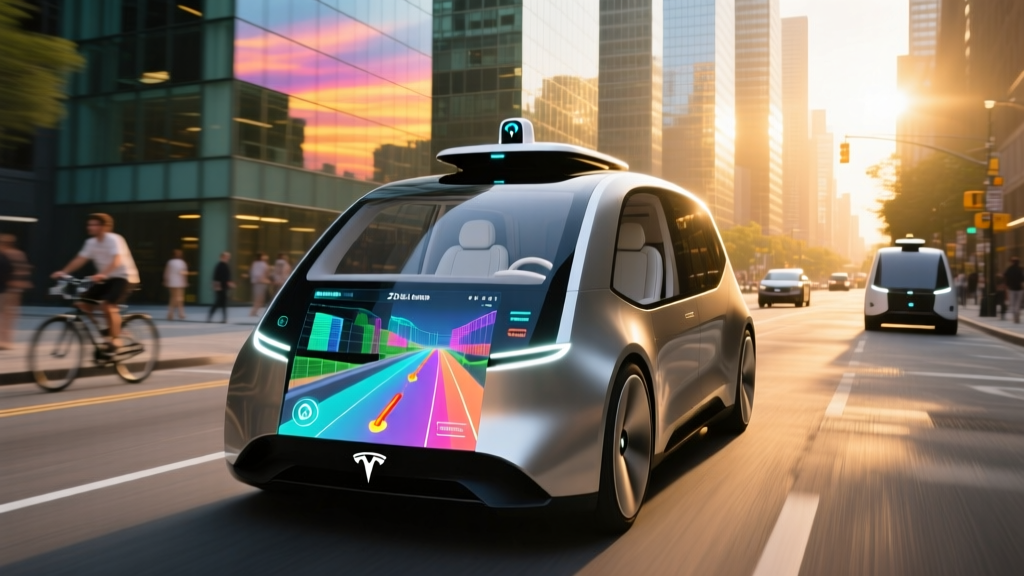
When you engage Autopilot on a Tesla, the instrument cluster (or the left portion of the central touchscreen on Model 3 Highland and Model Juniper) transforms into a real-time 3D rendering of your driving environment. This is Tesla Autopilot visualization — the system's attempt to show you what its neural network "sees." Cars, trucks, pedestrians, lane lines, traffic lights, stop signs, road curbs, and even crosswalks appear as stylized objects on a virtual road.
The visualization is not a camera feed. It is a software-generated reconstruction built from inputs across the vehicle's camera array, processed by Tesla's onboard inference computer. Understanding what it can and cannot accurately represent is critical to using the system safely.
Tesla Autopilot and Full Self-Driving (Supervised) are SAE Level 2 systems. The driver must remain fully attentive, keep hands on the steering wheel, and be prepared to take over at any moment. The vehicle does not drive itself. Only Level 4 services like Waymo operate without a human driver in defined areas.
How the Visualization System Works Technically
Tesla's approach to perception relies entirely on cameras — a philosophy the company calls Tesla Vision. Since 2022, Tesla removed ultrasonic sensors (USS) and radar from all new production vehicles, relying on a pure vision stack.
Camera Hardware (2026 Models)
Current-production Tesla vehicles (Model 3, Model Y Juniper, refreshed Model S/X) ship with Hardware 4 (HW4), which includes up to 8 cameras:
- Front main camera (narrow + wide lens, mounted behind the rearview mirror)
- Front-facing side repeaters (left/right front fenders)
- Rear-facing side cameras (left/right B-pillar area)
- Rear-view camera
- Cabin-facing camera (driver monitoring)
The HW4 suite uses higher-resolution sensors (up to 5 megapixels per camera) compared to the older HW3 (1.2 megapixels). Tesla's newer AI5 hardware, announced for future vehicles, promises further resolution and processing improvements, but as of early 2026, HW4 remains the production standard.
Processing and Neural Networks
The onboard computer runs Tesla's neural network inference engine, which processes camera frames to detect and classify objects, estimate depth, predict motion paths, and identify lane boundaries, road edges, and drivable space. The visualization on your screen is the output of this perception stack — a best-effort graphical representation of what the system believes surrounds the car.
| Element | Rendered? | Accuracy Notes |
|---|---|---|
| Lead vehicles (cars, trucks, SUVs) | Yes | Generally reliable; vehicle type classification usually correct |
| Motorcycles and bicycles | Yes | Smaller objects may appear intermittently at distance |
| Pedestrians | Yes | Detected but may lag or appear/disappear in complex scenes |
| Lane lines (solid, dashed, double) | Yes | Accurate when markings are fresh; fades on worn/unmarked roads |
| Road curbs and edges | Yes | Estimated from vision; can be inaccurate on rural/unpaved roads |
| Traffic lights | Yes | Color and state displayed; may misread in glare or oblique angles |
| Stop signs and speed limit signs | Yes | Generally accurate; may lag updating after passing a sign |
| Construction cones and barriers | Yes (FSD) | Rendered with FSD Supervised; basic Autopilot may not show all |
| Animals | Inconsistent | May appear as generic obstacles or not render at all |
| Weather (rain, fog, snow) | No | Visualization does not change; camera degradation is not shown |
Autopilot vs. FSD Supervised: What You're Paying For
Tesla splits its driver-assistance features into tiers. The visualization changes depending on which tier is active.
| Feature Tier | Cost | Visualization Features | Availability |
|---|---|---|---|
| Basic Autopilot | Included (all models) | Lane lines, lead vehicle, speed signs | Standard on every new Tesla |
| Enhanced Autopilot (EAP) | $6,000 one-time (when offered) | Same as Basic + auto lane-change visualization | Select markets; being phased out in US |
| FSD (Supervised) | $8,000 one-time or $99/month subscription | Full 3D environment: curbs, crosswalks, traffic light state, cones, turn arrows | All US/Canada models |
With Basic Autopilot (standard), the visualization is relatively sparse: you see the road ahead, lane markings, and the lead vehicle. When you upgrade to FSD (Supervised), the screen renders a much richer environment — road curvature, crosswalks, traffic signal colors, and even directional arrows on the pavement.
The $99/month FSD subscription allows you to try the full visualization and capability set without the $8,000 upfront commitment. Note: Tesla periodically adjusts pricing. Always verify current rates on Tesla's official Autopilot page.
Real-World Limitations of the Visualization
- The screen is not reality. The visualization is a software interpretation. An object may be missing from the display but still physically present. Conversely, "phantom" objects may briefly appear that do not exist.
- Weather degrades perception silently. Heavy rain, fog, snow, or direct sun glare can impair camera performance. The visualization will NOT show you a "degraded" state — it may simply fail to render objects or lane lines without warning.
- Construction zones are unpredictable. While FSD Supervised attempts to render cones and temporary barriers, rapidly changing work zones with conflicting lane markings remain high-risk scenarios requiring immediate driver takeover.
- Unmarked and rural roads. On roads without clear lane markings, the system estimates road edges. The visualization may show lane lines where none exist or fail to follow the actual road curvature.
- Phantom braking. Teslas with Tesla Vision have been documented applying unexpected deceleration on highways — often attributed to the system misidentifying shadows, overpasses, or roadside objects as obstacles. NHTSA has investigated these incidents.
Cold Weather and Camera Obstruction
In freezing conditions, cameras can become obscured by ice, road salt spray, or condensation. Tesla's system will display a "Camera obstructed or blinded" warning and may limit or disable Autopilot. The visualization will degrade or disappear entirely. Keeping cameras clean (especially the front main camera) is a real ownership task in winter climates.
Highway vs. City Accuracy
On well-marked divided highways, the visualization is generally reliable and stable. Lane lines track accurately, and lead vehicles are consistently rendered. In dense urban environments, the system processes more objects — parked cars, pedestrians, cyclists, complex intersections — and the visualization becomes busier, occasionally flickering as the neural network reclassifies objects frame to frame.
How Tesla's Visualization Compares to Competitors
| Brand / System | SAE Level | Visualization Style | Hands-Free? | Cost |
|---|---|---|---|---|
| Tesla Autopilot / FSD (Supervised) | Level 2 | Full 3D environment on instrument cluster/center screen | No (hands-on, torque monitoring) | Included / $8,000 or $99/mo |
| Ford BlueCruise | Level 2 | Instrument cluster: lane lines, lead vehicles, speed info | Yes (on pre-mapped highways, with DMS camera) | $2,100 (3-yr) or $75/mo |
| GM Super Cruise | Level 2 | Instrument cluster: lane lines, vehicles, road curvature | Yes (on pre-mapped roads, with DMS) | $2,500 (3-yr) then $25/mo |
| Hyundai/Kia Highway Driving Assist 2 | Level 2 | Instrument cluster: lane lines, vehicles, speed | No | Included on mid/high trims |
| BMW Driving Assistant Professional | Level 2 | Instrument cluster: 3D vehicle models, lane lines | Conditional (under 40 mph, hands-off with DMS) | $1,700–$2,500 package |
Tesla's visualization is arguably the most detailed of any consumer ADAS system — rendering curbs, crosswalks, and traffic light states that competitors typically omit. However, Ford's BlueCruise and GM's Super Cruise offer something Tesla does not: hands-free operation on pre-mapped highways, verified by an infrared driver-monitoring camera. Tesla requires continuous steering-wheel torque input (or, in newer versions, camera-based attention monitoring) as proof of engagement.
The trade-off is clear: Tesla provides richer visual information and broader geographic coverage (it works on virtually any road), while BlueCruise and Super Cruise provide a narrower but more relaxed experience on approved routes. For safety data and ongoing investigations into all Level 2 systems, refer to the NHTSA automated vehicles page.
Which Tesla Models Include Autopilot Visualization in 2026?
Every new Tesla sold in 2026 includes Basic Autopilot and its associated visualization as standard equipment. There are no trim-level exclusions — the feature is not locked behind a Premium or Long Range badge. Here is the current lineup:
- Model 3 (Highland refresh): Visualization on the left side of the 15.4-inch center screen (no separate instrument cluster). Basic Autopilot standard; FSD (Supervised) available.
- Model Y (Juniper): Same center-screen layout as Model 3 Highland. Basic Autopilot standard; FSD (Supervised) available.
- Model S (refreshed): Dedicated instrument cluster behind the steering wheel shows visualization. Basic Autopilot standard; FSD (Supervised) available.
- Model X (refreshed): Same dedicated instrument cluster as Model S. Basic Autopilot standard; FSD (Supervised) available.
- Cybertruck: Center-screen visualization layout. Basic Autopilot standard; FSD (Supervised) available.
Base MSRPs for 2026: Model 3 starts at approximately $38,990; Model Y at approximately $44,990; Model S at approximately $74,990; Model X at approximately $79,990; Cybertruck at approximately $79,990 (AWD). Verify current pricing at tesla.com, as Tesla adjusts MSRP frequently.
Is Tesla Autopilot Visualization Actually Self-Driving?
No. This bears repeating because the visualization can create a false sense of capability. When the screen shows a rich, detailed 3D world with lane lines curving smoothly and traffic lights changing color, it is tempting to assume the system is handling everything. It is not.
Tesla Autopilot and FSD (Supervised) are SAE Level 2 partial automation systems. By definition, Level 2 means the system can simultaneously control steering and acceleration/braking under certain conditions, but the human driver must continuously supervise and be ready to intervene immediately. There is no consumer vehicle sold in 2026 — Tesla included — that is Level 3 or above for general use.
The visualization is a status display, not a promise. It shows you what the system currently perceives so you can verify whether its understanding matches reality. If the visualization shows an open lane but you see a construction barrier with your own eyes, you are the one who must brake.
Frequently Asked Questions
Can I trust Tesla Autopilot visualization to show me every vehicle around me?
No. The visualization is a best-effort rendering from the neural network. Vehicles in blind spots, partially occluded objects, motorcycles at distance, or fast-approaching cars may not render immediately or at all. Always use your mirrors and eyes as the primary source of truth.
Does the visualization work at night?
Yes. Tesla's cameras operate in low light, and the visualization renders at night just as it does during the day. However, camera performance degrades on unlit rural roads, and the system may struggle with lane detection in darkness without reflective markings.
Why does the visualization sometimes show phantom objects?
The neural network occasionally misclassifies shadows, road surface variations, or reflections as objects. These "phantom" renderings typically disappear within a second or two as the system processes subsequent frames. Phantom braking — where the car decelerates for a perceived obstacle — is a related and more consequential issue that NHTSA has investigated.
Does FSD (Supervised) visualization look different from Basic Autopilot?
Yes, significantly. FSD (Supervised) adds curb rendering, crosswalks, traffic light colors and states, road-surface arrows, construction cones, and more detailed road-edge detection. Basic Autopilot shows only lane lines, lead vehicles, and basic road information.
Can I use the FSD subscription just to get the better visualization?
Technically, yes. The $99/month FSD (Supervised) subscription enables the full visualization and all FSD driving features. Some owners subscribe purely for the richer display and additional features like Smart Summon, even if they rarely engage FSD for actual city driving. You can cancel the subscription at any time.
Does Tesla's visualization show weather conditions like rain or snow?
No. The visualization renders a clean, idealized environment regardless of actual weather. If cameras are degraded by rain, snow, or salt spray, you may see a "Camera obstructed" warning text, but the 3D scene itself does not visually indicate reduced perception quality. This is a significant gap — always drive more cautiously in poor weather and be prepared for the system to disengage without notice.