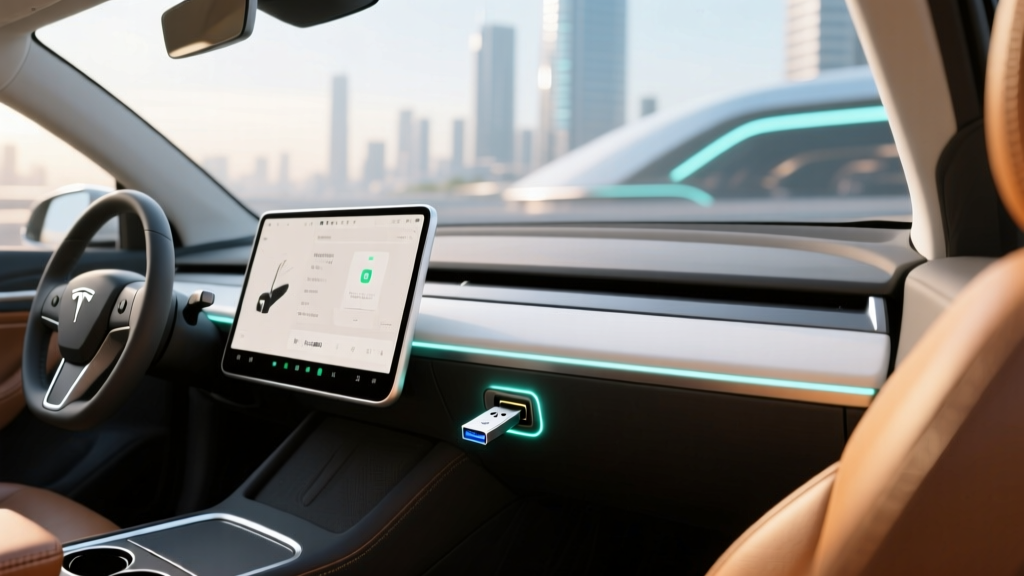
If you own a Tesla—or are about to buy one—the built-in dashcam and Sentry Mode are among the most practical features in the EV space. But neither works without one critical accessory: the right Tesla USB for dashcam storage. Unlike traditional aftermarket dashcams that write to microSD cards, Tesla's system records to a USB drive plugged into the glovebox (or center console on older models), and getting the wrong drive means missed clips, corrupted files, or the dreaded "dashcam icon with a red dot" warning on your touchscreen.
This guide covers exactly which USB drives work best in 2026 Tesla vehicles, how to format and configure them, and—since storage is only part of the ownership picture—the full range, charging, pricing, and tax-credit profile for every current Tesla model so you know exactly what you're signing up for.
Why Tesla's Dashcam System Demands the Right USB Drive
Tesla's dashcam continuously records from up to eight cameras (front, rear, left/right repeaters, and cabin on some models) whenever the car is powered on. Sentry Mode extends this by monitoring the surroundings while parked, saving clips when motion or impacts are detected. Both features write heavily to flash storage—far more than a typical consumer USB stick is designed to handle.
The problem? Standard USB flash drives use low-endurance NAND flash that degrades rapidly under constant write cycles. Owners who plug in a cheap 32 GB thumb drive often report corrupted file systems within weeks. The solution is a high-endurance USB drive or, better yet, a portable SSD designed for sustained write operations.
Top USB Drive Picks for Tesla Dashcam in 2026
| Drive | Type | Capacity | Read/Write Speed | Endurance Rating | Est. Price |
|---|---|---|---|---|---|
| Samsung BAR Plus 256 GB | USB-A 3.1 Flash | 256 GB | 400 / 60 MB/s | Good (consumer-grade) | $30 |
| SanDisk High Endurance 128 GB | USB-A Flash | 128 GB | 100 / 30 MB/s | High (designed for dashcams) | $18 |
| Samsung T7 Shield 500 GB | USB-C Portable SSD | 500 GB | 1,050 / 1,000 MB/s | Excellent (SSD endurance) | $70 |
| Crucial X9 Pro 1 TB | USB-C Portable SSD | 1 TB | 1,050 / 975 MB/s | Excellent | $90 |
Our recommendation: For most Tesla owners, the Samsung T7 Shield 500 GB hits the sweet spot. It's compact enough to tuck in the glovebox, fast enough that file indexing never lags, and its SSD controller handles years of Sentry Mode write cycles without breaking a sweat. You'll need a USB-A to USB-C adapter cable (or use the USB-C port directly if your Tesla has one in the glovebox—2024+ Model 3 Highland and refreshed Model S/X include USB-C glovebox ports).
How to Format Your Tesla Dashcam USB Drive
- Insert the drive into your computer.
- Format it as exFAT (required by Tesla's Linux-based OS). On Windows: right-click the drive → Format → select exFAT. On Mac: Disk Utility → Erase → exFAT.
- Create a folder on the root directory named TeslaCam (exact spelling and capitalization matter).
- Eject the drive, plug it into your Tesla's glovebox USB port.
- On the touchscreen, go to Controls → Safety → Dashcam and verify the drive is recognized. You can also tap the dashcam icon and select "Format USB Drive" to let the car handle formatting directly.
2026 Tesla Lineup: Range, Charging, and Pricing at a Glance
Storage setup matters, but you're also here because you drive—or want to drive—a Tesla. Below is the complete 2026 specification profile for every current Tesla model. All figures reflect the latest EPA data and manufacturer specifications as of early 2026.
| Spec | Model 3 RWD | Model 3 Long Range AWD | Model Y Long Range AWD | Model S LR | Model X LR | Cybertruck AWD |
|---|---|---|---|---|---|---|
| EPA Range | 272 mi | 363 mi | 320 mi | 402 mi | 348 mi | 340 mi |
| Battery (usable) | 60 kWh (LFP) | 79 kWh (NMC) | 79 kWh (NMC) | 100 kWh (NMC) | 100 kWh (NMC) | 123 kWh (NMC) |
| Peak DC Charge | 170 kW | 250 kW | 250 kW | 250 kW | 250 kW | 350 kW |
| 10–80% DC Time | ~28 min | ~27 min | ~27 min | ~30 min | ~31 min | ~20 min |
| Level 2 Rate | 11.5 kW (~37 mi/hr) | 11.5 kW (~44 mi/hr) | 11.5 kW (~44 mi/hr) | 11.5 kW (~41 mi/hr) | 11.5 kW (~37 mi/hr) | 17 kW (~52 mi/hr) |
| 0–60 mph | 5.8 sec | 4.2 sec | 4.8 sec | 3.1 sec | 3.8 sec | 4.1 sec |
| Horsepower | 283 hp | 384 hp | 384 hp | 670 hp | 670 hp | 600 hp |
| Drivetrain | RWD | Dual-Motor AWD | Dual-Motor AWD | Dual-Motor AWD | Dual-Motor AWD | Dual-Motor AWD |
| Efficiency | 132 MPGe / 25 kWh/100mi | 132 MPGe / 25 kWh/100mi | 122 MPGe / 28 kWh/100mi | 120 MPGe / 28 kWh/100mi | 110 MPGe / 31 kWh/100mi | 79 MPGe / 43 kWh/100mi |
| Base MSRP | $38,990 | $45,990 | $44,990 | $79,990 | $84,990 | $79,990 |
Sources: fueleconomy.gov, Tesla.com 2026 model-year specifications.
EPA range is measured on a mixed city/highway cycle at moderate temperatures. In real-world highway driving at 70–80 mph, expect 80–88% of EPA range (e.g., a Model 3 LR rated at 363 mi will deliver roughly 290–320 mi on a flat highway at 75 mph). In cold weather (below 32°F / 0°C), range drops an additional 15–30% depending on cabin heating use. Teslas equipped with heat pumps (standard on all current models) mitigate this loss compared to older resistive-heater vehicles, but the physics of lithium-ion in cold remains unavoidable. Always precondition your battery via the Tesla app before driving in cold weather to recover some range and enable faster DC charging.
Charging Deep Dive: What Tesla Owners Actually Experience
One of Tesla's biggest advantages remains its Supercharger network, which in 2026 includes over 20,000 V3 (250 kW) and V4 (up to 350 kW) stalls across North America. But peak kW numbers don't tell the full story—charge curves matter more.
Understanding Tesla's Charge Curve
DC fast charging is never linear. A Model 3 Long Range peaking at 250 kW will only sustain that rate between roughly 10–30% state of charge (SoC). Above 50%, the rate tapers to ~120 kW, and above 80%, it drops further to ~50 kW or less. This is why Tesla quotes 10–80% times rather than 0–100%: the last 20% can take as long as the first 70%.
| Charging Level | Power | Miles Added per Hour | Best Use Case |
|---|---|---|---|
| Level 1 (120V outlet) | 1.2–1.4 kW | 3–5 mi/hr | Emergency/top-off only |
| Level 2 (240V, 48A) | 11.5 kW | 37–44 mi/hr | Overnight home charging |
| DC Fast (V3 Supercharger) | Up to 250 kW | ~1,000 mi/hr (peak) | Road trips, 10–80% in ~27 min |
| DC Fast (V4 Supercharger) | Up to 350 kW | ~1,300 mi/hr (peak) | Cybertruck, future models |
Home charging tip: A Tesla Wall Connector on a 60-amp circuit (48A continuous) delivers 11.5 kW—enough to fully replenish any Tesla overnight. Installation typically costs $500–$2,000 depending on panel proximity and whether your home needs a 200-amp service upgrade. Always hire a licensed electrician and pull a permit; this is not a DIY job.
Federal Tax Credit: Which 2026 Teslas Qualify for §30D?
The IRS §30D Clean Vehicle Credit offers up to $7,500 for qualifying new EVs, but eligibility hinges on three moving targets: MSRP caps, buyer income limits, and battery-component/critical-mineral sourcing requirements. Rules can shift annually, so always verify against irs.gov before purchasing.
| Requirement | Threshold |
|---|---|
| MSRP Cap (sedans) | ≤ $55,000 |
| MSRP Cap (SUVs/trucks/vans) | ≤ $80,000 |
| Buyer AGI (single) | ≤ $150,000 |
| Buyer AGI (head of household) | ≤ $225,000 |
| Buyer AGI (married filing jointly) | ≤ $300,000 |
| Battery Sourcing | Must meet critical-mineral and battery-component thresholds (phased annually) |
| Point-of-Sale Transfer | Buyers can transfer the credit to the dealer for an immediate price reduction |
2026 Tesla eligibility snapshot:
- Model 3 RWD ($38,990): Under the $55K sedan cap. If battery sourcing requirements are met and your income qualifies, the full $7,500 credit applies → effective price as low as ~$31,490.
- Model 3 Long Range ($45,990): Also under the sedan cap. Eligibility depends on battery sourcing compliance for the specific build.
- Model Y Long Range ($44,990): Classified as an SUV → under the $80K cap. Has consistently qualified for the full credit in recent years.
- Cybertruck AWD ($79,990): Just under the $80K truck cap. Eligibility is tight on MSRP—adding options can push it over.
- Model S ($79,990) and Model X ($84,990): Model S is under the sedan cap; Model X exceeds the $80K SUV cap and does not qualify.
Important: Battery sourcing requirements tighten each year under the Inflation Reduction Act. Consult a tax professional and check IRS §30D guidance before relying on credit eligibility.
Interior, Cargo, and Tech: Living With a Tesla Daily
Beyond the powertrain, Tesla's cabin design is defined by its minimalism—and its reliance on the central touchscreen. Here's how the practical dimensions break down:
| Model | Cargo (rear seats up) | Cargo (rear seats folded) | Front Legroom | Rear Legroom | Frunk |
|---|---|---|---|---|---|
| Model 3 | 23 cu ft | ~55 cu ft | 42.7 in | 35.2 in | 3.1 cu ft |
| Model Y | 30 cu ft | ~72 cu ft | 41.8 in | 37.0 in | 4.1 cu ft |
| Model S | 28 cu ft | ~63 cu ft | 42.4 in | 35.4 in | 5.3 cu ft |
| Model X | 15 cu ft (behind 3rd row) | ~82 cu ft (max) | 41.2 in | 35.5 in (2nd row) | 6.6 cu ft |
| Cybertruck | 67 cu ft (bed) | N/A | 41.5 in | 38.0 in | 7.1 cu ft (frunk) |
Standout Tech Features
- 15.4" touchscreen (Model 3/Y) or 17" (Model S/X) — controls everything from climate to glovebox release.
- Over-the-air updates continuously add features; 2025–2026 updates brought improved battery preconditioning UI, enhanced Sentry Mode viewer, and a redesigned navigation stack.
- Autopilot (standard) includes adaptive cruise, lane centering, and automatic emergency braking. Full Self-Driving (Supervised) adds automatic lane changes, traffic-light recognition, and city-street navigation — but remains SAE Level 2, meaning the driver must remain fully engaged at all times.
- Sentry Mode records and saves clips of threats around the parked vehicle — this is where your USB drive earns its keep.
- Dashcam Viewer built into the touchscreen lets you scrub through recent footage directly in the car, or export clips to a phone via the Tesla app.
Tesla Autopilot and FSD (Supervised) are SAE Level 2 driver-assistance systems. They do not make the vehicle self-driving. The driver is legally and physically responsible for the vehicle at all times and must keep hands on the wheel (or demonstrate attentiveness via the cabin camera). These systems can and do fail to detect stationary objects, construction zones, and emergency vehicles. Never use them while distracted or impaired.
Notable Drawbacks
- No physical stalks (Model 3 Highland/Model Y Juniper): Turn signals are now steering-wheel buttons, and gear selection is touchscreen-based—a significant adjustment for new owners.
- Ride firmness: The Model 3 and Model Y have sport-tuned suspensions that transmit road imperfections noticeably, especially on 19"+ wheels.
- Panel gaps and paint: While improved since 2023, some owners still report minor fit-and-finish inconsistencies at delivery.
- Insurance costs: Teslas remain among the more expensive EVs to insure due to repair costs and aluminum/composite body panels. Get quotes before purchasing.
Who Should Buy a Tesla in 2026?
- You want access to the Supercharger network — still the most reliable and widespread DC fast-charging infrastructure in North America.
- You value over-the-air updates that genuinely add capability over time.
- You need a robust dashcam and Sentry Mode system for urban parking or security-conscious environments.
- You want class-leading efficiency (kWh per mile) and real-world range that closely tracks EPA estimates.
- You're buying a Model Y — it remains one of the best-value electric SUVs on the market with the $7,500 credit.
- You need a traditional instrument cluster, physical buttons, or conventional turn-signal stalks.
- You want the longest possible range at the lowest price — the Hyundai Ioniq 6 and Chevrolet Equinox EV offer strong range-per-dollar.
- You need three-row seating with easy third-row access (the Model X third row is tight; consider the Kia EV9).
- You live in an area with no reliable home charging access — all EVs are harder to own without Level 2 home charging.
Pros and Cons Summary
Pros
- Best-in-class Supercharger network access
- Excellent efficiency (low kWh/100mi)
- Built-in dashcam and Sentry Mode (no aftermarket hardware)
- OTA updates add real features over time
- Strong resale value relative to EV segment
- Heat pump standard on all models
Cons
- Minimalist controls require touchscreen reliance
- No turn-signal stalks on refreshed models
- Firm ride quality on larger wheels
- Higher insurance premiums than average
- FSD (Supervised) costs $8,000+ and remains Level 2
- Model S/X pricing excludes them from tax credit
Warranty Coverage
| Coverage | Model 3 / Model Y | Model S / Model X | Cybertruck |
|---|---|---|---|
| Basic Vehicle | 4 years / 50,000 mi | 4 years / 50,000 mi | 4 years / 50,000 mi |
| Battery & Drive Unit | 8 years / 120,000 mi (RWD) 8 years / 120,000 mi (LR/AWD) | 8 years / 150,000 mi | 8 years / 120,000 mi |
| Battery Retention Threshold | 70% capacity minimum | 70% capacity minimum | 70% capacity minimum |
Tesla's battery warranty guarantees that the pack will retain at least 70% of its original capacity during the warranty period. In practice, Tesla's battery degradation data (published in annual impact reports) shows average degradation of roughly 12% over 200,000 miles across the fleet—well within warranty thresholds for normal use. LFP batteries (Model 3 RWD) can be charged to 100% daily without accelerated degradation, while NMC packs (all other trims) benefit from daily charging limits of 80–90% with 100% only for road trips.
Frequently Asked Questions
What size USB drive do I need for Tesla dashcam and Sentry Mode?
A minimum of 64 GB is required, but 128–500 GB is ideal. Sentry Mode clips are 1 minute each from up to 8 cameras, and the system keeps the last hour of driving footage in a rolling buffer. A 256 GB drive stores roughly 100+ hours of dashcam footage before overwriting the oldest files.
Does a portable SSD work better than a USB flash drive for Tesla?
Yes. Portable SSDs like the Samsung T7 Shield handle sustained write cycles far better than consumer flash drives, resulting in longer lifespan and more reliable clip saving. The tradeoff is slightly higher cost ($70 vs $20) and the need for a short USB-A to USB-C cable in older Teslas.
How do I view and save Tesla dashcam clips?
Tap the dashcam icon on the touchscreen to view recent clips organized by date and event type (manual save, Sentry trigger, honk-to-save). To export, remove the USB drive and plug it into a computer—clips are stored as MP4 files in the TeslaCam folder, organized by date. You can also view Sentry clips remotely via the Tesla app if your vehicle has Premium Connectivity.
Which 2026 Tesla models qualify for the $7,500 federal tax credit?
The Model 3 RWD, Model 3 Long Range, Model Y Long Range, and Cybertruck AWD all fall under their respective MSRP caps and can qualify if the buyer meets IRS income limits and the vehicle's battery meets sourcing requirements. The Model X exceeds the $80K SUV cap and does not qualify. Always verify on IRS.gov at time of purchase, as rules can change.
What is the real-world highway range of the Model 3 Long Range?
The EPA rates it at 363 miles. In real-world highway driving at 75 mph and 70°F, expect approximately 290–320 miles. In cold weather (20°F), that drops to roughly 240–270 miles even with the heat pump running. Preconditioning and seat heaters help maximize cold-weather range.
Can I charge a Tesla at non-Tesla DC fast chargers?
Yes. All 2026 Teslas come with the NACS (North American Charging Standard) port, which is now supported by Electrify America, EVgo, and other major networks alongside CCS adapters. Tesla also includes a CCS adapter in the glovebox for older Supercharger stalls. Charging speeds on non-Tesla networks depend on the station's maximum output and the vehicle's charge curve.
Is FSD (Supervised) worth the extra cost?
At $8,000 (or $99/month in 2026), FSD (Supervised) adds city-street navigation, automatic lane changes, and traffic-light/stop-sign recognition. However, it remains an SAE Level 2 system requiring full driver attention. Most owners find standard Autopilot sufficient for highway commuting. We recommend trying the monthly subscription before committing to the full purchase.