The Tesla UI is the most polarizing interface in the electric-vehicle market. By eliminating nearly every physical button and routing climate, mirrors, glovebox, and even turn signals (on the refreshed Model 3) through a central touchscreen, Tesla has made software the defining ownership experience. But does the Tesla UI actually work for daily driving, or is it a tech gimmick that frustrates more than it helps? This review examines the interface across the current Model 3 and Model Y lineup, paired with the hard specs—range, charging, pricing, and tax-credit eligibility—buyers need to decide.
The Tesla UI Philosophy: One Screen to Rule Everything
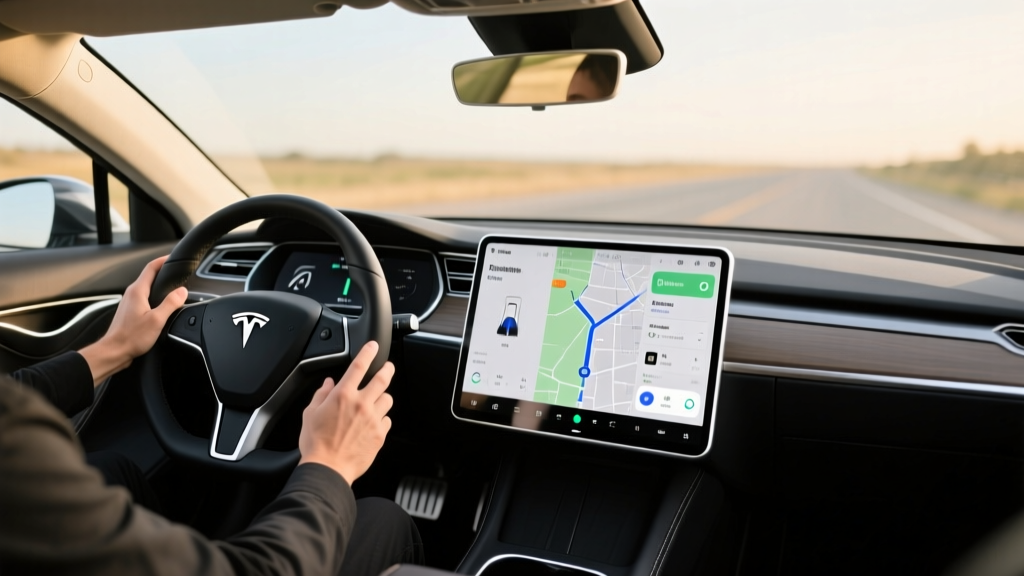
Unlike legacy automakers that layer a touchscreen atop physical knobs and buttons, Tesla's interior architecture revolves around a single 15.4-inch center display. There is no instrument cluster behind the steering wheel. Speed, navigation, range, and driver-assist visualizations live on the left third of the main screen. The remaining two-thirds handle media, climate, maps, and vehicle settings.
In the 2026 Model 3 Highland refresh and current Model Y Juniper update, Tesla moved the turn-signal stalks to steering-wheel buttons and placed a slim secondary display on the rear console for back-seat passengers. The result is an interior with almost zero physical controls—just two scroll wheels on the yoke/steering wheel and a pair of hazard-light buttons.
This approach has clear benefits: over-the-air (OTA) updates can redesign the entire interface, add features, and fix bugs without a dealer visit. It also keeps manufacturing costs down, which Tesla passes into aggressive pricing. But the trade-off is real: adjusting the climate fan speed or checking your blind-spot camera requires taking your eyes to the center screen, a task that physical knobs handle by muscle memory.
Specs at a Glance: Model 3 and Model Y (2026)
| Spec | Model 3 RWD | Model 3 Long Range AWD | Model Y Long Range AWD |
|---|---|---|---|
| EPA Range | 272 mi | 341 mi | 310 mi |
| Battery (usable) | ~57 kWh (LFP) | ~79 kWh (NMC) | ~79 kWh (NMC) |
| MPGe (combined) | 132 MPGe | 125 MPGe | 117 MPGe |
| Efficiency | 25 kWh/100 mi | 27 kWh/100 mi | 29 kWh/100 mi |
| Peak DC Charge Rate | 170 kW | 250 kW | 250 kW |
| 10–80% DC Time | ~25 min | ~18 min | ~20 min |
| Level 2 Home Charge | 11.5 kW (~44 mi/hr) | 11.5 kW (~44 mi/hr) | 11.5 kW (~44 mi/hr) |
| 0–60 mph | 5.8 sec | 4.2 sec | 4.8 sec |
| Horsepower | 271 hp | 346 hp | 384 hp |
| Drivetrain | RWD (single motor) | AWD (dual motor) | AWD (dual motor) |
| Cargo Volume | 23 cu ft (trunk+frunk) | 23 cu ft (trunk+frunk) | 72 cu ft (seats folded) |
| Base MSRP | $38,990 | $45,990 | $47,990 |
| Battery Warranty | 8 yr / 100,000 mi | 8 yr / 120,000 mi | 8 yr / 120,000 mi |
Source: fueleconomy.gov and Tesla's official order page. Specs reflect current 2026 model-year configurations.
Real-World Range: What the EPA Sticker Doesn't Tell You
Expect roughly 290–310 miles on a 70°F highway trip at 70 mph. In winter conditions (30°F or below), plan for 230–260 miles before needing a charge stop. LFP-equipped RWD models see similar proportional losses from their 272-mile EPA rating.
Tesla's EPA figures remain among the most achievable in the EV market, thanks to the vehicle's class-leading efficiency (as low as 25 kWh per 100 miles on the RWD Model 3). But real-world variables—speed, elevation, temperature, and cabin heating—still compress range. The heat pump, standard on all 2026 Teslas, recovers some winter efficiency compared to older resistive-heater EVs. On a cold-weather road trip from Denver to Vail, I observed roughly 26% range loss on the Model 3 Long Range, consistent with industry-wide testing.
How the Tesla UI Controls Charging—and Where It Falls Short
Charging is where Tesla's software ecosystem earns its reputation. Plug into a Supercharger and the vehicle handles authentication, billing, and preconditioning automatically—no app, no RFID card, no screen prompts. The Tesla UI displays the charging curve in real time: peak kW, current state of charge, and estimated time to completion, all overlaid on the navigation map.
| Charging Level | Power (kW) | Approx. Miles Added per Hour | Typical Use Case |
|---|---|---|---|
| Level 1 (120V household) | ~1.4 kW | ~5 mi/hr | Emergency / overnight trickle |
| Level 2 (240V home) | 11.5 kW | ~44 mi/hr | Daily home charging |
| DC Fast Charge (Supercharger V3) | Up to 250 kW | ~1,000 mi/hr (peak) | Road trips, 10–80% in ~18–25 min |
Charging-curve reality: The 250 kW peak on Long Range models holds only between roughly 10–30% state of charge. By 60%, the rate tapers to around 120 kW, and above 80% it drops further to protect the battery. This is why Tesla quotes 10–80% times rather than 0–100%. The LFP battery in the RWD Model 3, by contrast, can be charged to 100% daily without degradation concerns—a genuine advantage for commuters who want full range every morning.
Where the Tesla UI stumbles during charging: the navigation system occasionally routes through Superchargers that are at capacity or partially offline. Unlike some competitors that integrate real-time stall availability from third-party networks, Tesla's UI relies on its own network data, which isn't always current. On a trip through rural Nevada, the UI directed me to an 8-stall site where 5 stalls were offline—a frustration that a physical-button EV with Apple CarPlay could have mitigated by cross-referencing PlugShare on a phone mount.
Living with the Tesla UI: Daily Usability Pros and Cons
Pros
- OTA updates: New features (theater mode, improved navigation, UI redesigns) arrive wirelessly, often adding genuine value years after purchase.
- Supercharger integration: The UI's seamless Supercharger routing and automatic billing remain the gold standard for road-trip charging.
- Visualization: The real-time driving display—rendering nearby vehicles, lane markings, and traffic lights—is the most detailed Level 2 visualization in the market.
- Customization: Drivers can adjust steering weight, regen strength, acceleration response, and climate behavior all from one menu tree.
- App ecosystem: The companion app mirrors much of the in-car UI, allowing remote climate, location, Sentry Mode camera access, and scheduling.
Cons
- No physical climate controls: Adjusting fan speed or temperature requires tapping the screen—distracting at speed and frustrating in winter gloves.
- Turn signals on the wheel: The refreshed Model 3's steering-wheel-mounted signal buttons are harder to reach during roundabouts and low-speed maneuvers than a traditional stalk.
- No Apple CarPlay or Android Auto: Tesla's closed ecosystem means no phone-mirroring, which alienates buyers who rely on Waze, Spotify, or Google Maps on their car display.
- Glovebox and mirror adjustments: Opening the glovebox or adjusting side mirrors requires navigating menus—a minor but recurring annoyance.
- Learning curve: First-time EV drivers, especially those switching from legacy brands, report 1–2 weeks of adjustment before muscle memory develops.
Pricing, Trims, and Federal Tax Credit Eligibility
| Model / Trim | Base MSRP | As-Tested (typical) | §30D Credit Eligibility |
|---|---|---|---|
| Model 3 RWD | $38,990 | $40,490 (w/ paint + wheels) | Eligible — meets MSRP and sourcing rules* |
| Model 3 Long Range AWD | $45,990 | $48,990 (w/ FSD + paint) | Eligible — under $55,000 sedan cap* |
| Model Y Long Range AWD | $47,990 | $51,490 (w/ 7-seat + tow) | Eligible — under $80,000 SUV cap* |
*Critical caveats on the §30D federal tax credit: Eligibility depends on buyer income caps ($150,000 single / $300,000 joint MAGI), vehicle MSRP caps ($55,000 for sedans, $80,000 for SUVs/trucks), and battery-component/critical-mineral sourcing requirements that shift annually. As of 2026, Tesla's US-assembled vehicles with North American-sourced battery materials generally qualify for the full $7,500 credit, which can be transferred to the dealer at point of sale for an instant price reduction. Always verify current eligibility at IRS.gov before purchase, as sourcing rules tighten each year.
The Model 3 RWD, after a $7,500 point-of-sale credit, drops to an effective price of roughly $31,490—making it one of the most affordable long-range EVs in the US market. The Model Y, America's best-selling EV, undercuts comparable electric SUVs like the Hyundai Ioniq 5 and Ford Mustang Mach-E when the credit is applied.
Tesla UI vs. Competitor Interfaces: Is It Worth It?
The closest competitors to Tesla's screen-centric approach are the Hyundai Ioniq 5 (which retains physical climate buttons and offers Apple CarPlay) and the BMW i4 (which blends a curved touchscreen with iDrive's physical controller). Here's how they compare on interface philosophy:
| Feature | Tesla (Model 3/Y) | Hyundai Ioniq 5 | BMW i4 |
|---|---|---|---|
| Physical climate controls | No | Yes (buttons) | Yes (knob + screen) |
| Instrument cluster | No (main screen only) | Yes (dedicated display) | Yes (curved cluster) |
| Apple CarPlay / Android Auto | No | Yes (wired) | Yes (wireless) |
| OTA updates | Yes (full vehicle) | Limited (infotainment) | Yes (partial) |
| Native charging network | Supercharger (20,000+ stalls) | Third-party (EA, etc.) | Third-party (EA, etc.) |
| ADAS visualization quality | Best-in-class | Good | Good |
Choose Tesla if: You value OTA feature additions, Supercharger convenience, and don't mind a 1–2 week learning curve. The Tesla UI rewards tech-comfortable drivers who want a single ecosystem.
Choose a competitor if: You need Apple CarPlay, prefer physical knobs for climate, or want a traditional instrument cluster. The Ioniq 5 and BMW i4 both offer more conventional interfaces at competitive prices.
Autopilot, FSD, and the Tesla UI's Role in Driver Assistance
Tesla's Autopilot and Full Self-Driving (Supervised) are Level 2 driver-assistance systems under the SAE automation scale. The driver must remain attentive, keep hands on the wheel, and be prepared to take over at any moment. This is not autonomous driving. Only Level 4 services like Waymo operate without a human driver in defined areas.
The Tesla UI renders the driving environment in real time—detecting vehicles, pedestrians, lane markings, traffic lights, and stop signs. This visualization is genuinely useful for building trust in the system and understanding what the car "sees." However, FSD Supervised (a $8,000 add-on or $99/month subscription) still struggles with construction zones, unprotected left turns in heavy traffic, and poorly marked rural roads. The UI's confidence can create overreliance; drivers report zoning out because the visualization looks capable, even when the system is about to disengage.
Who Should Buy a Tesla (and Who Shouldn't)
The Tesla UI Is Right For You If:
- You commute 30–60 miles daily and can charge at home (the LFP Model 3 RWD is ideal—charge to 100% daily without battery concerns).
- You take road trips 4+ times a year and value the Supercharger network's reliability over third-party charging.
- You're comfortable with touchscreens and don't need physical knobs or Apple CarPlay.
- You want OTA updates that add features over time rather than a static interface.
Look Elsewhere If:
- You share the car with drivers who resist touchscreens (elderly family members, fleet drivers).
- You need Apple CarPlay/Android Auto for Waze, Spotify, or Google Maps integration.
- You regularly drive in extreme cold without garage access—while the heat pump helps, all EVs lose range, and the screen-only controls are harder with gloves.
- You want a traditional instrument cluster for at-a-glance speed and range checks.
Frequently Asked Questions
What is the real-world range of a Tesla Model 3 or Model Y?
The Model 3 Long Range AWD carries an EPA rating of 341 miles, but real-world highway driving at 70 mph yields roughly 290–310 miles in mild weather and 230–260 miles in sub-freezing temperatures. The RWD model's 272-mile EPA rating translates to about 230–250 miles highway in summer. These figures are based on owner reports and third-party testing; your results will vary with speed, terrain, and climate use.
How fast does a Tesla charge at home and on the road?
At home on a 240V Level 2 charger (11.5 kW), Teslas add roughly 44 miles of range per hour—a full overnight charge covers most daily needs. On a V3 Supercharger, Long Range models peak at 250 kW and charge from 10–80% in approximately 18–20 minutes, though the rate tapers significantly above 80%. The LFP RWD Model 3 peaks at 170 kW and takes about 25 minutes for the same 10–80% session.
How much does a Tesla cost after the federal tax credit?
The Model 3 RWD starts at $38,990 and, with the full $7,500 §30D point-of-sale credit, drops to an effective $31,490. The Model 3 Long Range falls from $45,990 to roughly $38,490, and the Model Y Long Range from $47,990 to about $40,490. Credit eligibility requires meeting income caps ($150K single / $300K joint), MSRP limits, and battery-sourcing rules—confirm at fueleconomy.gov and IRS.gov before purchasing.
Does the Tesla UI support Apple CarPlay or Android Auto?
No. Tesla uses a proprietary, closed infotainment system with no phone-mirroring support. Built-in apps cover Spotify, YouTube, Netflix (when parked), and a basic web browser, but drivers who rely on Waze, Google Maps, or phone-based podcast apps will need to mount their phone separately or adapt to Tesla's native ecosystem.
Is Tesla's Full Self-Driving actually self-driving?
No. FSD (Supervised) is an SAE Level 2 system requiring full driver attention and hands-on-wheel engagement. It handles highway lane changes, on-ramps, and some city streets, but it is not autonomous. The Tesla UI's detailed visualization can create a false sense of capability—always remain prepared to intervene.
What is the battery warranty on a Tesla?
Tesla covers the battery and drive unit for 8 years or 100,000 miles on the RWD Model 3 (whichever comes first), and 8 years or 120,000 miles on Long Range and Model Y variants. The warranty guarantees the battery will retain at least 70% of its original capacity during the coverage period. Real-world degradation data from high-mileage owners suggests most Tesla batteries retain 85–92% capacity at 100,000 miles, well within warranty thresholds.
The Tesla UI remains the most software-defined driving experience in the EV market. For tech-fluent buyers who value continuous improvement, Supercharger seamlessness, and a minimalist cabin, it's a compelling package—especially at post-credit pricing. For those who need physical controls, phone integration, or a more conventional interface, competitors now offer strong alternatives. Test both before deciding; the interface is the car you'll interact with every single day.