If you own a Tesla, you already know the central touchscreen runs everything—from climate controls and navigation to regenerative braking settings and Sentry Mode playback. Replace the screen, and you're looking at a $1,500–$2,500 repair bill. That reality is why the Tesla screen protector market has exploded, with owners rushing to shield their glass from fingerprints, micro-scratches, and the kind of UV damage that causes display delamination over time.
This guide covers what you actually need to know before buying and installing a screen protector on any current Tesla model, including how it affects touch sensitivity, anti-glare coatings, and whether adding one could complicate a warranty claim. We'll also touch on the specs of the vehicles these screens live in, because understanding your Tesla's electrical system matters when you're working near a $2,000 component.
Why Tesla Owners Install Screen Protectors
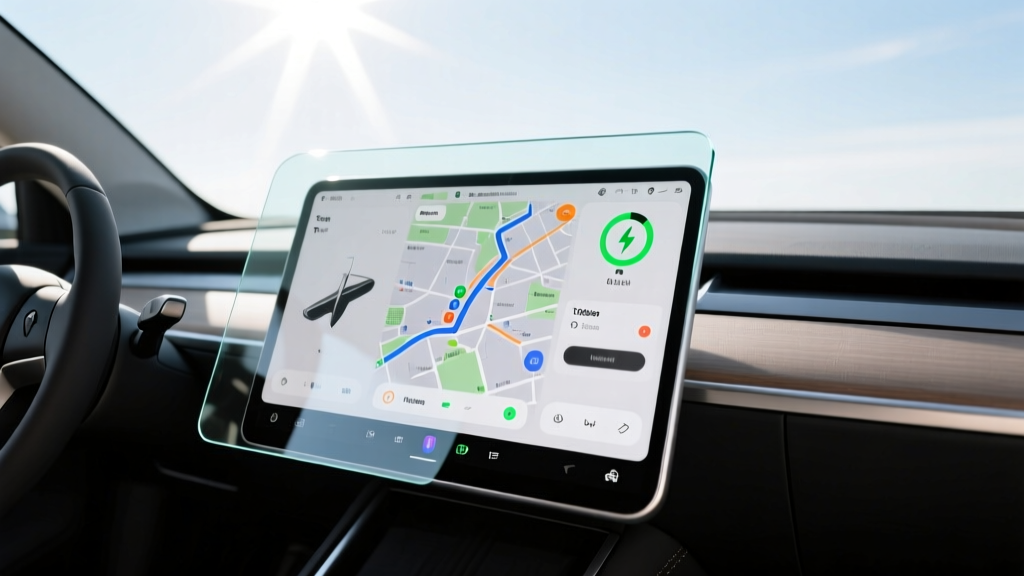
Tesla's minimalist interior design places almost all vehicle controls on a single central display—15.4 inches in the refreshed Model 3 (Highland) and Model Y (Juniper). Unlike traditional infotainment screens that see occasional use, a Tesla screen is touched hundreds of times per drive. Over months and years, that contact accumulates:
- Oleophobic coating wear: Factory anti-fingerprint coatings degrade, leaving screens smeared and harder to clean
- Micro-scratches: Rings, keys, and even fingernails create fine abrasions visible under direct sunlight
- UV-induced delamination: Prolonged sun exposure through the panoramic roof can cause screen layers to separate—particularly documented in 2021–2023 Model 3 and Model Y units
- Sentry Mode and dashcam playback: Scratches distort video review on the screen itself
A quality tempered glass or TPU (thermoplastic polyurethane) film adds a sacrificial layer. When it scratches, you replace a $15–$40 film instead of scheduling a service center visit.
Types of Tesla Screen Protectors: Tempered Glass vs. TPU Film
The market splits into two main categories, each with distinct trade-offs:
| Feature | Tempered Glass | TPU Film |
|---|---|---|
| Thickness | 0.33mm typical | 0.15–0.20mm |
| Scratch Resistance | 9H hardness rated | Self-healing minor scratches |
| Impact Protection | Superior (absorbs direct hits) | Moderate |
| Touch Sensitivity | Negligible impact | Essentially transparent to touch |
| Anti-Glare Option | Available (matte finish) | Limited matte options |
| Installation Ease | Moderate (rigid, dust-sensitive) | Harder (flexible, bubble-prone) |
| Typical Price | $15–$35 | $20–$45 |
For most owners, tempered glass with an anti-glare (matte) finish is the practical choice. The Highland/Juniper screens are bright enough that matte films don't meaningfully reduce readability, and the glare reduction is substantial for daytime driving. TPU films make more sense for owners who prioritize optical clarity above all else and are willing to accept less impact protection.
Installation: Step-by-Step for Tesla Touchscreens
Improper installation is the number-one reason owners report dissatisfaction. Bubbles, dust particles, and misalignment can make the screen look worse than an unprotected one. Here's a method that works consistently:
- Park indoors, out of direct sunlight. Heat causes adhesive to set prematurely. Interior temperature between 65–75°F is ideal.
- Power off the display. Go to Controls → Safety → Power Off. This prevents accidental inputs and makes dust visible against the dark screen.
- Clean with isopropyl alcohol wipe (70%+). Remove all oils. Follow with a dry microfiber cloth—no paper towels, which leave fibers.
- Use a dust-removal sticker or compressed air. Any remaining particle will create a visible bubble that won't self-heal in glass protectors.
- Align using the camera/sensor cutouts. On Model 3 Highland and Model Y Juniper, the screen has no physical bezel guides, so use the edges of the display housing as reference points.
- Apply from center outward. Use a squeegee card to push air bubbles to the edges. Work slowly—rushing traps air.
- Wait 24 hours before evaluating clarity. Some adhesive haze clears as the film fully bonds.
Does a Screen Protector Affect Touch Sensitivity or Autopilot Controls?
This is the most common concern, and the answer is straightforward: a properly installed tempered glass or TPU protector does not meaningfully affect touch response. Tesla's capacitive touchscreen is designed to register input through gloves and screen films. The 0.33mm thickness of quality tempered glass falls well within the capacitive sensing range.
Where issues arise is with cheap, poorly manufactured protectors that have uneven adhesive layers or air gaps. These can create dead zones or delayed response. Stick with brands that specifically template their protectors for the exact Tesla model year—Highland Model 3 screens differ dimensionally from pre-2024 units, and Juniper Model Y screens differ from the 2020–2024 generation.
Regarding Autopilot and FSD (Supervised): these are SAE Level 2 driver-assistance systems. The driver must remain fully engaged at all times. A screen protector has no bearing on how these systems function—they rely on cameras and neural network processing, not screen input.
Warranty Implications: Will a Screen Protector Void Coverage?
Tesla's New Vehicle Limited Warranty covers the touchscreen under the 4-year/50,000-mile basic warranty. Installing a screen protector does not automatically void this coverage under the Magnuson-Moss Warranty Act. However, there's nuance:
- If the protector causes damage (e.g., adhesive residue damages the oleophobic coating, or improper removal cracks the screen), Tesla can deny that specific claim.
- If a pre-existing screen defect appears (delamination, dead pixels, touch failure unrelated to the protector), the warranty still applies. Removing the protector before a service visit avoids unnecessary debate.
- Document your screen condition with photos before installation. If a warranty issue arises later, you have evidence of the pre-protector state.
Best Tesla Screen Protector Picks by Model (2026)
Model 3 (Highland, 2024–present) & Model Y (Juniper, 2025–present)
These share the 15.4-inch landscape display. Look for protectors specifically cut for these refresh generations—pre-2024 templates will not fit correctly due to revised screen dimensions and thinner bezels.
Model S (2021+ Refresh) & Model X (2021+ Refresh)
The 17-inch cinematic display is larger and angled. Tempered glass protectors for these models are heavier and more prone to edge-lifting if the adhesive quality is low. TPU film often works better here due to the screen's slight curvature at the edges.
Model 3/Y Instrument Cluster & Rear Screen
The refreshed Model 3 and Model Y added an 8-inch rear passenger touchscreen and (in some trims) a front instrument display. These smaller screens are less expensive to replace but still worth protecting—especially the rear screen, which children frequently contact with shoes and toys.
| Model | Main Screen | Rear Screen | Instrument Display |
|---|---|---|---|
| Model 3 (Highland) | 15.4" landscape | 8.0" landscape | None (base) / Available |
| Model Y (Juniper) | 15.4" landscape | 8.0" landscape | None (base) / Available |
| Model S (Refresh) | 17.0" portrait | 8.0" landscape | 12.3" driver display |
| Model X (Refresh) | 17.0" portrait | 8.0" landscape | 12.3" driver display |
Anti-Glare vs. Crystal Clear: Which Finish Should You Choose?
Tesla's screen brightness (roughly 400–500 nits depending on model year) handles matte anti-glare films well. In direct sunlight, a glossy screen reflects the panoramic roof and side windows, creating dangerous blind spots on the display itself. Anti-glare films diffuse these reflections at a minor cost to sharpness—text and map details appear very slightly softer.
For owners who primarily drive at night or in overcast climates, a crystal-clear (glossy) tempered glass protector preserves the screen's native sharpness and color accuracy. For daily commuters in sun-heavy regions (Arizona, Texas, Southern California), matte finish is the functional choice.
Tesla Vehicle Specs: What You're Protecting the Screen Inside Of
Understanding the vehicle context matters. Here are the current specs for the most popular Tesla models where screen protectors are installed:
| Spec | Model 3 Long Range AWD | Model Y Long Range AWD |
|---|---|---|
| EPA Range | 341 miles | 320 miles |
| Battery (usable) | ~75 kWh (NMC) | ~75 kWh (NMC) |
| Peak DC Fast Charge | 250 kW | 250 kW |
| 10–80% DC Time | ~28 minutes | ~28 minutes |
| Level 2 Home Charge | 11.5 kW (~44 mi/hr) | 11.5 kW (~44 mi/hr) |
| 0–60 mph | 4.2 seconds | 4.8 seconds |
| Horsepower | ~346 hp (dual motor) | ~384 hp (dual motor) |
| MPGe (combined) | 134 MPGe | 122 MPGe |
| Cargo Volume | 23 cu ft (rear up) | 30 cu ft (rear up) |
| Base MSRP (2026) | $47,740 | $50,740 |
| Battery Warranty | 8 yr / 120,000 mi | 8 yr / 120,000 mi |
Federal Tax Credit Eligibility (§30D)
As of 2026, the IRS §30D clean vehicle credit offers up to $7,500 for qualifying new EVs, applied at the point of sale. However, eligibility depends on:
- Buyer income caps: $150,000 single / $300,000 joint MAGI
- MSRP caps: $55,000 for sedans (Model 3) / $80,000 for SUVs (Model Y)
- Battery sourcing requirements: Critical minerals and battery components must meet escalating domestic-content thresholds that tighten annually
Tesla's US manufacturing and battery supply chain have generally kept Model 3 and Model Y eligible for the full or partial credit, but verify current eligibility on the IRS website or through your dealer at purchase, as sourcing rules change annually.
Frequently Asked Questions
Do I need a screen protector for my Tesla?
It's not essential, but it is practical insurance. A $20–$35 tempered glass protector prevents $1,500+ screen replacement costs from scratches or impact damage. If you plan to keep the vehicle 3+ years, the protector pays for itself by preserving resale condition.
Will a matte screen protector make my Tesla display look blurry?
Minimally. Quality matte films reduce sharpness by roughly 5–10%—noticeable in static comparisons but rarely perceived during actual driving. The glare reduction trade-off is worth it for most owners in sunny climates.
Can I install a Tesla screen protector myself?
Yes, with patience and a dust-free environment. The 15.4-inch screen is large enough that two-person installation is strongly recommended. Budget 20–30 minutes for a careful first attempt. If you're uncomfortable, most mobile detailing shops install them for $30–$50 in labor.
Does a screen protector affect Tesla Sentry Mode or dashcam footage?
No. Sentry Mode and dashcam footage are recorded by the external cameras, not displayed through the screen protector. Playback on the protected screen may appear very slightly softer with a matte film, but footage integrity is unaffected.
How often should I replace my Tesla screen protector?
Tempered glass protectors typically last 2–4 years before showing visible scratches or edge-lifting. TPU films may yellow slightly after 3+ years of UV exposure. Replace when clarity degrades or edges begin peeling.
Where can I verify my Tesla's federal tax credit eligibility?
Check the IRS clean vehicle credit page for current sourcing requirements and income thresholds. Your Tesla advisor can also confirm point-of-sale credit transfer eligibility at purchase.