Tesla's Built-In Dash Cam: TeslaCam and Sentry Mode Explained
If you've searched "does Tesla have a built-in dash cam," the short answer is yes. Every Tesla sold today — Model 3, Model Y, Model S, and Model X — comes with an integrated dash cam system called TeslaCam, plus a parked-surveillance feature called Sentry Mode. Neither requires an aftermarket camera. Both use the vehicle's existing Autopilot camera suite to record video, store clips on a USB drive (or glovebox SSD in newer builds), and let you review footage directly on the touchscreen or export it to a phone or computer.
But Tesla's approach has real trade-offs versus a dedicated dash cam: limited camera angles, no cabin-facing lens, and a dependency on the car's 12V system that has frustrated some owners. Below, we break down exactly what TeslaCam records, which cameras it uses, how Sentry Mode impacts range, and which Tesla models in 2026 deliver the best built-in recording experience.
2026 Tesla Fleet Dash Cam & Key Specs at a Glance
| Spec | Model 3 (Highland/Refresh) | Model Y (Juniper) | Model S | Model X |
|---|---|---|---|---|
| Built-in dash cam | Yes (TeslaCam) | Yes (TeslaCam) | Yes (TeslaCam) | Yes (TeslaCam) |
| Sentry Mode | Yes | Yes | Yes | Yes |
| Cameras used for recording | Front, left repeater, right repeater, rear | Front, left repeater, right repeater, rear | Front, left repeater, right repeater, rear | Front, left repeater, right repeater, rear |
| Cabin camera recording | No | No | No | No |
| Storage included | USB-C glovebox (128 GB SSD typical) | USB-C glovebox (128 GB SSD typical) | USB-A/C port (user-supplied drive) | USB-A/C port (user-supplied drive) |
| Clip length (manual save) | Last 10 min (4 x 1-min segments) | Last 10 min | Last 10 min | Last 10 min |
| Resolution (approx.) | ~1080p per camera | ~1080p per camera | ~1080p per camera | ~1080p per camera |
How TeslaCam Actually Works (And What It Records)
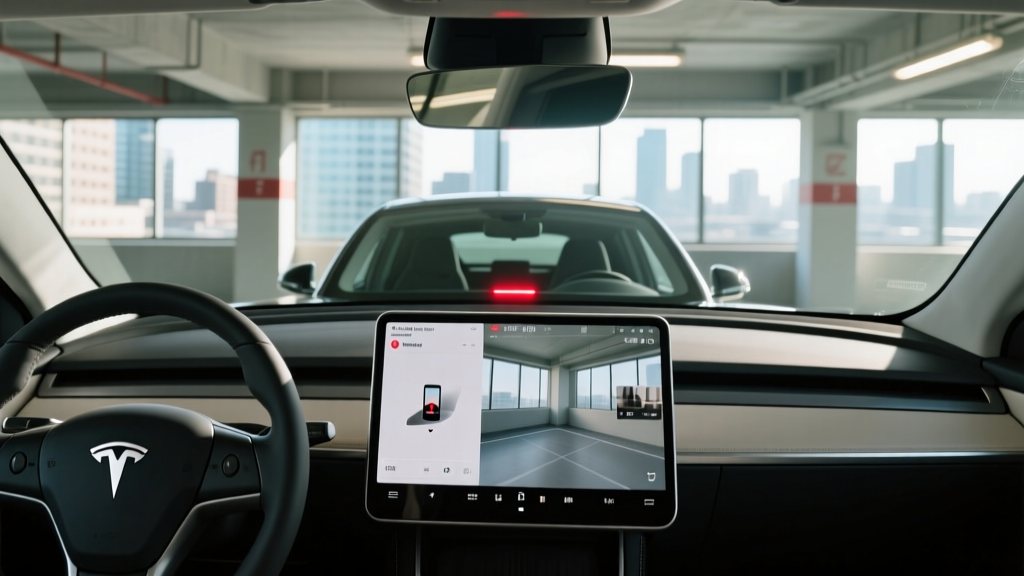
TeslaCam is not a single camera — it's a software feature that taps into the same external cameras Tesla uses for Autopilot and FSD (Supervised). When you press the dash cam icon on the touchscreen (or set it to auto-save on events), the system writes rolling video from up to four cameras:
- Front main camera — mounted behind the rearview mirror, facing forward. Primary dash cam view.
- Left and right repeater cameras — mounted on the front fenders. Useful for intersection side-impact and lane-change incidents.
- Rear camera — the backup camera. Records what's behind you while driving.
Notably, Tesla's interior cabin camera (used for driver monitoring with FSD) is not part of TeslaCam. It does not record to the dash cam folder, which is a gap versus rideshare drivers' needs — if you drive for Uber/Lyft, you'll still want a dedicated interior-facing cam.
When you hit save, Tesla writes the previous ~10 minutes of footage from all four cameras into a folder labeled SavedClips on your USB drive. Each minute is a separate file, timestamped and geotagged. You can review them on the car's Dashcam Viewer app or pull the drive and play them on any computer.
Sentry Mode: The Parked Dash Cam You Didn't Know You Had
Sentry Mode is where Tesla's built-in system really separates itself from a traditional dash cam. When the car is parked and locked, Sentry Mode keeps the external cameras active, watching for threats. It operates in three escalating states:
- Standby — cameras monitor, low power draw.
- Alert — motion detected near the car; recording begins, screen flashes a warning.
- Alarm — impact or break-in detected; alarm sounds, clips saved, notification sent to the Tesla app.
Sentry Mode records to the same SentryClips folder on your USB drive. Each event saves ~10 minutes of multi-angle footage. In real-world ownership, this has captured everything from door-dings in parking lots to catalytic converter theft attempts — evidence that a forward-facing-only aftermarket cam would miss entirely.
⚡ Sentry Mode's Real Cost: Vampire Drain
Sentry Mode is not free. It draws roughly 1-2 miles of range per hour of active monitoring — about 200-250 watts continuously. Over a 12-hour workday parked in a garage, expect to lose 15-25 miles of range. In cold weather (below 32°F), Sentry Mode can consume even more as it cycles the thermal management system. Tesla recommends disabling it at home if you're plugged in and not concerned about driveway security. Over a month of daily use, Sentry Mode can add the equivalent of ~50 kWh of phantom consumption.
Specs That Matter: Range, Charging, and Pricing (2026 Tesla Lineup)
Most shoppers searching for Tesla's dash cam feature are also evaluating the car itself. Here are the core 2026 numbers that drive a purchase decision, with EPA data cross-referenced against fueleconomy.gov:
| Spec | Model 3 Long Range AWD | Model Y Long Range AWD | Model S Long Range | Model X Long Range |
|---|---|---|---|---|
| EPA range | 341 mi | 320 mi | 402 mi | 335 mi |
| Real-world highway (70 mph, 68°F) | ~290-305 mi | ~275-290 mi | ~340-360 mi | ~285-300 mi |
| Real-world cold (30°F, mixed) | ~255-280 mi | ~240-265 mi | ~300-330 mi | ~250-275 mi |
| Battery capacity (usable) | ~79 kWh (NMC) | ~79 kWh (NMC) | ~100 kWh (NMC) | ~100 kWh (NMC) |
| Max DC fast charge | 250 kW | 250 kW | 250 kW | 250 kW |
| 10-80% DCFC time | ~25 min | ~25 min | ~30 min | ~30 min |
| Level 2 home rate | 11.5 kW (~44 mi/hr) | 11.5 kW (~44 mi/hr) | 11.5 kW (~34 mi/hr) | 11.5 kW (~30 mi/hr) |
| 0-60 mph | 4.2 sec | 4.8 sec | 3.1 sec | 3.8 sec |
| Horsepower | 346 hp | 384 hp | 670 hp | 670 hp |
| Drivetrain | Dual-motor AWD | Dual-motor AWD | Dual-motor AWD | Dual-motor AWD |
| MPGe (combined) | 131 MPGe | 122 MPGe | 120 MPGe | 109 MPGe |
| Efficiency (kWh/100 mi) | 26 kWh | 28 kWh | 28 kWh | 31 kWh |
| Cargo (rear + frunk) | 23 cu ft + 3.1 cu ft | 30 cu ft + 4.1 cu ft | 28 cu ft + 3.1 cu ft | 88 cu ft (folded) + 6.6 cu ft |
| Rear legroom | 35.3 in | 41.6 in | 35.4 in | 38.5 in |
| Battery warranty | 8 yr / 120,000 mi | 8 yr / 120,000 mi | 8 yr / 150,000 mi | 8 yr / 150,000 mi |
| Base MSRP (2026) | $47,740 | $48,990 | $79,990 | $84,990 |
Real-world range note: EPA numbers assume mixed driving. Sustained 70-80 mph highway travel typically costs 10-15% of range; cold weather below freezing can cost 15-25% depending on heat-pump usage and preconditioning. Tesla's heat pump (standard on all current models) significantly reduces cold-weather cabin-heating losses compared to older resistive heaters, but battery chemistry still suffers in sub-30°F conditions.
Does Tesla Qualify for the Federal EV Tax Credit?
This is where 2026 Tesla buyers need to pay close attention. Under current IRS §30D rules (always verify at irs.gov), federal tax credit eligibility depends on three moving targets:
2026 Tesla Federal Tax Credit Eligibility Snapshot
| Requirement | Model 3 | Model Y | Model S | Model X |
|---|---|---|---|---|
| MSRP cap (sedans: $55k; SUVs/trucks: $80k) | ✅ Eligible trims | ✅ Eligible | ❌ Over $55k cap | ❌ Over $80k cap (most trims) |
| Buyer income cap (AGI) | $150k single / $300k joint | $150k single / $300k joint | Same caps apply | Same caps apply |
| Battery sourcing (critical minerals + components) | Partial — varies by build | Partial — varies by build | Varies | Varies |
| Max potential credit | Up to $7,500 | Up to $7,500 | $0 (MSRP ineligible) | $0 (MSRP ineligible) |
| Point-of-sale transfer available | Yes, if eligible | Yes, if eligible | N/A | N/A |
Critical caveats: The $7,500 credit splits into two $3,750 halves — one for battery component manufacturing (North America), one for critical-mineral sourcing (US or FTA-partner countries). A given Tesla build may qualify for $3,750, $7,500, or $0 depending on the battery pack's supply chain that week. Tesla's checkout page shows eligibility before you finalize, and the IRS maintains a list of qualifying vehicles that updates periodically. Always confirm your specific VIN before relying on the credit for budgeting.
For a Model 3 Long Range AWD at $47,740 MSRP, a fully qualifying buyer could pay as little as ~$40,240 after the point-of-sale credit — competitive with many gas-powered Camrys and Accords once you factor in fuel savings.
TeslaCam vs. Aftermarket Dash Cams: Which Is Better?
Tesla's built-in system is excellent for most owners, but it's not perfect. Here's an honest comparison:
✅ TeslaCam / Sentry Mode Pros
- No extra hardware — uses cameras already on the car
- Four-camera coverage (front, rear, both sides) beats most aftermarket single-lens cams
- Sentry Mode provides parked surveillance no traditional dash cam matches
- Integrated GPS, timestamp, and G-force data in every clip
- No windshield suction cups or wiring clutter
- Review clips on the car's 15" touchscreen or export via USB
❌ TeslaCam / Sentry Mode Cons
- ~1080p resolution — lower than premium 4K aftermarket cams (Vantrue, BlackVue)
- No cabin/interior camera recording (rideshare drivers take note)
- Sentry Mode drains 1-2 miles of range per hour — significant for apartment dwellers without home charging
- Occasional software bugs: missed events, corrupted clips after OTA updates
- USB drive can fill up quickly if Sentry Mode triggers often (128 GB lasts ~1-2 weeks of city parking)
- No cloud backup unless you manually upload — stolen car = lost footage
- Night-mode quality trails dedicated low-light dash cams
Bottom line: For 90% of Tesla owners, the built-in system is sufficient. If you're a rideshare driver, live in a high-vandalism area, or want 4K evidence for insurance disputes, supplement with a dedicated front-facing cam (e.g., Viofo A229 Pro) and an interior cam. The redundancy is worth it.
Setting Up TeslaCam in 5 Minutes (2026 Software)
Tesla ships most 2026 Model 3 and Model Y vehicles with a pre-formatted USB-C solid-state drive in the glovebox. Older Model S/X may require you to supply your own drive (64 GB minimum, USB 3.0+ recommended). Here's the setup:
- Insert the USB drive into the glovebox USB-C port (Model 3/Y) or center console USB-A/C port (Model S/X).
- Format via the car: Tap Controls → Safety → Dashcam → Format USB Drive. This creates the required
TeslaCamfolder structure. - Enable recording: Controls → Safety → Dashcam → set to "Auto" (saves clips on events) or "On" (continuous recording while driving).
- Enable Sentry Mode: Controls → Safety → Sentry Mode → On. Configure exclusions (Home, Work, Favorites) to prevent drain in your own garage.
- Manual save: Tap the dashcam icon on the touchscreen anytime to save the last ~10 minutes.
Pro tip: Set Sentry Mode exclusions for your home and workplace addresses. If you have secure parking, there's no reason to burn range monitoring an empty garage.
Who Should Buy a Tesla in 2026 (And Who Shouldn't)
Choose Tesla If:
- You want the most mature public charging network (Superchargers remain the most reliable DC network in North America)
- Built-in dash cam + Sentry Mode is a priority and you don't want aftermarket hardware
- You value OTA software updates that add features post-purchase
- You can charge at home (Level 2) — Teslas shine as daily commuters with overnight charging
- You want strong resale value relative to other EVs (Teslas still depreciate, but slower than most EV competitors)
Look Elsewhere If:
- You need a cabin-facing camera for rideshare (Tesla doesn't offer it)
- You live in an apartment with no charging access and rely on public DCFC — Tesla's advantage shrinks vs. Hyundai Ioniq 5 or Kia EV6, which charge faster on 800V architectures
- You want Apple CarPlay / Android Auto (Tesla still doesn't support either)
- Build quality and panel gaps bother you — Tesla has improved, but Lexus/Porsche fit-and-finish is not the benchmark here
- You're shopping for a 3-row SUV — Model X is aging and expensive; consider Rivian R1S or Kia EV9
Frequently Asked Questions
Does Tesla have a built-in dash cam?
Yes. Every current Tesla (Model 3, Y, S, X) includes TeslaCam, which records from the front, rear, and both side-repeater cameras to a USB drive. No aftermarket hardware is required.
What is the real-world range of a Tesla in 2026?
Expect 85-90% of EPA range in mild-weather highway driving at 70 mph. In cold weather (below 32°F), plan for 75-85% of EPA range. A Model 3 Long Range (341 mi EPA) typically delivers ~290-305 miles on a warm highway run and ~255-280 miles in freezing conditions.
How fast does a Tesla charge at home and on the road?
On a Level 2 home charger (11.5 kW / 48A), a Model 3 or Y adds ~44 miles of range per hour — a full overnight charge from 20-80%. On a 250 kW Supercharger, expect 10-80% in roughly 25 minutes for Model 3/Y, tapering significantly above 80% as the battery management system protects cell longevity.
How much does a Tesla cost after the federal tax credit?
A 2026 Model 3 Long Range AWD starts at $47,740. If your VIN qualifies for the full $7,500 §30D credit and your AGI is under the cap ($150k single / $300k joint), your effective price drops to ~$40,240. Model S and Model X exceed MSRP caps and do not qualify. Always confirm eligibility at irs.gov before purchase.
Is Tesla worth buying vs. Hyundai Ioniq 5, Kia EV6, or Ford Mustang Mach-E?
Tesla wins on charging network access (Superchargers), software integration, and built-in dash cam/Sentry Mode. Hyundai/Kia win on DC charging speed (800V architecture: 10-80% in ~18 min at 350 kW), physical controls, and CarPlay support. Ford's Mach-E offers more SUV cargo space than Model Y but trails on efficiency. Test-drive all three — the right answer depends on your commute, charging access, and tech preferences.
What are the biggest pros and cons of Tesla's built-in dash cam?
Pros: four-camera coverage, no extra hardware, integrated GPS/timestamps, Sentry Mode parked surveillance. Cons: ~1080p resolution, no cabin recording, Sentry Mode drains 1-2 miles of range per hour, occasional software bugs, and no automatic cloud backup.
Does Sentry Mode drain the battery significantly?
Yes, modestly. Expect 1-2 miles of range loss per hour of Sentry Mode activity, or roughly 200-250 watts continuous draw. Over a 10-hour workday, that's 10-20 miles of range — manageable if you charge at home nightly, problematic if you rely on public charging.
Can I view TeslaCam footage on my phone?
Not directly via the Tesla app (unlike some competitors' cloud-based systems). You must either view clips on the car's touchscreen or remove the USB drive and play the .mp4 files on a computer or phone. Third-party tools like TeslaUSB (a Raspberry Pi-based sync solution) can auto-upload clips to a NAS or cloud storage over Wi-Fi when you're home.