What the Tesla Backup Gateway 2 Actually Does for EV Owners
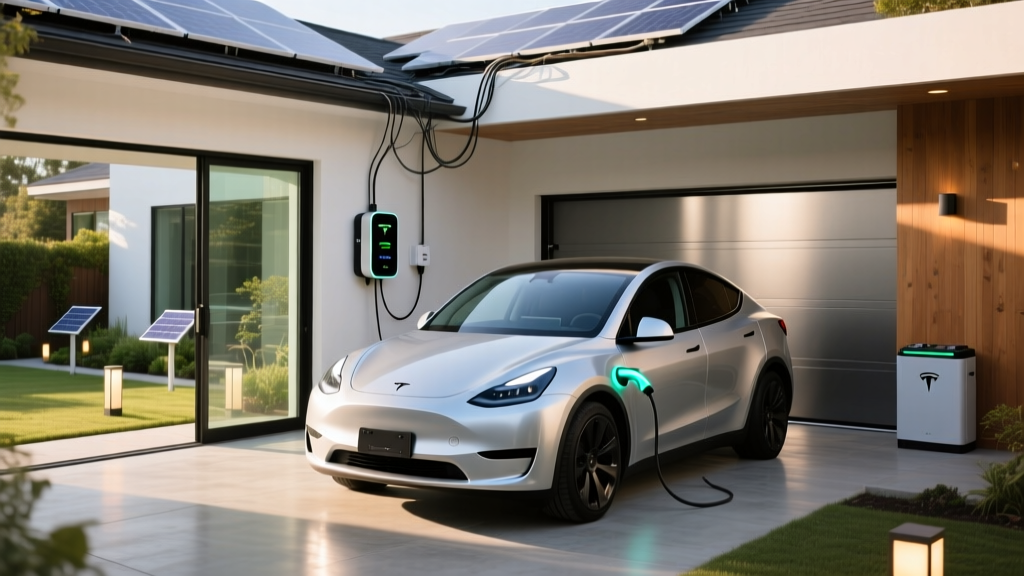
The Tesla Backup Gateway 2 is not a vehicle — it is the critical hub that connects your home's solar panels, Powerwall batteries, utility grid, and EV charger into a single managed system. For Tesla owners (and anyone driving an EV with a NACS or J1772 connector), the Gateway 2 determines whether your car charges from solar surplus, stored battery energy, or grid power — and what happens when the grid goes down.
Unlike the original Gateway, the Backup Gateway 2 supports up to 10 Powerwall units, provides whole-home backup (rather than a limited critical-loads panel), and integrates directly with the Tesla app for real-time energy routing. It retails for $1,750 (hardware only; installation and permitting add $1,500–$3,500 depending on your electrical panel and local code).
| Spec | Value |
|---|---|
| Max Powerwall Support | 10 units (Powerwall 2 or Powerwall 3) |
| Backup Type | Whole-home (seamless transition <50 ms) |
| Continuous Output (per Powerwall 3) | 11.5 kW |
| Surge Output (per Powerwall 3) | Up to 30 kW for motor starts |
| Grid Connection | Split-phase 120/240V, 200A service compatible |
| Solar Integration | DC-coupled (via Tesla Solar Inverter) or AC-coupled (third-party inverters) |
| EV Charger Compatibility | Tesla Wall Connector (Gen 3/4), any J1772/NACS Level 2 |
| Communication | Wi-Fi + Ethernet; Tesla app monitoring |
| Hardware Price | $1,750 (MSRP, before install) |
| Warranty | 10 years (when paired with Powerwall system) |
How the Gateway 2 Manages EV Charging During Outages
The most common question from EV owners: can I charge my car during a blackout? The answer depends on your configuration.
With a single Powerwall 3 (13.5 kWh usable, 11.5 kW continuous output), you can run essential loads and potentially add 15–25 miles of range to your EV overnight — but Level 2 charging at full 48A (11.5 kW) would nearly drain the battery in one session. The Gateway 2 solves this with load-shedding logic: you can configure EV charging as a non-essential circuit, or cap charge rate during outages to 16A (3.8 kW), preserving battery for household needs.
With two or three Powerwalls, whole-home backup becomes practical for 24–48 hours, and EV charging at reduced rates becomes viable even during multi-day outages. The Tesla app lets you set "Self-Powered" mode priorities: home loads first, then EV charging only when solar surplus or battery state-of-charge exceeds your threshold.
Solar + Powerwall + EV Charging: The Economics in 2026
Pairing the Gateway 2 with solar and Powerwall changes the math for EV fueling. Here is a realistic cost breakdown for a home with 10 kW of solar, two Powerwall 3 units, and a Tesla Wall Connector:
| Component | Cost (before incentives) |
|---|---|
| Tesla Backup Gateway 2 | $1,750 |
| 2x Powerwall 3 (incl. installation) | $22,000–$26,000 |
| 10 kW solar array (Tesla or third-party) | $22,000–$28,000 |
| Tesla Wall Connector (Gen 4) | $475 |
| Electrical panel upgrade (if needed) | $1,500–$3,000 |
| Total system | $47,725–$59,225 |
| 30% federal ITC (IRC §25D, solar + battery) | –$14,318 to –$17,768 |
| Net cost after federal credit | $33,407–$41,457 |
The 30% federal Investment Tax Credit (IRC §25D) applies to solar and battery storage — but not to the EV charger itself. The Gateway 2 qualifies as part of the battery storage system. Note that §25D has no income cap (unlike the §30D EV purchase credit), but you must have sufficient tax liability to claim it. Consult a tax professional for eligibility specifics.
For EV fueling, a well-sized solar array in a sunny state can offset 8,000–12,000 miles of driving annually at effectively $0 marginal cost. In cloudier climates, expect 40–60% solar offset and supplement with grid power at your utility's time-of-use rates.
Gateway 2 vs. Competing Home Energy Hubs
The Gateway 2 is purpose-built for the Tesla ecosystem. If you own a Tesla vehicle, Powerwall, and/or Solar Roof, integration is seamless — one app, one warranty provider, one service call. But it is not the only option:
| Feature | Tesla Backup Gateway 2 | Enphase IQ System Controller | FranklinWH aPower |
|---|---|---|---|
| Max Battery Units | 10 Powerwalls | 4x IQ 5P batteries | 4x aPower modules |
| Whole-Home Backup | Yes | Yes (with IQ combiner) | Yes |
| Solar Inverter Required | Tesla Solar Inverter (DC) or third-party (AC) | Enphase microinverters | Built-in hybrid inverter |
| EV Charger Integration | Native (Tesla Wall Connector) | Third-party (via CT monitoring) | Third-party |
| App Ecosystem | Tesla app (vehicle + energy unified) | Enphase app (energy only) | Franklin app |
| Hardware Cost | $1,750 | ~$1,200–$1,800 | ~$2,000–$2,500 |
| Best For | Existing Tesla vehicle owners | Microinverter solar systems | All-in-one new installs |
The Gateway 2's decisive advantage is unified vehicle-energy management. No other hub lets you see your car's state-of-charge, home battery level, and solar production in one dashboard — or set rules like "charge the Model Y only when Powerwall exceeds 80%."
Installation Requirements: What an Electrician Will Tell You
The Gateway 2 requires a licensed electrician and, in most jurisdictions, a permit. Key installation considerations:
- Electrical panel capacity: A 200A main panel is typically required. Older homes with 100A or 150A service may need a panel upgrade ($1,500–$3,000) or a line-side tap (where permitted by code).
- Conduit and wiring: The Gateway mounts near your main panel and requires 4/0 AWG copper conductors to each Powerwall. Run length affects cost.
- Backup load panel (optional): If you choose critical-loads-only backup (instead of whole-home), a sub-panel reduces Powerwall requirements but limits which circuits stay live.
- Utility interconnection agreement: Most utilities require an application before connecting battery storage to the grid. Approval timelines range from 2–12 weeks.
- Wi-Fi connectivity: The Gateway needs reliable internet for firmware updates and app monitoring. A hardwired Ethernet connection is preferred; Wi-Fi extenders work in a pinch.
Expect total installation (Gateway + Powerwalls + wiring + permits) to take 1–3 days for a certified Tesla installer. Third-party electricians can install the Gateway but may not be able to commission the system through Tesla's proprietary software without installer credentials.
Real-World EV Charging Performance With Gateway 2
How does EV charging actually perform when managed through the Gateway 2? Based on typical configurations:
Level 2 Charging via Tesla Wall Connector (48A / 11.5 kW):
- Grid-tied (normal operation): Full 48A, adds ~44 miles/hr to a Model Y Long Range.
- On battery backup (1 Powerwall 3): Capped at ~16A recommended (3.8 kW, ~15 miles/hr) to preserve home loads.
- On battery backup (3 Powerwalls): Full 48A sustainable for ~2.5 hours before depletion.
- Solar-only charging (10 kW array, no battery): ~12–14 miles/hr during peak sun, variable with cloud cover.
Source: Tesla Powerwall Support
The Gateway 2's "Scheduled Charging" feature syncs with your utility's time-of-use rates: charge from grid at off-peak (e.g., 11 PM–6 AM at $0.08/kWh), then switch to solar/battery during peak hours when rates spike to $0.25–$0.45/kWh. For a 75 kWh battery pack, this saves $4–$8 per full charge vs. unmanaged grid charging.
Federal Tax Credits: What Applies to the Gateway 2 System
Tax incentives for the Gateway 2 and its companion hardware are distinct from EV purchase credits:
- IRC §25D (Residential Clean Energy Credit): 30% of solar panel, solar inverter, and battery storage costs (including Gateway 2 and Powerwall). No income cap, no dollar cap, but requires tax liability. Expires for systems placed in service after 2034 (steps down to 26% in 2033, 22% in 2034).
- IRC §30D (New EV Purchase Credit): Up to $7,500 for qualifying new EVs — applies to the vehicle, not home energy equipment. Subject to MSRP caps ($80,000 SUVs/trucks, $55,000 sedans), buyer income limits ($150K single / $300K joint AGI), and battery-sourcing requirements. Point-of-sale transfer available at participating dealers.
- IRC §25C (Energy Efficient Home Improvement Credit): Up to $1,000 for qualified electrical panel upgrades when done in conjunction with other efficiency improvements (not the Gateway itself).
Always verify current rules at IRS.gov §25D and consult a tax professional before claiming.
Who Should (and Shouldn't) Install the Gateway 2
The Gateway 2 is not a standalone product — it is the connective tissue for a Tesla-centric home energy system. It makes sense if:
- You already own (or plan to buy) a Tesla vehicle and want unified app control of charging + home energy.
- You have or will install solar panels and want battery backup for whole-home resilience.
- You live in an area with frequent grid outages (California PSPS events, Texas grid instability, hurricane-prone coasts).
- Your utility has aggressive time-of-use rates, making solar-self-consumption economically compelling.
It is not the right choice if:
- You drive a non-Tesla EV and have no interest in the Tesla ecosystem (Enphase or FranklinWH offer better vendor-agnostic integration).
- You rent or plan to move within 3–5 years (the payback period for solar + storage typically runs 7–12 years).
- Your home has a 100A electrical panel and no feasible upgrade path.
- You only need EV charging (a standalone Level 2 charger like the ChargePoint Home Flex or Tesla Wall Connector costs $500–$700 installed, with no Gateway needed).
Frequently Asked Questions
Can the Tesla Backup Gateway 2 work without Powerwall?
No. The Gateway 2 is designed specifically to manage Powerwall batteries and their connection to your home's electrical system. Without at least one Powerwall, the Gateway has no function. If you only need solar monitoring without battery backup, Tesla's Solar Inverter provides basic app-based production tracking without a Gateway.
Does the Gateway 2 support non-Tesla EV chargers?
Yes, but with caveats. Any Level 2 charger (J1772 or NACS) will physically work on a circuit managed by the Gateway 2. However, intelligent features — scheduled charging, solar-surplus-only charging, outage load-shedding — require the Tesla Wall Connector and Tesla app. Third-party chargers like the Enel X JuiceBox or Emporia ChargePoint will draw power normally but won't coordinate with Powerwall state-of-charge.
What happens to EV charging during a grid outage?
The Gateway 2 transitions to battery backup in under 50 milliseconds — fast enough that most electronics (and EV chargers) don't register the interruption. However, available charging power depends on your Powerwall count and configured load priorities. With one Powerwall, expect reduced charge rates (16A/3.8 kW recommended). With three or more, full-rate charging is sustainable for limited sessions.
How long does the Gateway 2 last, and what's the warranty?
The Gateway 2 carries a 10-year warranty when installed as part of a Powerwall system. It has no moving parts or consumable components, so field lifespan typically exceeds 15 years. Firmware updates are delivered over Wi-Fi/Ethernet for the product's lifetime. If you add Powerwalls later, the Gateway supports incremental expansion without replacement.
Is the Gateway 2 worth it if I already have solar but no battery?
Only if you plan to add Powerwall storage. The Gateway 2's sole purpose is battery management and backup coordination. If you want to add battery backup to an existing solar system, the Gateway 2 (plus Powerwalls) is the correct Tesla-native path. For non-Tesla solar systems, a third-party battery like the Enphase IQ 5P or FranklinWH aPower may integrate more cleanly with your existing inverter hardware.