If you’re shopping for a Tesla and wondering about Tesla Android Auto compatibility, the short answer is: Tesla does not natively support Android Auto. Unlike nearly every other automaker, Tesla uses its own proprietary infotainment operating system and has never integrated Google’s phone-mirroring platform. For some buyers, that’s a dealbreaker; for others, Tesla’s native system is more than sufficient. This guide covers what you need to know about Tesla’s software ecosystem, the workarounds that exist, and a full profile of the 2026 Model 3 and Model Y—the two most popular Tesla vehicles—so you can decide whether Tesla’s approach works for your daily driving life.
Why Tesla Doesn’t Support Android Auto
Tesla’s philosophy has always been vertical integration: the company designs its own hardware, software, navigation, media streaming, and driver-assistance stack in-house. Android Auto, by contrast, hands control of the infotainment screen to your phone, overlaying Google Maps, Spotify, and other apps onto the car’s display. Tesla views this as redundant and inferior to its own system, which includes built-in navigation with real-time Supercharger routing, native Spotify and Apple Music integration, and over-the-air (OTA) updates that add features without dealer visits.
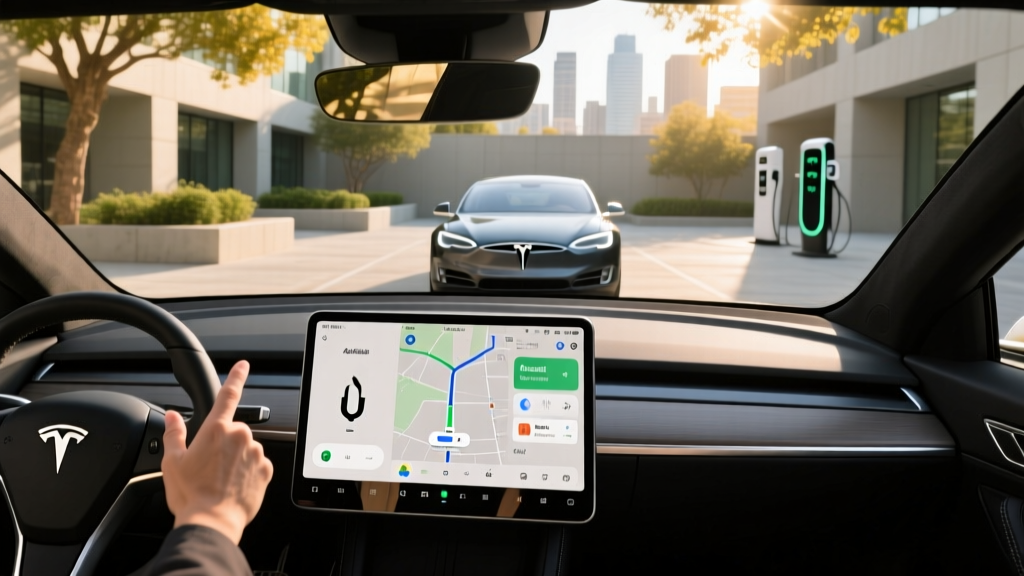
The result is a clean, responsive 15.4-inch touchscreen (in the Model 3) or 15.4-inch center display (Model Y) that handles everything from climate control to media to vehicle settings. However, it also means you cannot simply plug in your Android phone and see Google Maps or Waze on the dash. For drivers deeply embedded in Google’s ecosystem—those who rely on Google Assistant, Google Maps traffic data, or Android Auto’s simplified driving interface—this is a genuine friction point.
Current Tesla Infotainment: What You Get Instead
Tesla’s native infotainment system in 2026 includes:
- Navigation: Tesla’s own maps with real-time traffic, automatic Supercharger routing, and battery preconditioning for fast charging.
- Media: Native Spotify, Apple Music, Tidal, and TuneIn radio. Bluetooth audio streaming works with any phone.
- Phone integration: Bluetooth calling, contacts sync, and SMS read-aloud. No phone mirroring.
- Voice commands: Tesla’s voice assistant handles navigation, media, and climate requests ("Navigate to…", "Play…", "Set temperature to…").
- Apps: Netflix, YouTube, Disney+, and Arcade games while parked; a web browser; and Trip Planner.
- OTA updates: Tesla regularly pushes new features, UI improvements, and even performance upgrades over Wi-Fi.
For iPhone users, there is no Apple CarPlay support either—Tesla treats both ecosystems identically by offering no phone mirroring at all. The system is fast, visually polished, and deeply integrated with vehicle functions (you can adjust regenerative braking, mirror positions, and suspension settings from the same screen). But it is a walled garden.
Workarounds: How Android Users Adapt
Several community-driven solutions exist for drivers who want Android Auto-like functionality in a Tesla:
- Bluetooth + Tesla navigation: Most Android users simply pair their phone via Bluetooth for calls and messages, then use Tesla’s built-in navigation for directions. This works well if you’re comfortable with Tesla Maps.
- Phone mount: A simple vent or dashboard phone mount lets you run Google Maps or Waze on your phone screen alongside the Tesla display. Low-tech but effective.
- Third-party hardware (e.g., Hansshow, Taptes): Some aftermarket modules claim to inject Android Auto into the Tesla display via HDMI or CAN bus adapters. These are unsupported by Tesla, may void portions of your warranty, and can break after OTA updates. Use at your own risk.
- Tesla’s web browser: You can access Google Maps via the in-car browser, but the experience is clunky and not designed for turn-by-turn navigation while driving.
For most buyers, the Bluetooth-plus-phone-mount approach is the pragmatic solution. It preserves warranty coverage and avoids the instability of aftermarket hacks.
2026 Tesla Model 3: Range, Charging, and Specs
The 2026 Model 3 remains Tesla’s entry-level sedan and one of the best-selling EVs in the U.S. Here’s a full spec breakdown across its current trims:
| Spec | RWD (Base) | Long Range AWD | Performance |
|---|---|---|---|
| EPA Range | 272 mi | 341 mi | 315 mi |
| Battery (usable) | 57.5 kWh (LFP) | 79 kWh (NMC) | 79 kWh (NMC) |
| 0-60 mph | 5.8 sec | 4.2 sec | 2.9 sec |
| Horsepower | 271 hp | 346 hp | 510 hp |
| Drivetrain | RWD | AWD (Dual Motor) | AWD (Dual Motor) |
| Max DC Fast Charge | 170 kW | 250 kW | 250 kW |
| 10-80% DC Time | ~25 min | ~25 min | ~25 min |
| Level 2 Home Charge | 11.5 kW (~44 mi/hr) | 11.5 kW (~44 mi/hr) | 11.5 kW (~44 mi/hr) |
| Efficiency (MPGe) | 132 MPGe | 134 MPGe | 116 MPGe |
| Base MSRP | $38,990 | $47,740 | $54,990 |
| Cargo (trunk + frunk) | 23 cu ft | 23 cu ft | 23 cu ft |
| Rear Legroom | 35.3 in | 35.3 in | 35.3 in |
| Battery Warranty | 8 yr / 100,000 mi | 8 yr / 120,000 mi | 8 yr / 120,000 mi |
Source: fueleconomy.gov, Tesla.com (2026 model year)
Real-World Range Reality Check
The EPA figures above assume a mix of city and highway driving at moderate temperatures. In real-world highway use at 75 mph, expect the Long Range AWD to deliver roughly 290-310 miles before needing a charge. In cold weather (below 32°F), range can drop 15-30% depending on cabin heating demands and whether you precondition the battery. The RWD model’s LFP battery is more tolerant of daily 100% charging (Tesla recommends it), which partially offsets its smaller capacity for commuters who charge at home every night.
2026 Tesla Model Y: The Family-Friendly SUV Profile
The refreshed Model Y (introduced for the 2025 model year and carried into 2026) remains Tesla’s best-selling vehicle globally. It shares the same powertrain options and infotainment system as the Model 3 but offers significantly more cargo space and available third-row seating.
| Spec | RWD (Base) | Long Range AWD | Performance |
|---|---|---|---|
| EPA Range | 274 mi | 320 mi | 295 mi |
| Battery (usable) | 57.5 kWh (LFP) | 79 kWh (NMC) | 79 kWh (NMC) |
| 0-60 mph | 6.6 sec | 4.8 sec | 3.5 sec |
| Horsepower | 271 hp | 384 hp | 510 hp |
| Max DC Fast Charge | 170 kW | 250 kW | 250 kW |
| 10-80% DC Time | ~25 min | ~25 min | ~25 min |
| Efficiency (MPGe) | 123 MPGe | 122 MPGe | 111 MPGe |
| Base MSRP | $44,990 | $49,990 | $54,990 |
| Cargo (behind 2nd row) | 34 cu ft | 34 cu ft | 34 cu ft |
| Cargo (max, seats folded) | 72 cu ft | 72 cu ft | 72 cu ft |
| Battery Warranty | 8 yr / 100,000 mi | 8 yr / 120,000 mi | 8 yr / 120,000 mi |
Source: fueleconomy.gov
Charging Speed and Home Setup
Tesla’s Supercharger network remains the gold standard for DC fast charging reliability. At a V3 Supercharger (250 kW), both the Model 3 and Model Y Long Range/Performance trims peak at 250 kW and charge from 10-80% in approximately 25 minutes. However, the charge curve tapers significantly above 80%—a full 10-100% session takes roughly 45-50 minutes. This is typical of NMC batteries; the BMS (battery management system) slows charging to protect cell longevity.
For home Level 2 charging, Tesla’s Wall Connector delivers up to 11.5 kW on a 60-amp circuit, adding roughly 44 miles of range per hour. Most owners charge overnight and wake to a full battery every morning. Installation costs vary widely: expect $500-$2,500 for a straightforward install near your electrical panel, or $3,000-$5,000+ if you need a panel upgrade to support a 60-amp dedicated circuit. Always get a quote from a licensed electrician before purchasing equipment.
The base RWD trims (LFP battery) charge at a lower peak DC rate of 170 kW, but because the battery is smaller, the 10-80% time is similar (~25 minutes). LFP chemistry has a key advantage: Tesla recommends charging to 100% daily, whereas NMC batteries are best kept between 20-80% for long-term health unless you need full range for a trip.
Pricing and Federal Tax Credit Eligibility
Under the current IRS §30D rules, the federal EV tax credit offers up to $7,500, but eligibility depends on multiple factors that change frequently:
§30D Credit Requirements (2026)
- MSRP cap: Sedans (Model 3) must be under $55,000; SUVs (Model Y) under $80,000.
- Buyer income cap: Modified AGI ≤ $150,000 (single) / $300,000 (joint) / $225,000 (head of household).
- Battery sourcing: A percentage of critical minerals and battery components must be sourced from the U.S. or FTA partners (requirements tighten annually).
- Point-of-sale transfer: You can transfer the credit to the dealer at purchase to reduce your out-of-pocket cost immediately, rather than waiting to claim it on your tax return.
Always verify current rules at IRS.gov before purchasing. Battery sourcing requirements are subject to change.
| Model | Base MSRP | Est. Federal Credit | Effective Price* |
|---|---|---|---|
| Model 3 RWD | $38,990 | $7,500 (if eligible) | ~$31,490 |
| Model 3 Long Range AWD | $47,740 | $3,750-$7,500 | ~$40,240-$43,990 |
| Model Y Long Range AWD | $49,990 | $3,750-$7,500 | ~$42,490-$46,240 |
| Model Y Performance | $54,990 | $3,750-$7,500 | ~$47,490-$51,240 |
*Effective price assumes full credit eligibility. Actual credit amount depends on battery sourcing compliance and your income. Consult a tax professional for personalized guidance.
Tesla vs. Competitors: Is It Worth Buying Without Android Auto?
If Android Auto is a non-negotiable feature, several strong EV alternatives offer it natively:
- Hyundai Ioniq 5: 303-mile range, 800V architecture (10-80% in 18 min), full Android Auto/CarPlay, starting ~$42,000.
- Kia EV6: Shares the Ioniq 5’s platform, 310-mile range, Android Auto standard, sportier styling.
- Ford Mustang Mach-E: 320-mile extended-range battery, Android Auto, more traditional dealership service network.
- Volkswagen ID.4: 275-mile range, competitive pricing, Android Auto, softer ride quality.
However, Tesla retains advantages in charging infrastructure (the Supercharger network is still the most reliable and extensive in North America), over-the-air update cadence, and energy efficiency (Tesla’s MPGe figures consistently lead the segment). If you can adapt to Tesla’s native system—or use a phone mount for Google Maps—the ownership experience is difficult to match.
Pros
- Best-in-class Supercharger network
- Excellent efficiency (MPGe)
- Fast OTA updates add features continuously
- Strong resale value
- Spacious cargo (Model Y: 72 cu ft max)
- Optional FSD (Supervised) for highway driving assist
Cons
- No Android Auto or Apple CarPlay
- No physical buttons (everything via touchscreen)
- Aftermarket Android Auto hacks risk warranty
- Service center wait times can be long in some regions
- FSD (Supervised) is Level 2, not autonomous—driver must remain engaged
Who Should Buy a Tesla (and Who Shouldn’t)
Buy a Tesla if: You value charging infrastructure reliability, want OTA updates that improve the car over time, and are comfortable using Tesla’s native navigation and media apps. The Model 3 suits commuters and couples; the Model Y fits families needing cargo space and optional third-row seating.
Look elsewhere if: Android Auto (or Apple CarPlay) is essential to your daily workflow, you prefer physical buttons and knobs, or you live in an area with limited Tesla Service Center access. In those cases, the Hyundai Ioniq 5 or Kia EV6 offer compelling alternatives with phone mirroring and competitive range.
Frequently Asked Questions
Does any Tesla model support Android Auto?
No. As of 2026, no Tesla vehicle—Model 3, Model Y, Model S, Model X, or Cybertruck—supports Android Auto natively. Tesla uses its proprietary infotainment system exclusively.
Can I install Android Auto in my Tesla aftermarket?
Third-party hardware modules exist that attempt to inject Android Auto into Tesla’s display, but these are unsupported, may void warranty coverage, and often break after Tesla OTA updates. A phone mount is the safer workaround.
Does Tesla support Apple CarPlay?
No. Tesla does not support Apple CarPlay either. The company treats both phone-mirroring platforms the same by offering neither.
Is Tesla’s built-in navigation better than Google Maps?
Tesla’s navigation has a key advantage: it integrates with the battery management system to precondition the battery before Supercharger stops, optimizing charge speed. It also routes through Superchargers automatically on long trips. However, Google Maps may have more up-to-date traffic data and better POI coverage in some areas. Many owners use both—Tesla Nav for routing and a phone mount with Google Maps for real-time traffic overlay.
What’s the real-world range of the 2026 Model 3 Long Range?
The EPA rates it at 341 miles. In real-world highway driving at 70-75 mph, expect 290-310 miles. In cold weather (below freezing), range can drop to 240-270 miles depending on heating use and whether you precondition.
Does the 2026 Model Y qualify for the $7,500 federal tax credit?
It depends. The Model Y’s MSRP is under the $80,000 SUV cap, but eligibility also requires meeting buyer income limits and battery sourcing requirements. The credit amount may be $3,750 or $7,500 depending on whether the vehicle meets critical minerals and battery component thresholds. Verify at IRS.gov and with your tax professional before purchasing.