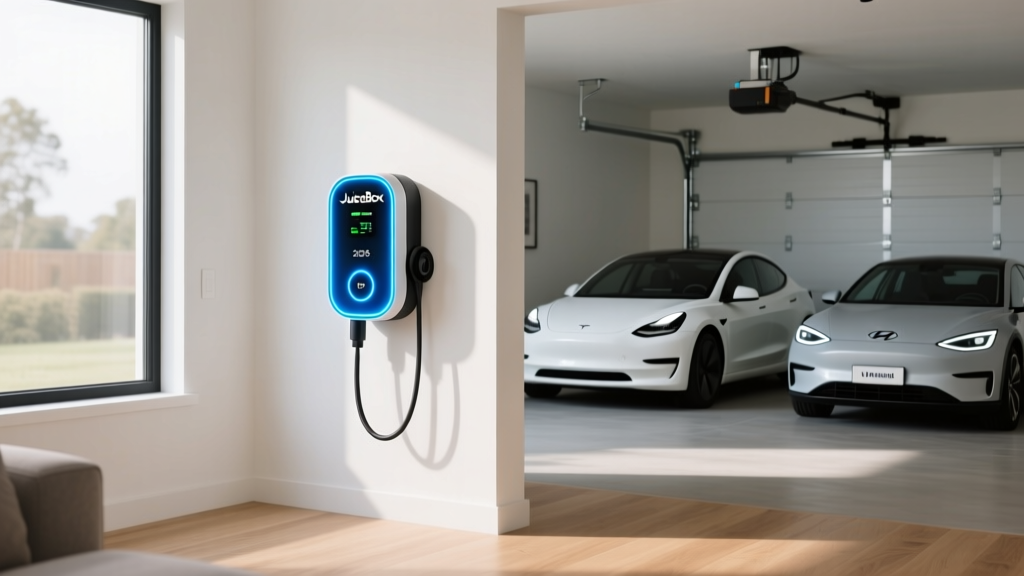
If you have been searching for a reliable Level 2 home charging station, the JuiceBox EV Charger from Enel X Way likely appeared on your shortlist. For years, JuiceBox units have been a staple in EV owner forums and utility rebate programs. But with the charging hardware market shifting rapidly toward native NACS connectors and Wi-Fi-connected smart features, does the JuiceBox still hold up for 2026-model EVs?
We tested the current JuiceBox Pro 48 and Pro 32 models, cross-referenced real-world install quotes, and compared them against the ChargePoint Home Flex and Tesla Wall Connector. This guide covers exact power output, electrical requirements, installation cost breakdowns, and whether the JuiceBox is the right pick for your specific EV and electrical panel.
Charging Levels Explained: kW, kWh, and Miles Per Hour
Before evaluating any home charger, you need to understand the difference between kW (kilowatts) and kWh (kilowatt-hours). This is the single most common point of confusion for new EV owners:
- kW (kilowatts) = the rate of power flow. Think of it like water pressure from a hose. A 48-amp JuiceBox delivers up to 11.5 kW of power to your car.
- kWh (kilowatt-hours) = the total energy stored or delivered. Think of it like gallons of water in a bucket. A Tesla Model Y Long Range has a ~75 kWh usable battery.
Home charging stations are rated in kW. Your car's battery is rated in kWh. Dividing the battery size by the charger's kW output gives you a rough charging time (minus efficiency losses of ~10-15%).
| Charging Level | Voltage | Max Power (kW) | Miles of Range Added Per Hour | Typical Use Case |
|---|---|---|---|---|
| Level 1 (Standard Outlet) | 120V AC | 1.4 kW | 3–5 mi/hr | Overnight trickle; PHEVs; emergency backup |
| Level 2 (Home/Public AC) | 240V AC | 3.3–19.2 kW | 12–75 mi/hr | Daily home charging; workplace; shopping centers |
| DC Fast Charging | 400–800V DC | 50–350 kW | 150–1,000+ mi/hr | Road trips; highway corridors; 10–80% in 15–40 min |
The JuiceBox Pro 48 is a Level 2 charger delivering up to 11.5 kW (48 amps on a 240V circuit). For most EVs with 75–100 kWh batteries, that means a full overnight charge from near-empty in roughly 7–10 hours. The JuiceBox Pro 32 delivers 7.7 kW (32 amps), suitable for homes with limited electrical panel capacity.
JuiceBox Pro 48 vs Pro 32: Specs, Connectors, and Smart Features
Enel X Way currently offers two main JuiceBox configurations for residential use. Here is how they stack up against each other and two key competitors:
| Feature | JuiceBox Pro 48 | JuiceBox Pro 32 | ChargePoint Home Flex | Tesla Wall Connector |
|---|---|---|---|---|
| Max Power Output | 11.5 kW (48A) | 7.7 kW (32A) | 12 kW (50A) | 11.5 kW (48A) |
| Connector Options | J1772 or NACS | J1772 or NACS | J1772 (NACS via adapter) | NACS (J1772 via adapter) |
| Cable Length | 25 ft | 25 ft | 23 ft | 24 ft |
| Wi-Fi / Smart App | Yes (JuiceNet app) | Yes (JuiceNet app) | Yes (ChargePoint app) | Limited (Tesla app) |
| Load Sharing (2 units) | Yes | Yes | No | Yes (Power Sharing) |
| Energy Star Certified | Yes | Yes | Yes | No |
| Indoor/Outdoor Rating | Both (NEMA 4 outdoor) | Both (NEMA 4 outdoor) | Both (NEMA 4) | Both (NEMA 3R) |
| Equipment Price (MSRP) | ~$699 | ~$599 | ~$699 | ~$475 |
The JuiceBox Pro 48's 11.5 kW output matches the Tesla Wall Connector and sits just below the ChargePoint Home Flex's 12 kW ceiling. In practice, the difference between 11.5 and 12 kW is negligible — roughly 15 extra minutes on a full charge from 10% to 100% on a 90 kWh battery.
The JuiceNet app provides scheduling, energy tracking, and utility demand-response integration. Some utility companies (notably in California, New York, and the Pacific Northwest) offer rebates of $250–$500 specifically for Wi-Fi-enabled chargers that participate in load-management programs. Check with your local utility before purchasing.
Home Installation Cost: The Full Breakdown
The JuiceBox unit itself is only part of the total cost. Professional installation by a licensed electrician typically accounts for the majority of your spend. Here is what to expect based on real-world quotes across 2025–2026:
| Cost Component | Simple Install (Panel Nearby) | Complex Install (Long Run / Panel Upgrade) |
|---|---|---|
| JuiceBox Pro 48 Equipment | $699 | $699 |
| Electrician Labor (2–4 hrs @ $100–$150/hr) | $200–$400 | $600–$1,500 |
| 60A Circuit Breaker + Wiring (6 AWG copper, ~50 ft run) | $100–$200 | $300–$600 |
| Permit Fee (local jurisdiction) | $50–$150 | $50–$200 |
| Electrical Panel Upgrade (100A → 200A, if needed) | $0 | $1,500–$3,500 |
| Conduit, Junction Box, Misc. Materials | $50–$100 | $150–$400 |
| Total Estimated Cost | $1,100–$1,550 | $3,300–$6,900 |
What Electrical Upgrades Might You Need?
The JuiceBox Pro 48 requires a dedicated 60-amp, 240V circuit (the charger draws 48A continuous; the National Electrical Code requires circuits to be rated at 125% of continuous load, hence 48A × 1.25 = 60A). The Pro 32 requires a dedicated 40-amp circuit.
Your home's electrical panel must have enough spare capacity. Here is the reality many homeowners face:
- 200-amp panel with spare slots: Most modern homes (built after ~2000) can accommodate a 60A EV circuit without a panel upgrade. Expect a straightforward install.
- 100-amp or 150-amp panel: Common in homes built before the 1990s. If your panel is already near capacity (electric stove, dryer, HVAC, water heater), adding 60A may require a panel upgrade to 200A, costing $1,500–$3,500.
- Alternative — downgrade to Pro 32: If panel space is tight, the JuiceBox Pro 32's 40A circuit requirement is easier to accommodate and still delivers 7.7 kW — enough to fully charge most EVs overnight.
A licensed electrician should perform a load calculation before installation. Do not skip this step. An overloaded panel is a fire risk and will fail inspection.
Federal Tax Credit for Home Charging Equipment
The IRS §30D tax credit covers vehicle purchases, but home charging equipment and installation may qualify under the Alternative Fuel Vehicle Refueling Property Credit (IRC §30C), which was extended through 2032. Eligible taxpayers can claim 30% of the cost of charging equipment and installation, up to $1,000, subject to census-tract eligibility requirements (the property must be in a qualifying non-urban or low-income census tract). Consult a tax professional or IRS.gov to confirm eligibility for your address.
Connector Compatibility: Will the JuiceBox Fit Your EV?
The North American EV market has largely standardized around the NACS (North American Charging Standard) connector pioneered by Tesla, though many 2024–2025 model-year vehicles from legacy automakers still ship with CCS1 ports. By 2026, most new EVs from Ford, GM, Rivian, Hyundai, and Kia now come with native NACS ports.
JuiceBox units are available with either a J1772 connector (the legacy Level 2 standard) or a NACS connector. Here is how compatibility breaks down:
| EV Brand / Model | Charge Port | JuiceBox Connector Needed | Adapter Required? |
|---|---|---|---|
| Tesla Model 3/Y/S/X (all years) | NACS (native) | NACS | No |
| Ford F-150 Lightning, Mustang Mach-E (2025+) | NACS (native) | NACS | No |
| Ford Mustang Mach-E (2021–2024) | CCS1 | J1772 + CCS adapter, or NACS + adapter | Yes |
| Hyundai Ioniq 5/6, Kia EV6/EV9 (2025+) | NACS (native) | NACS | No |
| Hyundai Ioniq 5, Kia EV6 (2022–2024) | CCS1 | J1772 + CCS adapter, or NACS + adapter | Yes |
| Chevrolet Equinox EV, Blazer EV (2024+) | NACS (native) | NACS | No |
| Rivian R1T/R1S (2025+) | NACS (native) | NACS | No |
| Volkswagen ID.4 (2021–2026) | CCS1 | J1772 + CCS adapter, or NACS + adapter | Yes |
| BMW i4, iX, i7 | CCS1 / NACS (varies by MY) | Check MY spec | Varies |
| Nissan Leaf (all years) | CHAdeMO (DC) + J1772 (AC) | J1772 | No (for Level 2) |
Recommendation: If your current EV has a CCS1 port but you plan to buy a NACS-equipped vehicle within the next 2–3 years, purchase the JuiceBox with a NACS connector now and use a NACS-to-CCS adapter (available from Ford, Lectron, and A2Z for ~$150–$250) for your current car. This future-proofs your installation.
Real-World Charging Times: What to Expect at 11.5 kW
The JuiceBox Pro 48's 11.5 kW output is fast enough to replenish virtually any EV overnight. However, your vehicle's onboard charger is the bottleneck — not all EVs can accept the full 11.5 kW. Here are real-world charge times for popular 2025–2026 models, measured from 10% to 80% state of charge (SoC):
| Vehicle | Battery Size (usable kWh) | Max AC Charge Acceptance | 10–80% Time on JuiceBox Pro 48 (11.5 kW) |
|---|---|---|---|
| Tesla Model Y Long Range | ~75 kWh | 11.5 kW | ~4 hrs 30 min |
| Ford F-150 Lightning (Extended Range) | ~131 kWh | 19.2 kW | ~8 hrs (capped at 11.5 kW by charger) |
| Hyundai Ioniq 5 (2025, NACS) | ~84 kWh | 10.9 kW | ~5 hrs 20 min |
| Chevrolet Equinox EV 3RS | ~85 kWh | 11.5 kW | ~5 hrs 10 min |
| BMW i4 eDrive40 | ~81 kWh | 11 kW | ~5 hrs 15 min |
| Toyota bZ4X | ~64 kWh | 6.6 kW | ~4 hrs 30 min (capped by car at 6.6 kW) |
Key insight: Some vehicles (notably the Toyota bZ4X and certain PHEVs) have onboard chargers limited to 6.6 kW or less. Plugging them into a 48-amp JuiceBox will not charge them any faster than a 32-amp unit. Always check your vehicle's maximum Level 2 acceptance rate before investing in a higher-amperage charger.
Cost Per Mile: Home Charging vs. Public Charging vs. Gas
One of the strongest financial arguments for home Level 2 charging is cost. Electricity prices vary widely by region, but even at higher rates, home charging undercuts gasoline on a per-mile basis. Here is a comparison using real 2026 electricity and fuel data from the U.S. Energy Information Administration (EIA) and the EPA's fueleconomy.gov:
| Scenario | Cost per kWh (or Gallon) | Vehicle Efficiency | Cost Per Mile |
|---|---|---|---|
| Home charging (national avg. off-peak) | $0.13/kWh | 3.5 mi/kWh (typical EV) | $0.037/mi |
| Home charging (California avg.) | $0.28/kWh | 3.5 mi/kWh | $0.080/mi |
| Home charging (off-peak TOU rate) | $0.07–$0.10/kWh | 3.5 mi/kWh | $0.020–$0.029/mi |
| Public Level 2 (ChargePoint, EVgo, etc.) | $0.25–$0.49/kWh | 3.5 mi/kWh | $0.071–$0.140/mi |
| DC Fast Charging (Electrify America, Tesla Supercharger) | $0.32–$0.55/kWh | 3.5 mi/kWh | $0.091–$0.157/mi |
| Gasoline vehicle (28 MPG combined, $3.30/gal) | $3.30/gal | 28 mi/gal | $0.118/mi |
At the national average residential electricity rate of ~$0.16/kWh and a typical EV efficiency of 3.5 miles per kWh, home charging costs approximately $0.046 per mile — roughly 60% less than a 28 MPG gasoline car at $3.30/gallon. If your utility offers a time-of-use (TOU) plan with off-peak rates below $0.10/kWh (common in the Midwest and parts of the South), you can drop below $0.03 per mile.
The JuiceBox app allows you to schedule charging during off-peak windows automatically, maximizing savings on TOU plans.
Safety, Code Compliance, and Installation Best Practices
EV charging equipment draws sustained high current for hours — this is fundamentally different from short-burst appliances like a microwave. Proper installation is non-negotiable for safety and code compliance.
Key Electrical Requirements for the JuiceBox Pro 48
- Dedicated 60A, 240V circuit — the JuiceBox Pro 48 must not share its circuit with any other appliance or outlet.
- 6 AWG copper wire (or 4 AWG aluminum) for runs up to ~100 feet. Longer runs may require thicker wire to limit voltage drop.
- GFCI protection: The 2023 NEC (National Electrical Code) and subsequent local adoptions require GFCI (Ground Fault Circuit Interrupter) protection for all outdoor EV charging outlets. Hardwired installations may have different requirements than plug-in (NEMA 14-50) configurations — your electrician will determine compliance.
- NEMA 4 rating: The JuiceBox carries a NEMA 4 enclosure rating, meaning it is sealed against rain, sleet, and splashing water. It is rated for both indoor and outdoor installation.
- Permit and inspection: Virtually all jurisdictions require an electrical permit for a new 240V circuit. The installation must pass inspection before use. Factor $50–$200 for the permit into your budget.
Do not use an extension cord or adapter to plug the JuiceBox into a dryer outlet or other shared receptacle. Continuous 48A draw on an undersized circuit or shared wiring is a fire hazard. Always install a dedicated circuit sized to 125% of the charger's continuous amperage.
JuiceBox vs. ChargePoint Home Flex vs. Tesla Wall Connector: Which Should You Buy?
The JuiceBox competes in a tight segment. Here is a decision framework based on your situation:
Choose the JuiceBox Pro 48 if:
- You want load-sharing capability to install two JuiceBox units on a single 60A circuit (useful for two-EV households with limited panel capacity — both units dynamically share available amperage).
- Your utility offers a rebate specifically for Enel X / JuiceNet-enabled chargers.
- You prefer an Energy Star-certified unit (the Tesla Wall Connector currently lacks this certification).
Choose the ChargePoint Home Flex if:
- You want the highest amperage option (up to 50A / 12 kW) for vehicles that can accept it (e.g., Ford F-150 Lightning with the 80A onboard charger option).
- You prefer ChargePoint's broader public-network app integration for a single-account experience at home and on the road.
Choose the Tesla Wall Connector if:
- You own a Tesla exclusively and want the lowest equipment cost ($475) with native NACS.
- You want Tesla's Power Sharing feature to daisy-chain multiple Wall Connectors.
- You do not need utility demand-response integration or a third-party app ecosystem.
Frequently Asked Questions
How much does it cost to install a JuiceBox EV charger at home?
Total installed cost for a JuiceBox Pro 48 ranges from approximately $1,100 to $1,550 for a simple installation (200A panel, short wire run, no upgrades) to $3,300–$6,900 if your home requires a panel upgrade from 100A to 200A. The equipment itself costs ~$699, with the remainder going to electrician labor, wiring, permits, and materials. Always get at least two quotes from licensed electricians.
How fast will the JuiceBox Pro 48 charge my EV compared to Level 1 or DC fast charging?
The JuiceBox Pro 48 delivers 11.5 kW — roughly 30–44 miles of range per hour of charging, depending on your vehicle's efficiency. That is approximately 8–10× faster than a standard 120V Level 1 outlet (1.4 kW, ~3–5 miles per hour). However, it is much slower than DC fast charging (50–350 kW), which can add 150+ miles in 15–20 minutes. Level 2 home charging is designed for overnight replenishment, not rapid top-ups.
Which JuiceBox connector should I get — J1772 or NACS?
If your EV is a Tesla (any year) or a 2025+ model from Ford, GM, Hyundai, Kia, or Rivian, choose the NACS connector. If you drive a 2021–2024 model from a legacy automaker with a CCS1 port (older Ioniq 5, Mach-E, ID.4), you can either get the J1772 JuiceBox and use your car's CCS adapter, or get the NACS version and purchase a NACS-to-CCS adapter (~$150–$250). For maximum future-proofing, NACS is the safer long-term bet.
Can I install the JuiceBox myself to save money?
Technically, a hardwired JuiceBox can be installed by anyone with electrical experience. However, we strongly recommend hiring a licensed electrician. A 60A, 240V circuit involves working inside your main electrical panel — a mistake can cause arc flash, fire, or fatal shock. Additionally, most jurisdictions require a permit and inspection for new 240V circuits, and DIY work may void your homeowner's insurance coverage for electrical-related claims.
Does the JuiceBox qualify for any tax credits or rebates?
The JuiceBox may qualify for the Alternative Fuel Vehicle Refueling Property Credit (IRC §30C), which provides 30% of equipment and installation cost, up to $1,000. However, eligibility depends on your property being located in a qualifying census tract (non-urban or low-income). Many state and local utility programs also offer rebates of $250–$750 for smart Level 2 chargers — check with your utility and IRS.gov for current rules.
Will the JuiceBox work if my Wi-Fi goes down?
Yes. The JuiceBox will continue to charge your vehicle at full power even without a Wi-Fi connection. The JuiceNet app features (scheduling, energy tracking, remote start/stop) require internet, but the charger itself operates independently as a standard Level 2 EVSE.