Quick Answer: What Google Maps EV Routing Actually Does
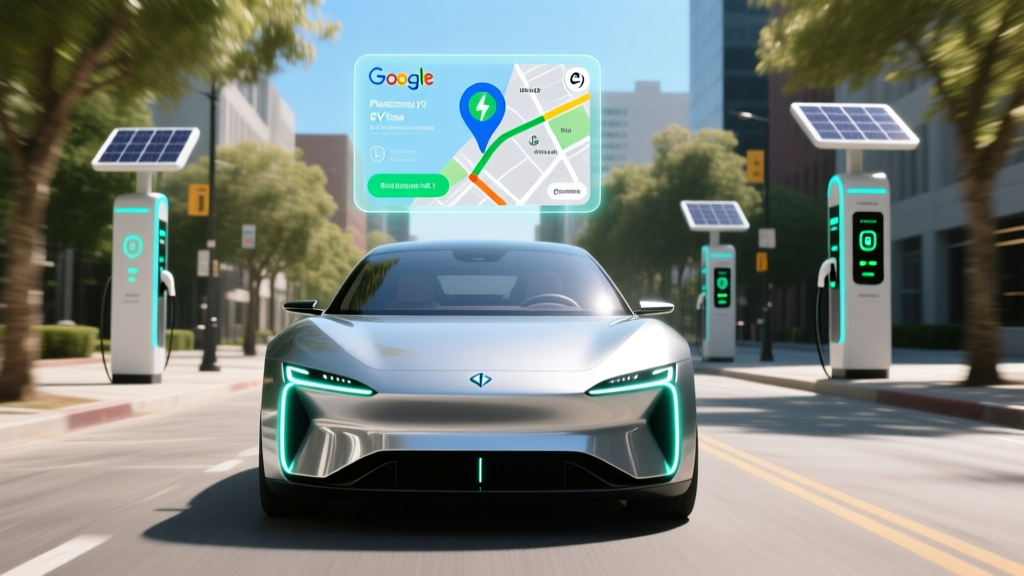
Google Maps EV routing automatically plans charging stops along your route based on your vehicle's real-time battery level, elevation changes, weather, and traffic. When you enter a destination that exceeds your current range, the app inserts DC fast-charging waypoints, estimates how long you'll charge at each stop (typically 15–30 minutes to reach 80% SoC), and calculates total trip time including charging. It works with over 300,000 charging stations globally and supports connector filtering (NACS, CCS, CHAdeMO). However, it does not automatically account for battery degradation, sustained vs. peak charge rates, or whether a specific stall is operational — so real-world arrival SoC can vary by 10–15% from the estimate.
How Google Maps Calculates Your EV Route
When you request directions in an EV-linked Google Maps profile, the routing engine pulls several data points simultaneously:
- Current State of Charge (SoC): Pulled from your vehicle's telematics (if connected via Android Auto or a supported OEM integration like GM Ultifi, Ford BlueCruise, or Polestar) or from your manually entered battery percentage.
- Usable battery capacity: Based on your specific vehicle model (e.g., a 2026 Hyundai Ioniq 5 has 84 kWh usable on an NMC pack; a Tesla Model Y Long Range uses a ~75 kWh NCA pack).
- Route energy consumption model: Factors in elevation gain/loss, ambient temperature, posted speed limits, and real-time traffic congestion. A 300-mile flat highway route at 65 mph consumes roughly 15–20% less energy than the same distance through mountain passes.
- Charging station database: Aggregates live availability data from networks like Electrify America, EVgo, ChargePoint, and Tesla Superchargers (now open to NACS-equipped non-Tesla EVs).
The algorithm then inserts the minimum number of charging stops needed to reach your destination with a safety buffer (typically 10–15% SoC remaining). It favors stations with higher peak kW rates and routes you to chargers that match your vehicle's connector and maximum charge acceptance.
One critical detail many drivers miss: Google Maps uses your vehicle's peak charge rate to estimate stop duration. A 2026 Kia EV6, for example, peaks at 240 kW on a 350 kW charger and can reach 10–80% in roughly 18 minutes. But that peak only holds between approximately 10–55% SoC. Above 60%, the charge curve tapers sharply — from 240 kW down to under 50 kW past 85%. If Google Maps routes you to charge from 30–90%, the actual stop will take 8–12 minutes longer than the estimate suggests.
Google Maps EV Routing vs. a Gas Car Road Trip
The most common question from first-time EV buyers: how much longer does a road trip take when you rely on EV routing versus pulling into any gas station? Here's a data-grounded comparison using a 600-mile corridor trip (e.g., Los Angeles to San Francisco via I-5):
| Metric | 2026 Hyundai Ioniq 6 SE (EV) | 2026 Toyota Camry LE (Gas) |
|---|---|---|
| EPA Range / Tank Range | 361 mi (EPA) / ~290 mi real-world highway | ~510 mi (13.2 gal × 32 mpg combined) |
| Stops Required | 2 DC fast-charge stops (~25 min each) | 1 fuel stop (~8 min) |
| Total Stop Time | ~50 minutes | ~8 minutes |
| Energy/Fuel Cost (Trip) | ~$32–$48 (at $0.30–$0.45/kWh public DC) | ~$68 (at $3.70/gal, 18.8 gal used) |
| Total Drive + Stop Time | ~10 hr 10 min | ~9 hr 28 min |
The EV adds roughly 40–45 minutes of total trip time on a 600-mile journey. For most drivers making 2–3 long trips per year, this is a manageable trade-off for the $20–$36 fuel savings per trip and the elimination of tailpipe emissions. For daily commuting under 60 miles round-trip, home Level 2 charging means you never visit a public charger at all — you start every morning with a full battery.
Real Costs: EV Ownership vs. Gas in 2026
Google Maps EV routing helps you plan trips, but the bigger financial picture is total cost of ownership. Here's a 5-year breakdown comparing a popular EV against its gas equivalent, assuming 12,000 miles/year, 85% home charging at $0.14/kWh (national average), and 15% public DC fast charging at $0.38/kWh:
| Cost Category | 2026 Tesla Model Y Long Range ($46,990 MSRP) | 2026 Honda CR-V EX-L AWD ($37,295 MSRP) |
|---|---|---|
| Purchase Price (after §30D credit) | $39,490 (assuming full $7,500 credit eligibility) | $37,295 |
| Fuel/Energy (5 yr) | $3,360 (~$672/yr) | $7,875 (~$1,575/yr at 28 mpg, $3.68/gal) |
| Maintenance (5 yr) | $1,200 (cabin filter, wipers, tire rotation, brake fluid) | $3,800 (oil changes, filters, brake pads, transmission fluid) |
| Insurance (5 yr avg) | $10,800 ($2,160/yr — EVs typically 15–25% higher) | $8,400 ($1,680/yr) |
| Estimated Depreciation | $18,500 | $14,200 |
| Total 5-Year Cost | $73,350 | $71,570 |
The EV costs roughly $1,780 more over five years in this scenario — primarily due to higher insurance premiums and steeper depreciation. But energy savings alone total $4,515, and maintenance savings add another $2,600. The gap narrows further if you qualify for the full §30D federal tax credit (up to $7,500, subject to MSRP caps of $55,000 for SUVs, buyer income limits of $150K single/$300K joint, and critical-mineral/battery-sourcing requirements that change annually).
If you install a home Level 2 charger (240V, 48A, ~$1,200–$2,500 including electrician and permit), your per-mile energy cost drops to roughly $0.04–$0.06/mile — about one-third the cost of a 28 mpg gas car at current fuel prices.
What Google Maps EV Routing Gets Wrong (and What to Watch For)
After thousands of miles of EV routing across multiple vehicles and climates, here are the consistent gaps between Google Maps estimates and reality:
Myth vs. Fact: EV Routing Assumptions
| Google Maps Assumes | Real-World Reality |
|---|---|
| Your battery holds its original capacity | A 3-year-old EV with 45,000 miles may have 90–94% State of Health (SoH), reducing effective range by 6–10% below EPA. |
| Peak charge rate is sustained throughout the stop | Most EVs sustain peak kW for only 20–40% of the charge session. A "250 kW" car averages ~140–160 kW over a 10–80% session. |
| All listed chargers are operational | Public DC charger uptime averages 85–92% across major networks (per J.D. Power 2025 data). Always have a backup station in mind. |
| Cold-weather range matches EPA estimates | At 20°F, expect 20–35% range loss depending on whether your EV has a heat pump. LFP chemistry batteries lose slightly more in extreme cold than NMC. |
| Posted speed limits match your actual speed | Driving 75 mph instead of 65 mph increases energy consumption by ~15–20%, cutting effective range significantly. |
Pro tip: If you're driving in winter or at sustained highway speeds above 70 mph, mentally subtract 15–20% from the range Google Maps projects. If the app says you'll arrive at a charger with 12% SoC, treat that as 5–8% in cold/highway conditions — and plan an earlier stop.
Setting Up Google Maps EV Routing Correctly
Getting accurate routing requires a few setup steps that most drivers skip:
- Add your EV to your Google account: In Google Maps → Settings → Electric vehicles, enter your exact make, model, year, and trim. This determines battery size and efficiency curves.
- Set your preferred networks: Filter for networks you have accounts with (e.g., Tesla Supercharger, Electrify America, EVgo) to avoid routing to stations requiring a new app download at 2 AM.
- Enable connector filters: In 2026, the North American landscape is split — Tesla and newer Ford/GM/Rivian vehicles use NACS; most legacy EVs (Hyundai, Kia, Volkswagen, BMW) use CCS1; older Nissan Leafs use CHAdeMO. Set your connector type to avoid incompatible stops.
- Link your vehicle (if supported): OEMs like Polestar, Volvo, GM, and Ford offer real-time SoC sharing with Google Maps via built-in Android Automotive or companion apps. This dramatically improves routing accuracy versus manual SoC entry.
- Precondition before fast charging: When Google Maps routes you to a DC fast charger, many EVs (Tesla, Hyundai/Kia E-GMP, BMW) automatically begin battery preconditioning 10–20 minutes before arrival. This warms the battery to optimal temperature, enabling peak charge rates. Without preconditioning, a cold battery may peak at only 50–80 kW instead of 200+ kW.
Decision Framework: Is EV Routing Right for Your Driving Life?
Should You Rely on Google Maps EV Routing?
Choose EV routing with confidence if:
- You have reliable home Level 2 charging (covers 90%+ of daily needs)
- Your typical road trips are under 400 miles between overnight stops
- You drive primarily in temperate climates or your EV has a heat pump
- You travel corridors served by Electrify America, Tesla Superchargers, or EVgo (I-5, I-95, I-80, I-10)
- You can tolerate 20–40 extra minutes on a 500+ mile trip
Consider a PHEV or delay EV purchase if:
- You live in an apartment without charging access and street charging is unavailable
- You regularly drive 500+ miles in rural areas (western Nebraska, eastern Montana, rural Nevada)
- You frequently tow trailers (towing cuts EV range by 40–60%)
- You regularly drive in sub-zero temperatures where range loss exceeds 30%
- Your schedule cannot absorb any unplanned 30-minute charging delay
For drivers in the middle — those with home charging who take 3–4 road trips per year — Google Maps EV routing works well enough that range anxiety fades within the first few months of ownership. The routing isn't perfect, but it's good enough to plan around, especially when paired with a second opinion from apps like A Better Route Planner (ABRP) for complex multi-stop trips.
Frequently Asked Questions
Does Google Maps EV routing work with Apple CarPlay?
Yes, but with limitations. When using Google Maps through Apple CarPlay, the app does not have direct access to your vehicle's real-time battery data (unless the OEM provides it via a CarPlay-compatible integration). You'll need to manually enter your current SoC for accurate routing. For the best experience, native Android Automotive (built into vehicles like the Polestar 2, Volvo EX30, and GMC Sierra EV) provides seamless SoC sharing.
Can Google Maps route me to Tesla Superchargers if I don't drive a Tesla?
Yes. As of 2026, Tesla has opened over 15,000 Supercharger stalls in North America to non-Tesla EVs equipped with NACS charge ports (or using a Tesla-provided adapter). Google Maps includes these stations in its database and will route compatible vehicles to them. Vehicles with CCS ports need a NACS adapter — Ford, Rivian, and GM provide these with purchase or via dealer order.
How much data does EV routing use?
Typical EV routing consumes 5–15 MB per hour of active navigation — comparable to standard turn-by-turn directions. Downloading offline maps for your route corridor (recommended for rural trips) uses 100–400 MB depending on area size but eliminates any connectivity concerns in coverage gaps.
Does Google Maps account for regenerative braking on downhill segments?
Yes, the routing engine factors in net elevation change. A route descending 3,000 feet over 40 miles can recover 3–8% SoC through regenerative braking, depending on vehicle weight and regen aggressiveness. Google Maps reflects this in its arrival-SoC estimate, though real-world recovery varies with driver behavior and brake temperature.
What happens if a charger on my route is broken when I arrive?
Google Maps shows real-time status (available/in-use/out-of-order) for many networks, but data lags by 2–10 minutes in some cases. Always identify a backup charger within 15–20 miles of your planned stop. Networks like Electrify America and EVgo offer in-app stall-level status that's more current than Google Maps aggregation. Per J.D. Power's 2025 EVX Public Charging Study, DC fast-charger reliability averaged 89% uptime across major networks.
Is a dedicated EV route planner better than Google Maps?
For daily navigation, Google Maps is sufficient and convenient. For complex road trips with multiple stops, towing, or extreme-cold driving, dedicated planners like A Better Route Planner (ABRP) offer more granular control — you can manually set battery degradation, tire pressure, cargo weight, and temperature. Many experienced EV owners use Google Maps for real-time traffic and turn-by-turn directions while referencing ABRP for charge-stop strategy on long trips.
Google Maps EV routing has matured significantly since its 2020 launch. In 2026, it's a practical, reliable tool for the majority of EV drivers — particularly those who charge at home and take occasional road trips. Understanding its limitations (charge-curve taper, cold-weather loss, station uptime) lets you plan around the gaps rather than being surprised by them. For the data-driven EV buyer, the real question isn't whether the routing is perfect — it's whether your driving patterns put you in the 90% of scenarios where it works well, or the 10% where a PHEV or gas car still makes more sense.