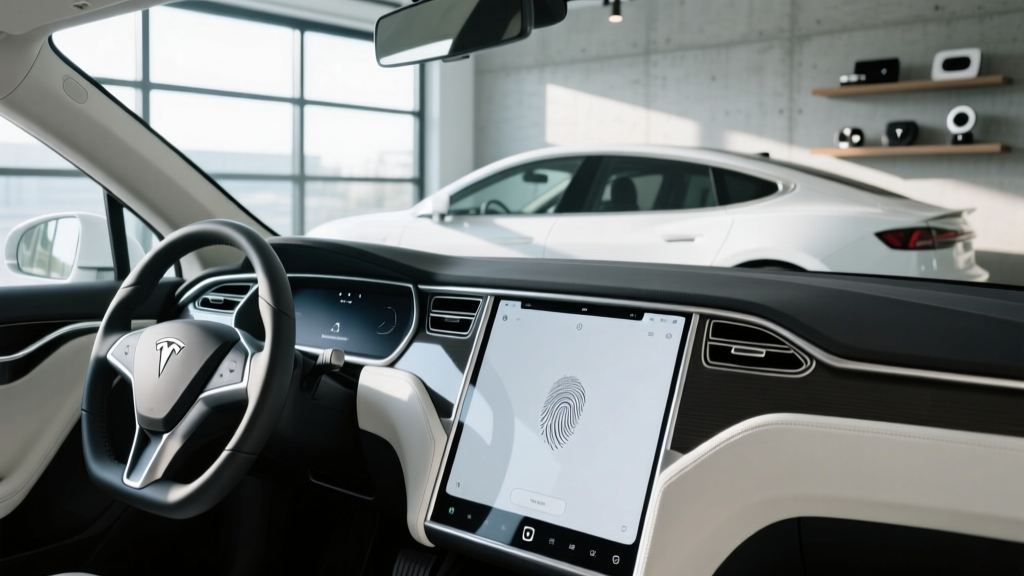
If you own a Tesla, the center touchscreen is your dashboard, your climate control, your navigation, and your entertainment hub — all rolled into one massive pane of glass. Keeping it smudge-free isn't just about aesthetics; a clean Tesla screen reduces glare, improves touch responsiveness, and protects the oleophobic (anti-fingerprint) coating that Tesla applies at the factory. Get the cleaning process wrong, and you can permanently strip that coating or scratch the surface.
This guide walks you through the exact products and technique to clean your Tesla's touchscreen safely, then pivots into a full 2026 spec-and-value breakdown of every Tesla model currently on sale — so you know exactly what you're buying or owning beyond the glass.
How to Clean a Tesla Screen the Right Way
Tesla's official owner manuals specify a simple approach: use a clean, lint-free microfiber cloth slightly dampened with water. That's it. No Windex, no ammonia-based glass cleaners, no paper towels, no abrasive wipes. Here's the step-by-step method that preserves your screen's coating:
- Power down the display. Go to Controls → Safety → Power Off (or use Screen Clean Mode on 2024+ software builds, which locks the touchscreen so you can wipe without triggering inputs).
- Use a dry microfiber cloth first to remove loose dust and grit — this prevents micro-scratches when you apply moisture.
- Lightly mist distilled water onto the cloth (never directly onto the screen). For stubborn fingerprints, a 50/50 distilled water and white vinegar solution works, or a dedicated electronics screen cleaner like iKlear or Screen Mom.
- Wipe in gentle, circular motions with light pressure. Do not scrub.
- Dry immediately with a second clean microfiber cloth to prevent water spots.
2026 Tesla Lineup: Range, Charging, and Specs at a Glance
Whether you're cleaning a 15.4-inch Model 3 screen or the 17-inch tilting display in a Model S, the vehicle behind that screen matters just as much. Below is the complete 2026 spec table for every Tesla currently available in the U.S.
| Spec | Model 3 (Long Range AWD) | Model Y (Long Range AWD) | Model S (Long Range) | Model X (Long Range) | Cybertruck (AWD) |
|---|---|---|---|---|---|
| EPA Range | 363 mi | 320 mi | 402 mi | 335 mi | 340 mi |
| Battery (usable kWh) | ~75 kWh (NMC) | ~75 kWh (NMC) | ~95 kWh (NMC) | ~95 kWh (NMC) | ~123 kWh (NMC, 4680 cells) |
| Max DC Fast Charge | 250 kW | 250 kW | 250 kW | 250 kW | 350 kW (est.) |
| 10–80% DCFC Time | ~25 min | ~27 min | ~30 min | ~32 min | ~20 min (est.) |
| Level 2 Home Rate | 11.5 kW / ~44 mi/hr | 11.5 kW / ~40 mi/hr | 11.5 kW / ~38 mi/hr | 11.5 kW / ~34 mi/hr | 11.5 kW / ~30 mi/hr |
| 0–60 mph | 4.2 sec | 4.8 sec | 3.1 sec | 3.8 sec | 3.9 sec |
| Horsepower | ~346 hp | ~384 hp | ~670 hp | ~670 hp | ~600 hp |
| Drivetrain | Dual-Motor AWD | Dual-Motor AWD | Dual-Motor AWD | Dual-Motor AWD | Dual-Motor AWD |
| MPGe (combined) | 132 MPGe | 122 MPGe | 120 MPGe | 105 MPGe | ~100 MPGe (est.) |
| Cargo (rear seats up) | 23 cu ft | 30 cu ft | 28 cu ft | ~40 cu ft (to ceiling) | ~67 cu ft (vault) |
| Base MSRP | $47,740 | $48,990 | $79,990 | $84,990 | $79,990 |
Sources: EPA / fueleconomy.gov, Tesla.com. Specs reflect 2025/2026 model year data. Real-world figures may vary.
Real-World Range: What the EPA Sticker Doesn't Tell You
Model 3 Long Range: EPA 363 mi → Expect ~310–330 mi mixed driving; ~260–280 mi sustained highway at 75 mph; ~240–260 mi in freezing temps (below 32°F).
Model Y Long Range: EPA 320 mi → Expect ~270–290 mi mixed; ~230–250 mi highway; ~210–230 mi cold weather.
Model S Long Range: EPA 402 mi → Expect ~340–370 mi mixed; ~300–320 mi highway; ~270–300 mi cold weather.
Cybertruck AWD: EPA 340 mi → Expect ~270–300 mi mixed (high drag coefficient); highway and cold losses are steeper than sedan platforms.
Tesla's thermal management system — which includes a heat pump on all current models — is among the best in the industry at mitigating cold-weather range loss. In testing, Tesla vehicles typically lose 20–30% of EPA range in sub-freezing conditions, compared to 30–40% for EVs without heat pumps. Still, if you live in Minnesota or Maine, budget for that loss when planning road trips.
Highway efficiency also drops noticeably above 70 mph. Tesla's drag coefficients are excellent (Model 3: ~0.219 Cd; Model S: ~0.208 Cd), but physics dominates at speed. Plan for roughly 15–20% less range at 80 mph compared to the EPA's mixed-cycle test.
Charging Speed: DC Fast Charging and Home Level 2
All current Teslas use the North American Charging Standard (NACS) connector — the port Tesla designed and which Ford, GM, Rivian, Volvo, and most major automakers have adopted through 2026. This gives Tesla owners native access to the Tesla Supercharger network, which remains the most reliable DC fast-charging ecosystem in the U.S., with over 25,000 stalls nationally.
| Level | Power | Miles Added per Hour | Use Case |
|---|---|---|---|
| Level 1 (120V outlet) | ~1.4 kW | 3–5 mi/hr | Emergency / trickle |
| Level 2 (240V, Wall Connector) | 11.5 kW | 30–44 mi/hr | Daily home charging |
| DC Fast Charge (Supercharger V3) | Up to 250 kW | ~1,000 mi/hr (peak) | Road trips |
| DC Fast Charge (V4 / Cybertruck) | Up to 350 kW | ~1,200 mi/hr (peak) | Newer stalls, 4680-cell packs |
Charge curve reality: Teslas, like all EVs, do not sustain peak charge rates for the entire session. A Model 3 Long Range hitting a V3 Supercharger at 10% SoC will ramp quickly to ~250 kW but begins tapering around 50–55% SoC. By 80%, you're typically pulling 60–80 kW. This is why the 10–80% metric matters more than peak kW — and why Tesla's navigation system preconditions the battery (warms it to optimal temperature) when you route to a Supercharger, significantly improving charge speed in cold weather.
For home charging, the Tesla Wall Connector ($475) delivers up to 11.5 kW on a 60-amp circuit (48-amp continuous). Most owners install a NEMA 14-50 outlet instead (~$500–$1,500 for electrician + permit), which supports the Mobile Connector at up to 32 amps (~7.7 kW). A full overnight charge on Level 2 is standard practice and keeps the battery in its healthiest SoC window (20–80% for daily use; charge to 100% only before long trips).
Pricing, Trims, and Federal Tax Credit Eligibility
| Model / Trim | Base MSRP | Under §30D MSRP Cap? | Est. Credit | Effective Price (if eligible) |
|---|---|---|---|---|
| Model 3 RWD | $38,990 | ✅ Yes (sedan cap: $55,000) | Up to $7,500* | ~$31,490 |
| Model 3 Long Range AWD | $47,740 | ✅ Yes | Up to $7,500* | ~$40,240 |
| Model Y Long Range AWD | $48,990 | ✅ Yes (SUV cap: $80,000) | Up to $7,500* | ~$41,490 |
| Model S Long Range | $79,990 | ✅ Yes (sedan cap: $55,000) — ❌ Exceeds | $0 | $79,990 |
| Model X Long Range | $84,990 | ❌ Exceeds $80K SUV cap | $0 | $84,990 |
| Cybertruck AWD | $79,990 | ❌ Exceeds $80K truck cap | $0 | $79,990 |
*Critical caveats on the §30D credit (per IRS.gov): The full $7,500 requires meeting BOTH critical-mineral AND battery-component sourcing thresholds, which shift annually. Buyer income caps apply: $150K single / $225K head of household / $300K joint (modified AGI). The credit can be transferred to the dealer at point of sale as an instant discount. Always verify current-year eligibility on IRS.gov or with a tax professional before relying on the credit in your purchase math.
Tech, Autopilot, and the Screen-Centric Interior
Every 2026 Tesla routes virtually all vehicle controls through the central touchscreen — no physical instrument cluster, minimal physical buttons (the refreshed Model 3 "Highland" added rear-seat touchscreens and a few steering-wheel buttons, but the center display remains primary). This is precisely why keeping a clean Tesla screen is so critical: you interact with it hundreds of times per drive.
Standard tech across the lineup:
- Over-the-air (OTA) software updates that add features post-purchase
- Navigation with real-time Supercharger routing and battery preconditioning
- Sentry Mode (360° camera-based security recording)
- Dashcam with front/rear/left/right recording
- Streaming (Netflix, YouTube, Spotify, Arcade) while parked
- Dog Mode, Camp Mode, and Summon (low-speed remote parking)
Tesla's Autopilot (standard) and Full Self-Driving Supervised ($8,000 option or $99/month subscription) are SAE Level 2 driver-assistance systems. This means the vehicle can manage steering, acceleration, and braking under certain conditions, but the driver must remain fully engaged, hands on or near the wheel, eyes on the road, and ready to take over instantly. FSD Supervised does not make the car autonomous. Only Level 4 services like Waymo operate without a human driver — and those are limited to specific geofenced areas.
Tesla's camera-only vision approach (no lidar or radar on current models) is polarizing. It performs well on well-marked highways but can struggle in heavy rain, construction zones, or faded lane markings. Competitors like GM's Super Cruise and Ford's BlueCruise use lidar + camera fusion and offer true hands-free driving on pre-mapped highways — a tangible advantage for long-distance commuters, though they cover fewer roads.
Warranty, Battery Longevity, and Ownership Costs
Tesla's warranty structure is straightforward:
- Basic vehicle: 4 years / 50,000 miles
- Battery & drive unit: 8 years / 100,000 miles (Model 3/Y) or 8 years / 150,000 miles (Model S/X) — with a minimum 70% capacity retention threshold
In practice, Tesla's NMC batteries have shown strong longevity. Fleet data aggregated by sources like Tesla's Impact Report indicates average degradation of roughly 12–15% after 200,000 miles. The LFP (lithium iron phosphate) batteries used in the base Model 3 RWD offer even longer cycle life and can be charged to 100% regularly without degradation concerns — though they sacrifice some energy density and cold-weather performance compared to NMC.
Ownership cost reality: Electricity costs vary dramatically by region and charging method. At the U.S. average residential rate of ~$0.17/kWh, charging a Model 3 Long Range from empty to full at home costs roughly $12.75 (~3.5¢/mile). Supercharger pricing averages $0.25–$0.35/kWh nationally, or ~7–9¢/mile — still well below gasoline at ~$3.50/gallon (~12–15¢/mile for a comparable 30 MPG sedan). Insurance, however, tends to run 15–30% higher for Teslas than comparable gas vehicles due to repair costs; always get a quote before purchasing.
Pros, Cons, and Who Should Buy a Tesla
- Best-in-class Supercharger network (native access, no adapters needed)
- Industry-leading efficiency (low kWh/mile)
- Frequent OTA updates add features over time
- Strong resale value relative to most EVs
- Heat pump standard — excellent cold-weather range retention
- Extensive Supercharger preconditioning optimizes charging
- Screen-dependent controls — no physical buttons for HVAC, wipers, etc.
- FSD Supervised is expensive and still requires full driver attention
- Panel gaps and build consistency still trail legacy luxury brands
- Insurance premiums above segment average
- No Apple CarPlay or Android Auto
- Model S/X pricing exceeds §30D tax credit caps
- Model 3: Solo commuters and couples who want max efficiency, strong range, and the lowest Tesla entry price. Best value in the lineup after the tax credit.
- Model Y: Families needing SUV cargo space, car-seat room, and easy ingress. The best-selling EV in the U.S. for a reason.
- Model S: Luxury sedan buyers who want 400+ mile range and sub-3.5-second 0–60 performance — and can absorb the premium without a tax credit.
- Model X: Families wanting falcon-wing doors, optional 6/7-seat layouts, and flagship status — but the value proposition is thin vs. the Model Y.
- Cybertruck: Truck buyers prioritizing acceleration, stainless-steel durability, and novelty — but payload/towing specs and real-world range lag conventional trucks.
Frequently Asked Questions
Can I use Clorox wipes or Lysol on my Tesla screen?
No. Disinfecting wipes contain chemicals (quaternary ammonium compounds, alcohol, fragrances) that can degrade the oleophobic coating on Tesla touchscreens. Stick to a microfiber cloth with distilled water or a dedicated electronics screen cleaner.
How often should I clean my Tesla touchscreen?
Most owners find a quick wipe-down once a week keeps fingerprints manageable. If you use Screen Clean Mode and a quality microfiber cloth, the process takes under 30 seconds.
Does the Model 3 Highland have a different screen than older Model 3s?
The refreshed Model 3 ("Highland," launched late 2023 and continuing into 2026) uses the same 15.4-inch center display size but with a slightly thinner bezel and improved brightness. The rear-seat 8-inch touchscreen is new and should be cleaned with the same microfiber-and-water method.
Does the Tesla Model Y qualify for the $7,500 federal tax credit in 2026?
The Model Y Long Range AWD at $48,990 MSRP falls under the $80,000 SUV cap. However, the actual credit amount depends on battery-sourcing requirements (critical minerals + battery components) that change annually, plus your income. Check IRS.gov or consult a tax professional for your specific eligibility. The credit can be applied as a point-of-sale discount at the dealer.
What's better for battery health — charging to 80% or 100%?
For NMC batteries (Model 3 Long Range, Model Y, Model S, Model X, Cybertruck), Tesla recommends setting your daily charge limit to 80% and only charging to 100% when you need maximum range for a trip. For LFP batteries (Model 3 RWD), Tesla recommends charging to 100% at least once per week for accurate state-of-charge calibration. This is one of the few cases where the chemistry changes your daily routine.