When you're sitting at a DC fast charger for 20 minutes or navigating a 300-mile road trip, your phone is your lifeline — for navigation apps, charging-network routing, entertainment, and vehicle telemetry. A dead phone at a remote Electrify America station isn't just inconvenient; it can strand you without a way to activate the charger or call for help. That's why a reliable charging car phone mount is one of the most practical accessories an EV owner can buy.
But not all mounts play nicely with every EV's interior. Tesla's minimalist cabin offers no traditional air vents. Rivian's vertical screen blocks certain dashboard positions. Hyundai Ioniq 5 owners need USB-C passthrough to avoid hogging the single front data port. And if you're using your phone for Waze or ABRP (A Better Route Planner) on long highway stretches, you need a mount that delivers sustained wattage — not a trickle charge that barely keeps up with screen-on drain.
This guide covers the best charging car phone mounts for popular 2026 EVs, the power-output specs that actually matter, and how to integrate one with your EV's existing USB infrastructure without causing electrical issues.
Why EV Owners Need a Dedicated Charging Phone Mount
Most 2026 EVs come with USB-C ports — typically two front, two rear — but they serve multiple purposes: data connection for Android Auto/Apple CarPlay, dashcam footage transfer, and device charging. In a Tesla Model Y (which doesn't support CarPlay natively), your phone runs navigation, media, and vehicle controls via Bluetooth, draining the battery faster than a typical USB-A port can replenish it.
Here's the real-world math: Running Google Maps with the screen on at 50% brightness consumes roughly 3–5 watts on a modern smartphone. A standard 5W USB-A port barely keeps pace. A 15W MagSafe or 20W USB-C PD (Power Delivery) mount, by contrast, adds 10–15% battery per hour of highway driving — enough to arrive at your destination with more charge than you started with.
For EV road-trippers who rely on fueleconomy.gov range planning or the ABRP app to find chargers along I-70 or I-80, keeping your phone charged isn't optional. It's part of your charging strategy.
Charging Wattage Explained: What Your EV's USB Ports Actually Deliver
Before choosing a charging car phone mount, you need to know what your EV can supply. Here's a breakdown of common 2026 EV USB port outputs:
| EV Model | Front USB-C Output | Rear USB-C Output | Wireless Pad (if equipped) |
|---|---|---|---|
| Tesla Model Y (2026) | 27W (USB-C PD) | 15W | 15W Qi |
| Hyundai Ioniq 5 | 27W (USB-C PD) | 15W | 15W Qi |
| Ford Mustang Mach-E | 18W (USB-C) | 10W (USB-A) | None (wireless pad 10W) |
| Rivian R1S / R1T | 27W (USB-C PD) | 27W (USB-C PD) | None |
| Chevrolet Equinox EV | 18W (USB-C) | 10W (USB-A) | 15W Qi |
| BMW i4 / iX | 27W (USB-C PD) | 15W | 15W Qi |
The takeaway: if your EV supplies 27W via USB-C PD, a quality charging car phone mount can leverage that full output. If you're plugging into a 10W USB-A port, even the best mount will bottleneck at the source. In that case, consider a mount with its own 12V cigarette-lighter adapter (most 2026 EVs still have one 12V accessory socket rated at 120–180W) to bypass the USB limitation entirely.
Types of Charging Car Phone Mounts: MagSafe, Qi2, USB-C, and Clamp
The market splits into four categories, each with trade-offs for EV use:
MagSafe / Qi2 Magnetic Mounts (15W Wireless)
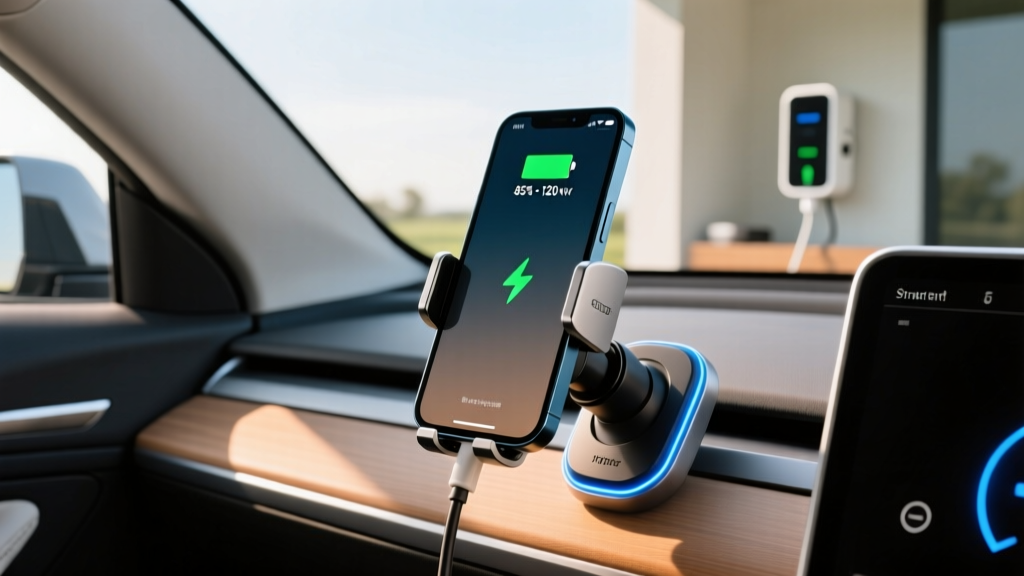
Apple's MagSafe and the cross-platform Qi2 standard deliver up to 15W wirelessly via magnetic alignment. These are the cleanest option for Teslas and Rivians — no cables dangling across the console. However, 15W is a peak figure; sustained wireless charging typically averages 8–12W due to thermal throttling. In hot Arizona summers with the phone in direct sunlight, expect even lower throughput.
USB-C PD Mounts (20–27W Wired)
A wired USB-C PD mount with a short 1-foot cable delivers the fastest, most consistent charge. These are ideal for Android users and anyone running power-hungry navigation apps. The cable clutter is the trade-off, but a well-routed cable along the dash trim keeps things tidy.
Qi Wireless Pad Mounts (10–15W)
Older Qi (non-Qi2) pads offer 10–15W but lack magnetic alignment. Your phone can slide off during hard braking — a real concern in EVs with aggressive regenerative braking that causes sudden deceleration when you lift off the accelerator.
Passive Clamp Mounts with Passthrough
These hold your phone mechanically and let you plug your own cable into the phone's port. They're the cheapest option ($15–$25) and work with any phone, but offer no integrated charging. You supply the cable and power source.
Top Charging Car Phone Mounts for EVs: 2026 Picks
We evaluated mounts across five criteria critical to EV owners: sustained wattage under load, compatibility with ventless dashboards (Tesla, Rivian), heat management, one-hand operation, and cable-routing flexibility. Here are our top picks with exact specs:
Best Overall for Tesla & Rivian: ESR HaloLock MagSafe Vent Mount (2026 Model)
Power: 15W Qi2 wireless (MagSafe compatible)
Mount Type: Dashboard adhesive base (no vent clip needed)
Cable: USB-C input, 3.3 ft included
Price: $32.99
Why for EVs: Tesla and Rivian owners can't use vent clips. ESR's adhesive base bonds to the flat dashboard surface above the center screen. The Qi2 magnets are strong enough to hold an iPhone 16 Pro Max (227g) through potholes and one-pedal regen braking. Pairs perfectly with Tesla's 27W USB-C port or a 12V-to-USB-C PD adapter.
Best Wired Speed: Anker MagGo 3-in-1 Car Mount (USB-C PD 27W)
Power: 27W USB-C PD wired + 15W Qi2 wireless pad
Mount Type: CD-slot or dashboard adhesive
Cable: USB-C to USB-C, 2 ft included
Price: $45.99
Why for EVs: Delivers true 27W to Samsung Galaxy S25 Ultra or Pixel 9 Pro via wired PD — charging a 5,000 mAh battery from 20% to 80% in roughly 35 minutes while navigating. The CD-slot mount works in the Hyundai Ioniq 5 and Kia EV6, which still have accessible CD-slot-style trim gaps. The integrated Qi2 pad on the base charges a second device or earbuds.
Best Budget: Spigen OneTap Pro USB-C Car Mount
Power: Passthrough (no built-in charging — use your own cable)
Mount Type: Dashboard adhesive or vent clip (dual option)
Cable: Not included
Price: $18.99
Why for EVs: If you already have a quality USB-C cable and your EV has a conveniently located 27W port (like the Rivian R1T's center console), the Spigen OneTap holds the phone securely with a mechanical arm and lets you route the cable cleanly. No electronics to fail. Works with any phone size up to 6.9 inches.
Best for Hot Climates: iOttie Velox Magnetic Wireless (Active Cooling)
Power: 15W Qi2 wireless with integrated cooling fan
Mount Type: Dashboard adhesive or vent clip
Cable: USB-C input, 3 ft included
Price: $49.99
Why for EVs: Wireless charging generates heat, and EV cabins can exceed 130°F when parked in summer sun before the HVAC kicks in. The Velox's active fan keeps the phone below thermal throttle thresholds, maintaining 12–14W sustained instead of dropping to 5W. Critical for Phoenix, Las Vegas, and Texas EV owners running navigation during summer road trips.
Compatibility Guide: Which Mount Fits Your 2026 EV?
Not every mount works in every EV. Tesla's vent design, Rivian's rugged interior geometry, and Hyundai's floating console all present unique challenges. Here's a compatibility matrix:
| EV Model | Vent Clip | Dash Adhesive | CD-Slot | Windshield Suction | Best Mount Type |
|---|---|---|---|---|---|
| Tesla Model 3/Y (2026) | ❌ (hidden vents) | ✅ | ❌ | ✅ (check local law) | Dash adhesive / Qi2 |
| Tesla Model S/X | ✅ | ✅ | ❌ | ✅ | Vent clip or adhesive |
| Hyundai Ioniq 5 / Kia EV6 | ✅ | ✅ | ✅ (trim gap) | ✅ | CD-slot or vent clip |
| Ford Mustang Mach-E | ✅ | ✅ | ❌ | ✅ | Vent clip |
| Rivian R1S / R1T | ❌ (vertical vents) | ✅ | ❌ | ✅ | Dash adhesive |
| Chevrolet Equinox EV | ✅ | ✅ | ❌ | ✅ | Vent clip or adhesive |
| BMW i4 / iX | ✅ | ✅ | ❌ | ❌ (curved dash) | Vent clip |
Windshield suction note: Several states (including California, per CA DMV vehicle code) restrict objects mounted to the windshield that obstruct the driver's view. A dash adhesive or vent clip avoids this legal gray area entirely.
Power Source Options: USB Port vs. 12V Adapter
Your charging car phone mount needs power. You have two routes, and the right choice depends on your EV's port layout:
Option A: Plug Into Your EV's USB-C Port
If your EV has a conveniently located 27W USB-C PD port (driver-side console or lower dash), simply run the mount's USB-C cable to that port. This is the cleanest install — no extra adapters. The limitation: if that port is also your CarPlay/Android Auto data connection, plugging in the mount may trigger a data handshake that interrupts your phone projection. Solution: use a charge-only USB-C cable (no data pins) for the mount, and keep your data cable separate for CarPlay.
Option B: Use the 12V Accessory Socket with a PD Adapter
Every 2026 EV still includes at least one 12V accessory socket (the old "cigarette lighter" port), typically rated at 120–180W. Pair it with a compact 12V-to-USB-C PD adapter (like the Anker 521, $17.99, 45W output) and you have a dedicated power source that doesn't interfere with your EV's data ports. This is the preferred setup for Teslas running the native navigation system, where the USB ports are already occupied by the dashcam USB drive and data connections.
Energy cost is negligible: Charging a phone from 0% to 100% uses roughly 15–20 watt-hours (0.015–0.02 kWh) from your EV's 12V system. On a 75 kWh battery pack, that's 0.02% of capacity — effectively zero impact on your driving range. The 12V battery is replenished by the DC-DC converter from the main traction battery, so there's no net drain concern.
Installation Tips for a Clean EV Setup
A sloppy mount installation with cables draped across the console is a distraction hazard. Here's how EV owners get a factory-clean look:
- Cable routing: Run the USB-C cable along the dash-to-console seam, securing it with adhesive cable clips ($6 for a 20-pack). In the Ioniq 5 and EV6, the floating console has a gap underneath that's perfect for hiding cables.
- Adhesive prep: Clean the dashboard surface with isopropyl alcohol before applying any adhesive mount. EV dashboards often have anti-glare coatings that reduce adhesive grip — 3M VHB tape (included with most quality mounts) outperforms generic foam tape.
- Positioning for visibility: Place the mount so the phone screen is within 15° of your natural sightline to the road. The NHTSA recommends driver displays be positioned to minimize eyes-off-road time. A mount that forces you to look down at your lap defeats the purpose.
- Heat avoidance: Don't place a wireless charging mount in direct sunlight on the upper dashboard. Even with active cooling, ambient temps above 110°F will throttle wireless charging. The shaded area near the center stack or just below the windshield line is ideal.
Charging Your EV vs. Charging Your Phone: Keeping Perspective
It's worth stepping back to compare the two "charging" conversations EV owners navigate. Your phone needs 15–27 watts. Your EV needs 7,200 watts (Level 2 home) to 350,000 watts (DC fast charging). The scale difference is enormous, but the infrastructure logic is similar:
| Metric | Phone (Qi2 Wireless) | Phone (USB-C PD) | EV (Level 2 Home) | EV (DC Fast) |
|---|---|---|---|---|
| Peak Power | 15W | 27W | 11.5 kW | 350 kW |
| 0–100% Time | ~2.5 hours | ~1.2 hours | ~8–10 hours (75 kWh battery) | 10–80% in ~18 min (peak) |
| Energy per Full Charge | ~0.018 kWh | ~0.018 kWh | ~75 kWh | ~50 kWh (10–80%) |
| Cost at $0.15/kWh | $0.003 | $0.003 | $11.25 | $7.50 |
When you're plugged into a Level 2 home charger overnight — say, a ChargePoint Home Flex delivering 11.5 kW on a 240V/48A circuit — your EV is adding roughly 37 miles of range per hour. Meanwhile, your phone on the dashboard mount is sipping 15W, fully charged and ready for your morning commute. Both systems are working, just at vastly different scales.
Frequently Asked Questions
Will a wireless charging mount drain my EV's 12V battery?
No. When the EV is "on" (ready to drive), the DC-DC converter continuously replenishes the 12V battery from the main traction pack. A 15W wireless mount running for 2 hours uses 0.03 kWh — a trivial amount from a 75+ kWh battery. The only risk is leaving the mount plugged in with the EV fully powered off for days, which could slowly drain the 12V battery. Most 2026 EVs automatically cut accessory power after 15–30 minutes of being off.
Can I use a MagSafe mount with an Android phone?
Yes, if the Android phone supports Qi2 (the 2026 standard that unifies MagSafe and Android magnetic charging). Samsung Galaxy S25, Google Pixel 9, and OnePlus 13 all support Qi2. For older Android phones without magnets, use a Qi2-compatible magnetic ring adapter ($8–$12) that adheres to the phone case.
Does fast wireless charging damage my phone battery?
Heat is the enemy of battery longevity, not wattage itself. A 15W Qi2 mount with active cooling (like the iOttie Velox) will cause less long-term degradation than a 10W pad with no cooling that lets the phone thermally soak. Modern phones also throttle charge rate when the battery exceeds 80% State of Charge — the same principle as your EV's charge curve taper above 80% at a DC fast station.
What's the best charging car phone mount for a Tesla Model Y?
The ESR HaloLock dashboard adhesive mount (15W Qi2) is our top pick for the Model Y. Since Tesla's cabin lacks traditional air vents, a dashboard adhesive base is the only secure option. Pair it with a 12V-to-USB-C PD adapter plugged into the Model Y's center console 12V socket to avoid tying up the USB-C data ports used by Tesla's dashcam and Sentry Mode.
How do I keep my phone from overheating on the mount in summer?
Three strategies: (1) Choose a mount with an active cooling fan, (2) position the mount in a shaded area below the windshield line rather than on the upper dash, and (3) enable your phone's "optimized charging" setting, which reduces charge rate when the battery is warm. If you're parked in direct sun before driving, let the EV's preconditioning system (activated via the Tesla or Hyundai app) cool the cabin for 10 minutes before you place the phone on the mount.
For more on EV electrical systems and home charging infrastructure, see the U.S. Department of Energy's home charging guide, which covers the 12V and high-voltage systems that power everything from your phone mount to your Level 2 wallbox.